
Workbench
Use Workbench directly from chrome to visualize record details and analyze User access, profile, permissions, etc
As of June 2026, Workbench has 4,000 users and a 5.00/5 rating from 15 reviews in the Productivity category.
Usersup 33.3 percent+33.3%
4.0K
4,000
Ratingno change0%
5.00
15 reviews
Reviewsup 7.1 percent+7.1%
15
Version
2.0.6
Manifest V3
90-day change · In the last 90 days this extension gained 1.0K users, 5 version updates, changed permissions.
History
7 snapshotsTracking since Apr 16, 2026.
View as table
| Date | Users | Rating | Reviews | Version |
|---|---|---|---|---|
| Apr 16, 2026 | 3.0K | 5.00 | 14 | 1.5.1 |
| Apr 26, 2026 | 3.0K | 5.00 | 14 | 1.5.1 |
| May 11, 2026 | 3.0K | 5.00 | 14 | 2.0.0 |
| May 14, 2026 | 2.0K | 5.00 | 14 | 2.0.2 |
| Jun 6, 2026 | 3.0K | 5.00 | 14 | 2.0.2 |
| Jun 10, 2026 | 4.0K | 5.00 | 14 | 2.0.3 |
| Jun 21, 2026 | 4.0K | 5.00 | 14 | 2.0.4 |
| Now | 4.0K | 5.00 | 15 | 2.0.6 |
Changelog
- Jun 21, 2026permissions
identity, cookies, storage, tabs, tabGroups, sidePanel, contextMenus, unlimitedStorage, activeTab, scripting, debugger
identity, cookies, storage, tabs, tabGroups, sidePanel, contextMenus, unlimitedStorage, activeTab, scripting, debugger, webNavigation
- Apr 26, 2026description
Transform Your Salesforce Experience with ⚡️SF Toolkit⚡️

Inspired by the legendary Salesforce Inspector, the Salesforce Toolkit is your all-in-one Chrome extension—built to replace Workbench and supercharge your admin and developer workflows.
Wisely used by Salesforce internal engineers, it’s designed for those who demand the best !

⚡️Why SF Toolkit?⚡️

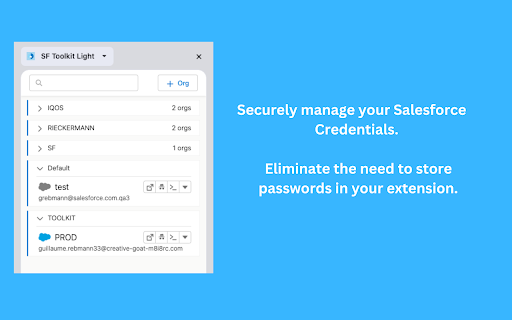
➤ Secure Org Management: Connect to all your Salesforce environments with OAuth 2.0. No passwords. No hassle.
➤ Record Field Viewer: Instantly search and explore record fields without switching tabs.
➤ AI-Powered Assistant: If Einstein is enabled, unlock a personal AI assistant to boost productivity.
➤ Pro SOQL & Apex Editor: Access the most advanced editor for SOQL queries and Anonymous Apex execution.
➤ Real-Time Event Monitoring: Subscribe to Platform Events and CDC changes live, directly in your browser.
➤ Instant Access: Use the full toolkit with your current session—no extra login needed.
➤ Always Evolving: Get new features and updates every week.

⚡️Built for Salesforce admins, developers, and power users who want it all—in one place⚡️

Take your Salesforce experience to the next level with SF Toolkit.

One extension. Infinite possibilities.
⚡Workbench 2.0⚡ is the all-in-one Salesforce productivity toolkit built for admins, developers, and power users who are done context-switching. It embeds directly into your browser as a Chrome extension, replacing the old Workbench with a modern, fast, and privacy-first alternative.

⚡ Always at Hand — Overlay on Every Salesforce Page

A non-intrusive panel appears on every Salesforce page. Instantly access tools, logs, and org data without ever leaving your current context. Press `Ctrl/Cmd + Shift + E` to open it anywhere.

🖥️ VS Code Editor — Right in Your Browser

A full-featured code editor — powered by the same engine as VS Code — opens directly inside your browser. Write, run, and debug Apex without switching windows.

🤖 AI Agent — AI That Actually Does Work

The AI agent doesn't just answer questions. It takes actions:

- Run SOQL queries in natural language
- Execute Anonymous Apex on the fly
- Read and write metadata (Apex classes, Flows, Custom Fields, Permission Sets)
- Trigger deploys and review change sets
- Navigate the Workbench UI and chain multi-step workflows
- Run Salesforce CLI (`sf` / `sfdx`) commands

Supports OpenAI, Anthropic, Google Gemini, Mistral, and xAI Grok. All AI requests run entirely through your browser and go directly to your chosen AI provider. 🔒No data ever passes through SF Toolkit servers.🔒

🔍 SOQL Explorer

Build and run SOQL queries with field-level autocomplete. Browse every SObject, see results instantly, and export data — a focused query interface designed to replace the old Workbench query tool.

🗂️ Metadata Explorer

Browse every object, field, permission set, and metadata component in your org. Inspect, compare, push changes, and manage your org from one focused interface.

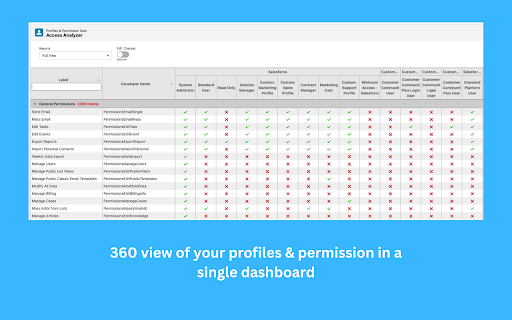
 🔑 Access Analyzer

Compare permission sets and profiles side by side. Instantly understand who has access to what across your org.

📦 Deploy & Retrieve

Deploy or retrieve metadata packages using the Metadata API — directly from your browser.

📡 Event Explorer — Real-Time Platform Events

Subscribe to Platform Events and Change Data Capture (CDC) streams and visualize payloads live, without writing a single line of code.

📋 More Built-in Tools
◆ Org Overview — Users, company info, license utilization, and code health summary
◆ SObject Explorer — Fields, relationships, and picklist values for any SObject
◆ Record Viewer — Inspect any Salesforce record by ID
◆ API Explorer — Call Salesforce REST and SOAP APIs directly
◆ Anonymous Apex — Execute Apex scripts on the fly
◆ Data Import — Insert, update, or upsert records from CSV via REST or Bulk API
◆ Text Compare — Side-by-side diff of any two text inputs

🔒 Security & Privacy

- Connect to all your Salesforce environments via **OAuth 2.0** — no passwords stored
- Your Salesforce data never passes through SF Toolkit infrastructure
- API keys are stored locally in Chrome extension storage only
- All destructive agent actions (writes, deploys, deletions) require explicit confirmation

 🔄 Always Evolving

Workbench ships updates regularly with new features and improvements.
Used daily by Salesforce internal engineers and thousands of admins and developers worldwide.

(An unofficial open-source tool built by Salesforce engineers)
- Apr 26, 2026short_description
Use SF Toolkit directly from chrome to visualize record details and analyze User access, profile, permissions, etc
Use Workbench directly from chrome to visualize record details and analyze User access, profile, permissions, etc
- Apr 26, 2026name
Salesforce Toolkit
Workbench
- Apr 26, 2026permissions
identity, cookies, storage, tabs, tabGroups, sidePanel, contextMenus, unlimitedStorage, activeTab, scripting
identity, cookies, storage, tabs, tabGroups, sidePanel, contextMenus, unlimitedStorage, activeTab, scripting, debugger
Permissions & access
- Permissions
- identitycookiesstoragetabstabGroupssidePanelcontextMenusunlimitedStorageactiveTabscriptingdebuggerwebNavigation
- Host access
- <all_urls>
Screenshots




About
⚡Workbench 2.0⚡ is the all-in-one Salesforce productivity toolkit built for admins, developers, and power users who are done context-switching. It embeds directly into your browser as a Chrome extension, replacing the old Workbench with a modern, fast, and privacy-first alternative.

⚡ Always at Hand — Overlay on Every Salesforce Page

A non-intrusive panel appears on every Salesforce page. Instantly access tools, logs, and org data without ever leaving your current context. Press `Ctrl/Cmd + Shift + E` to open it anywhere.

🖥️ VS Code Editor — Right in Your Browser

A full-featured code editor — powered by the same engine as VS Code — opens directly inside your browser. Write, run, and debug Apex without switching windows.

🤖 AI Agent — AI That Actually Does Work

The AI agent doesn't just answer questions. It takes actions:

- Run SOQL queries in natural language
- Execute Anonymous Apex on the fly
- Read and write metadata (Apex classes, Flows, Custom Fields, Permission Sets)
- Trigger deploys and review change sets
- Navigate the Workbench UI and chain multi-step workflows
- Run Salesforce CLI (`sf` / `sfdx`) commands

Supports OpenAI, Anthropic, Google Gemini, Mistral, and xAI Grok. All AI requests run entirely through your browser and go directly to your chosen AI provider. 🔒No data ever passes through SF Toolkit servers.🔒

🔍 SOQL Explorer

Build and run SOQL queries with field-level autocomplete. Browse every SObject, see results instantly, and export data — a focused query interface designed to replace the old Workbench query tool.

🗂️ Metadata Explorer

Browse every object, field, permission set, and metadata component in your org. Inspect, compare, push changes, and manage your org from one focused interface.

 🔑 Access Analyzer

Compare permission sets and profiles side by side. Instantly understand who has access to what across your org.

📦 Deploy & Retrieve

Deploy or retrieve metadata packages using the Metadata API — directly from your browser.

📡 Event Explorer — Real-Time Platform Events

Subscribe to Platform Events and Change Data Capture (CDC) streams and visualize payloads live, without writing a single line of code.

📋 More Built-in Tools
◆ Org Overview — Users, company info, license utilization, and code health summary
◆ SObject Explorer — Fields, relationships, and picklist values for any SObject
◆ Record Viewer — Inspect any Salesforce record by ID
◆ API Explorer — Call Salesforce REST and SOAP APIs directly
◆ Anonymous Apex — Execute Apex scripts on the fly
◆ Data Import — Insert, update, or upsert records from CSV via REST or Bulk API
◆ Text Compare — Side-by-side diff of any two text inputs

🔒 Security & Privacy

- Connect to all your Salesforce environments via **OAuth 2.0** — no passwords stored
- Your Salesforce data never passes through SF Toolkit infrastructure
- API keys are stored locally in Chrome extension storage only
- All destructive agent actions (writes, deploys, deletions) require explicit confirmation

 🔄 Always Evolving

Workbench ships updates regularly with new features and improvements.
Used daily by Salesforce internal engineers and thousands of admins and developers worldwide.

(An unofficial open-source tool built by Salesforce engineers)
Technical
- Version
- 2.0.6
- Manifest
- V3
- Size
- 56.82MiB
- Min Chrome
- 88
- Languages
- 1
- Featured
- No
Metadata
- ID
- konbmllgicfccombdckckakhnmejjoei
- Developer ID
- uec0aae3829bee57f6c0724bfb5642cf2
- Developer Email
- [email protected]
- Created
- Dec 7, 2023
- Last Updated (Store)
- Jun 21, 2026
- Last Scraped
- Jun 21, 2026
- Website
- sf-workbench.com
- Support URL
- —
Similar extensions
Alternatives to Workbench, ranked by description similarity.

Salesforce Utils
Log in anonymously and inspect/edit Salesforce record data directly in your browser. The ultimate developer & admin toolkit.
36
★ 5.0

Salesforce Field Master
Enhances Quick Find, exports to Excel, and provides bulk updates for custom fields
104
★ 5.0

SFDC AI Inspect - Salesforce Quick Inspector
Salesforce AI inspector & navigator - Press Ctrl+I or click icon to open
89

Salesforce HotKeyUser
This extension allows you to use hotkeys to navigate Salesforce
11

Salesforce Flow Assistant v2
Download and analyze Salesforce flow metadata with a single click
382
★ 5.0

Processity
Automatically document any Salesforce workflow. Create step-by-step guides and analyze your business processes
2

GenAI Explorer
Salesforce Generative AI Explorer
20

Salesforce Record Redirector
Quickly navigate to Salesforce records by pasting their IDs
16
★ 5.0
Data sourced from the Chrome Web Store · last verified Jun 21, 2026.