
PotPlayer YouTube Shortcut, Open Links
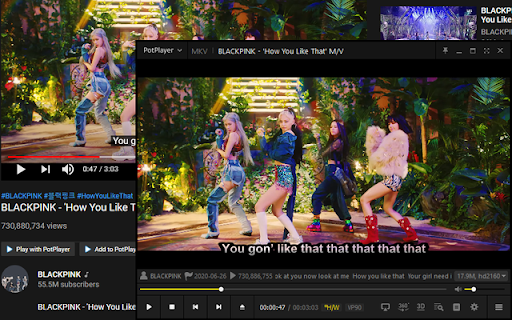
Quickly play or add a YouTube video (playlist), Twitch to PotPlayer using buttons on a page, also via context menu and middle-click
As of June 2026, PotPlayer YouTube Shortcut, Open Links has 30,000 users and a 4.59/5 rating from 295 reviews in the Accessibility category.
Usersno change0%
30.0K
30,000
Ratingno change0%
4.59
295 reviews
Reviewsup 1.4 percent+1.4%
295
Version
1.31
Manifest V3
History
4 snapshotsTracking since Apr 18, 2026.
View as table
| Date | Users | Rating | Reviews | Version |
|---|---|---|---|---|
| Apr 18, 2026 | 30.0K | 4.59 | 291 | 1.31 |
| May 12, 2026 | 30.0K | 4.59 | 292 | 1.31 |
| May 25, 2026 | 30.0K | 4.58 | 293 | 1.31 |
| Jun 6, 2026 | 30.0K | 4.59 | 294 | 1.31 |
| Now | 30.0K | 4.59 | 295 | 1.31 |
Permissions & access
- Permissions
- activeTabcontextMenusstoragescripting
- Host access
- <all_urls>
Screenshots


About
> HOW TO USE IT: You need to install the latest version of PotPlayer to get it working - https://potplayer.daum.net <

PotPlayer is a media player developed for Windows by South Korean Internet company Kakao (formerly Daum Communications). Player can play some video service links or any links if they are direct urls to some video.

To open a video link or playlist link in PotPlayer you can use the buttons on the site or you can use the menu items from the context menu (the right-click popup bar) on a link or on the actual video page.

You can also use mouse clicks on a link or a page to open it directly in the player. In order for that to work, you need to open the extension's preferences and enable the necessary features.

Optional features (disabled by default):
- auto-pause a video in Youtube player;
- pause Youtube player when Potplayer starts;
- play video using middle mouse click on youtube.com/watch* page;
- sync current video position (time) with PotPlayer;
- open a Youtube link in the player using middle mouse click on a link;
- «Open/Add link to player» in the context menu for any link, html5 video player

If it doesn't work for you or you have portable version of player then try to open the player's settings (key "F5"), then go to "Association" tab and check any association (e.g. ".mp4") and finally press Apply or OK button (after applying the settings you can uncheck previously checked association).

It's recommended to always update the player to the latest version of PotPlayer (get the latest version: https://potplayer.daum.net).

Twitch PotPlayer requirements: https://github.com/23rd/TwitchPotPlayer
Technical
- Version
- 1.31
- Manifest
- V3
- Size
- 179KiB
- Min Chrome
- 88
- Languages
- 6
- Featured
- No
Metadata
- ID
- cfdpeaefecdlkdlgdpjjllmhlnckcodp
- Developer ID
- ub5b68a1c45b0e586451f5eb4d0e08448
- Developer Email
- [email protected]
- Created
- Aug 21, 2015
- Last Updated (Store)
- Oct 11, 2025
- Last Scraped
- Jun 6, 2026
- Website
- —
- Support URL
- —
- Privacy Policy
- https://helgeapps.github.io/Chrome-Extensions-Policy/
Similar extensions
Alternatives to PotPlayer YouTube Shortcut, Open Links, ranked by description similarity.

FHD Bilibili Video Downloader
Download Bilibili videos easily up to 1080p high resolution formats
8.0K
★ 2.3

FastStream Video Player
Stream without buffering. Fix bad video players on the internet.
70.0K
★ 4.7

Twitch: Click to Pause
Easily pause and resume Twitch videos with a simple click on the video itself. Take control of your viewing experience today!
897
★ 4.5

Pure motion
The video ad remover
20.0K
★ 4.4

tvkz
Ajoute le lecteur de dlive au stream
39
★ 5.0

OpenVideo – ad-free streaming
Watch all of the videos – but none of the ads! (...even on sites which block adblockers)
30.0K
★ 4.6

InstaPlayer
Adds playback controls, volume slider, and progress bar to Instagram videos.
27

Floating Video Player & Picture-in-Picture for All Sites
Floating video player for YouTube, Netflix & any site. Keep watching while working!
1.0K
★ 4.0
Data sourced from the Chrome Web Store · last verified Jun 6, 2026.