
Floating Video Player & Picture-in-Picture for All Sites
Floating video player for YouTube, Netflix & any site. Keep watching while working!
As of May 2026, Floating Video Player & Picture-in-Picture for All Sites has 1,000 users and a 4.00/5 rating from 3 reviews in the Accessibility category.
Usersno change0%
1.0K
1,000
Ratingno change0%
4.00
3 reviews
Reviewsno change0%
3
Version
2.3.9
Manifest V3
History
2 snapshotsTracking since Apr 20, 2026.
View as table
| Date | Users | Rating | Reviews | Version |
|---|---|---|---|---|
| Apr 20, 2026 | 1.0K | 4.00 | 3 | 2.3.9 |
| May 6, 2026 | 1.0K | 4.00 | 3 | 2.3.9 |
| Now | 1.0K | 4.00 | 3 | 2.3.9 |
Permissions & access
- Permissions
- scripting
- Host access
- <all_urls>
Screenshots

About
📺 PiP Mode – Floating Picture‑in‑Picture Video Player for All Sites

🌟 Overview
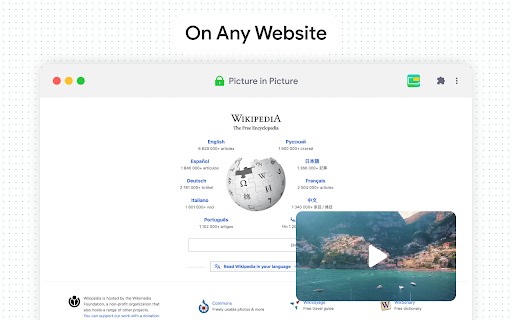
Boost productivity with PiP Mode, a lightweight Chrome extension that lets you watch videos in a floating Picture‑in‑Picture window across any site—YouTube, Netflix, Vimeo, and more. Just click the icon during any HTML5 video to launch multitasking at its best.

🚀 Quick Benefits:
🔹Watch while working – stay on top of your tasks and videos
🔹Clean, distraction‑free UI – no ads, no tracking, just smooth viewing

🔧 Features:
✅ Supports all sites: YouTube, Netflix, Vimeo, Disney+, Amazon Prime, Dailymotion & any HTML5 video
🛠 One‑click PiP: effortlessly activate the floating player
📐 Customizable window: drag and resize to suit your flow
🔝 Always‑on‑top: video stays front and center
⚡ Fast & light: minimal impact on performance
🛡 Privacy‑first: no tracking, no ads, fully GDPR‑compliant

🛠 How to Use:
1. Play any HTML5 video (e.g. YouTube, Netflix)
2. Click the PiP Mode toolbar icon
3. Enjoy a floating, movable video window while you continue browsing

💡 Why You’ll Love It:
🔹Instant PiP activation, zero setup
🔹Perfect for studying, working, or media enjoyment
🔹Reliable updates, refined user experience

✍️ Feedback Appreciated
Love PiP Mode? Please leave a review or share your ideas—your feedback helps us make it even better.

⚠️ Legal Notice
Disclaimer: YouTube is a trademark of Google Inc. This extension is not affiliated with or endorsed by Google.
Technical
- Version
- 2.3.9
- Manifest
- V3
- Size
- 103KiB
- Min Chrome
- 88
- Languages
- 34
- Featured
- No
Metadata
- ID
- jdeclncafhilghjnkfpacmlomimfaklh
- Developer ID
- uafe16a309a4f7f0298d88d62f1924043
- Developer Email
- [email protected]
- Created
- Jan 25, 2023
- Last Updated (Store)
- Jun 20, 2025
- Last Scraped
- May 30, 2026
- Website
- floatplayer.app
- Support URL
- —
- Privacy Policy
- —
Similar extensions
Alternatives to Floating Video Player & Picture-in-Picture for All Sites, ranked by description similarity.

PiP With Controls
View videos in Picture-in-Picture mode across the web.
56
★ 5.0

Auto PiP for YouTube™ - Video Controller
Control YouTube video playback in background tabs
782
★ 5.0

Easy PIP Switcher
You can easily switch to picture-in-picture mode when the video is cropped.(動画が見切れた際に簡単にピクチャーインピクチャーモードに切り替えることができます。)
8

Picture in picture by NNT
Switch videos into Picture-in-Picture (PiP) mode, allowing you to freely browse the internet or work on other web pages.
279
★ 5.0

SubPiP – Picture-in-Picture with Subtitle Support
Picture in Picture
415
★ 4.2

YouTube PiP Extension
1. *Picture-in-Picture Mode*: Watch YouTube videos in Picture-in-Picture (PiP) mode while browsing other tabs or using other…
4.0K
★ 5.0

YouTube Picture-in-Picture by Saurabh Mukhekar
Adds a Picture-in-Picture button to YouTube videos.
9

Floating Video with Playback Controls
Picture-in-Picture mode allows you to watch a video in a floating window with playback video controls.
90.0K
★ 4.2
Data sourced from the Chrome Web Store · last verified May 30, 2026.