
ChatGPT Screenshot Ex
Easily capture, edit, and share ChatGPT conversations. Offers selective editing for clarity, and image splitting for readability.
As of May 2026, ChatGPT Screenshot Ex has 156 users and a 1.00/5 rating from 1 reviews in the Workflow & Planning category.
Usersdown 7.7 percent−7.7%
156
156
Ratingno change0%
1.00
1 reviews
Reviewsno change0%
1
Version
2.1.0
Manifest V3
History
3 snapshotsTracking since Apr 1, 2026.
View as table
| Date | Users | Rating | Reviews | Version |
|---|---|---|---|---|
| Apr 1, 2026 | 169 | 1.00 | 1 | 2.1.0 |
| Apr 30, 2026 | 176 | 1.00 | 1 | 2.1.0 |
| May 29, 2026 | 175 | 1.00 | 1 | 2.1.0 |
| Now | 156 | 1.00 | 1 | 2.1.0 |
Permissions & access
- Permissions
- scriptingstorage
- Host access
- https://chat.openai.com/
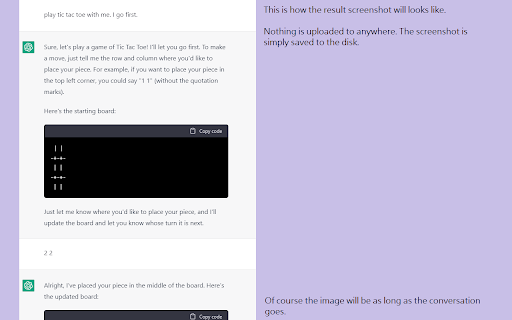
Screenshots


About
Introducing "ChatGPT Screenshot Ex", a versatile Chrome extension designed for users who frequently interact with ChatGPT and wish to preserve their conversations.

Key Features:

1. Effortless Screenshot Capture: Capture your entire ChatGPT conversation with a single click, ensuring no detail is missed, whether the conversation is brief or extensive.

2. Comprehensive Thread Capture: Our extension includes all threads and branches of your conversation, preserving the full context and depth of your discussions.

3. Editorial Control with Privacy: With "ChatGPT Screenshot Ex", you have the editorial freedom to selectively hide specific lines, allowing you to tailor the content for your audience while maintaining privacy and focus.

4. Image Splitting for Long Conversations: For particularly lengthy conversations, set a height cap to split the output into multiple, manageable images. This ensures that even the most extended dialogues are captured in an organized and readable format.

5. Client-Side Security: Operating entirely on the client side, "ChatGPT Screenshot Ex" guarantees that your data remains private and secure, with no server-side data processing.

The source code is openly available for review and contributions at https://github.com/it9gamelog/chatgpt-screenshot-ex.
Technical
- Version
- 2.1.0
- Manifest
- V3
- Size
- 598KiB
- Min Chrome
- 88
- Languages
- 2
- Featured
- No
Metadata
- ID
- cdhbhenafofcgljodakoeglmlnboeijf
- Developer ID
- u57172f45e082d02e644fab41b99cd28d
- Developer Email
- [email protected]
- Created
- Dec 13, 2022
- Last Updated (Store)
- Dec 1, 2023
- Last Scraped
- May 29, 2026
- Website
- —
- Support URL
- —
- Privacy Policy
- —
Similar extensions
Alternatives to ChatGPT Screenshot Ex, ranked by description similarity.

ChatGPT to PNG
Capture ChatGPT conversations as a single long vertical image.
273
★ 1.3

chatGPT snapshot
Capture ChatGPT magic, thread by thread, pic by pic.
41
★ 5.0
ChatGPT Conversation Exporter
A simple extension to export ChatGPT conversation as an HTML file.
366
★ 3.4
Scribe GPT
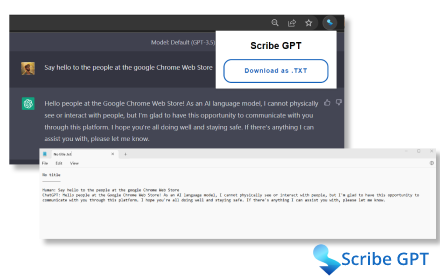
Download ChatGPT conversations as text files.
170

ChatGPT Enhancer
Effortless file attachments in chat, clean text copying without formatting. Connect on Telegram https://t.me/ChatGPTEnhancer.
30

ChatGPT Chat SAVE
Save ChatGPT conversations, chat, replies, prompts, responses as TXT file or PDF file.
8.0K
★ 4.5

ChatClipper
It provides a function to copy conversations in ChatGPT as images to the clipboard
49
★ 5.0

CopyGPT
Share your ChatGPT chat logs with friends or save them to your computer.
724
★ 1.0
Data sourced from the Chrome Web Store · last verified May 29, 2026.