
WindChat TapTap Markdown Web Clipper
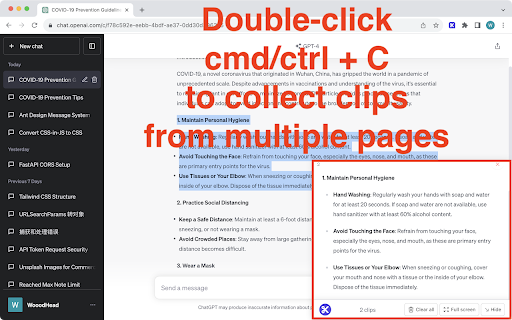
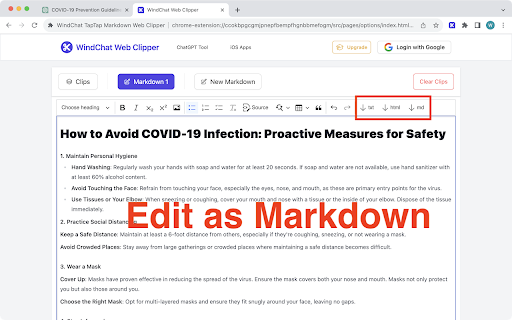
Double-click Ctrl/Cmd+C, save clips from any webpage.
As of May 2026, WindChat TapTap Markdown Web Clipper has 4 users in the Productivity category.
Usersdown 33.3 percent−33.3%
4
4
Ratingno change0%
—
— reviews
Reviewsno change0%
—
Version
0.0.2
Manifest V3
History
2 snapshotsTracking since Apr 1, 2026.
View as table
| Date | Users | Rating | Reviews | Version |
|---|---|---|---|---|
| Apr 1, 2026 | 6 | — | — | 0.0.2 |
| Apr 30, 2026 | 7 | — | — | 0.0.2 |
| Now | 4 | — | — | 0.0.2 |
Permissions & access
- Permissions
- identityidentity.emaildownloadsstoragetabs
- Host access
- https://*.openai.com/*, https://*.windchat.link/*
Screenshots

About
Double-click Ctrl/Cmd+C, save clips from any webpage.
Technical
- Version
- 0.0.2
- Manifest
- V3
- Size
- 672KiB
- Min Chrome
- 88
- Languages
- 1
- Featured
- No
Metadata
- ID
- ccokbpgcgmjpnepfbempfhgnbbmefogm
- Developer ID
- u95fbeb15a8273768f7935f5e5e5d707c
- Developer Email
- [email protected]
- Created
- Sep 3, 2023
- Last Updated (Store)
- Sep 9, 2023
- Last Scraped
- May 29, 2026
- Website
- windchat.link
- Support URL
- —
- Privacy Policy
- —
Similar extensions
Alternatives to WindChat TapTap Markdown Web Clipper, ranked by description similarity.

ClipMark
Quickly copy any webpage as a markdown link to your clipboard with just one click.
1

ClipTitle
Quickly copy any webpage title to your clipboard with just one click.
1

LinkCapture
Copy any link URL instantly by hovering and pressing Ctrl+C or ⌘+C. No right-click needed by AIO.com.ai
65

Clipmate AI
Chrome extension companion for Clipmate AI
73
★ 5.0

ClipNRead: The Universal Web Clipper
The universal web clipper: save any website into your notebook.
8

Multi-Clipboard Manager
Manage multiple clipboard items easily. Save, edit, delete, and quickly copy past clips directly from your browser.
—

LilysAI - Save and Summarize Everything
Powerful AI web clipper to save and summarize everything, including YouTube videos and web pages.
50.0K
★ 4.7

Snap clip
Click any page element—even non-selectable text—and copy its contents to your clipboard in one click.
18
★ 5.0
Data sourced from the Chrome Web Store · last verified May 29, 2026.