
Image compressor
A Chrome extension to Compress images
As of May 2026, Image compressor has 287 users and a 5.00/5 rating from 2 reviews in the Productivity category.
Usersup 22.6 percent+22.6%
287
287
Ratingno change0%
5.00
2 reviews
Reviewsno change0%
2
Version
1.0
Manifest V3
History
3 snapshotsTracking since Apr 1, 2026.
View as table
| Date | Users | Rating | Reviews | Version |
|---|---|---|---|---|
| Apr 1, 2026 | 234 | 5.00 | 2 | 1.0 |
| Apr 30, 2026 | 237 | 5.00 | 2 | 1.0 |
| May 29, 2026 | 261 | 5.00 | 2 | 1.0 |
| Now | 287 | 5.00 | 2 | 1.0 |
Permissions & access
- Permissions
- None declared
- Host access
- None declared
Screenshots
About
Image Compressor Web App
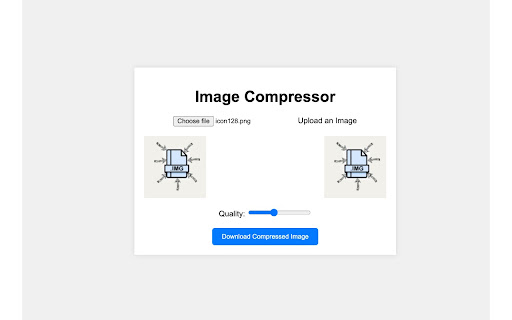
A simple, client-side web application for compressing images using JavaScript, HTML, and CSS. This app allows users to upload an image, adjust the compression quality, and download the compressed version—all without requiring any server-side processing.

Features
*New Feature* Bulk Images downloader
Client-Side Compression: All image processing is done in the browser, keeping user data private and ensuring fast processing.
Real-Time Quality Adjustment: Adjust the compression quality with a slider to balance file size and image clarity.
Preview of Original and Compressed Images: See both the original and compressed images side-by-side to compare quality.
Download Option: Download the compressed image in JPEG or PNG format, depending on the original image's format.

How to Use
Upload an Image: Click the "Choose File" button and select an image from your device.
Adjust Quality: Use the quality slider to set the compression level (lower values increase compression but may reduce quality).
Download Compressed Image: Click the "Download Compressed Image" button to save the compressed version.

Compression Settings
The app uses a canvas element to handle image processing. You can control the compression quality with the slider:
PNG Images: Retain transparency and do not use quality settings (saved in lossless format).
JPEG Images: Use the quality setting to adjust compression, with values ranging from 0.1 (high compression) to 1.0 (low compression, higher quality).

Limitations
File Size and Resolution: Very large images may cause performance issues or fail to load due to browser memory limits.
Transparency: For images with transparency (e.g., PNGs), the app defaults to PNG format. However, converting these to JPEG will remove transparency, filling transparent areas with a white background.
Technical
- Version
- 1.0
- Manifest
- V3
- Size
- 15.28KiB
- Min Chrome
- 88
- Languages
- 1
- Featured
- No
Metadata
- ID
- ccnilljhekkfkmfhoifpkkfdfjhdafim
- Developer ID
- uaddf446f551a96327ad37d8b0ea1183d
- Developer Email
- [email protected]
- Created
- Nov 8, 2024
- Last Updated (Store)
- Nov 19, 2024
- Last Scraped
- May 29, 2026
- Support URL
- —
- Privacy Policy
- https://nirmalj000.github.io/privacy-policy/
Similar extensions
Alternatives to Image compressor, ranked by description similarity.

Compress Image to 500kb » Convert JPG to 500kb
Resize + Compress JPG PNG WebP Photo to 500KB
28
★ 5.0

Image Compressor to 50KB
Compress any image to 50KB or less with one click. Just upload Your image and compress it.
17

Compress Images – Optimize JPG & PNG Quality
Compress images by drag and drop with quality control
19

Bulk Image Compressor
Reduce the file size of multiple JPG, PNG, and WEBP images at once. Privacy-focused local processing.
20
★ 5.0

Photo Compressor
Lightweight image compressor to compress your images directly in your browser.
73
★ 5.0

OneImage Squoosh
Compress and compare images directly from your browser.
347

ImgConvert99 – Offline Image Converter | Convert img to PNG, JPG & WEBP
Convert & compress JPG, PNG, and WEBP images 100% offline. No uploads, no tracking.
15
★ 5.0

Photo Optimizer
A user-friendly extension to optimize photos (PNG, JPG, JPEG) with adjustable compression levels.
—
Data sourced from the Chrome Web Store · last verified May 29, 2026.