
Akubo IT Autofill
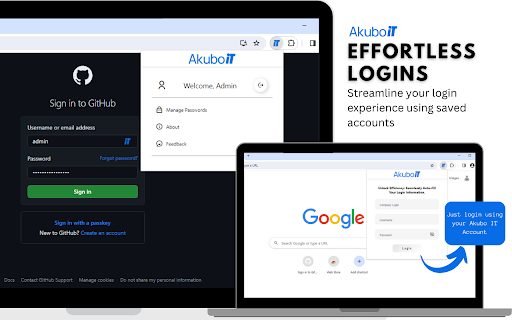
Exclusively for Akubo IT users. Automatically fill credentials based on saved passwords, providing a streamlined login experience.
As of May 2026, Akubo IT Autofill has 3 users in the Productivity category.
Usersdown 25.0 percent−25.0%
3
3
Ratingno change0%
—
— reviews
Reviewsno change0%
—
Version
0.4.0
Manifest V3
History
1 snapshotsTracking since Apr 1, 2026.
View as table
| Date | Users | Rating | Reviews | Version |
|---|---|---|---|---|
| Apr 1, 2026 | 4 | — | — | 0.4.0 |
| Now | 3 | — | — | 0.4.0 |
Permissions & access
- Permissions
- storage
- Host access
- None declared
Screenshots


About
Introducing Akubo IT Autofill, the ideal complement to the Akubo IT password management.

📌Important Note: This Autofill is designed exclusively for users of Akubo IT. To fully utilize the features of this extension, you must have an active Akubo IT account. This extension enhances your experience by providing seamless autofill capabilities on supported websites.

**Key Features:** 🌟

✅ Unified Password Management: Seamlessly integrate your Akubo IT account with our extension for effortless login management.
✅ Automated Autofill: Let us do the heavy lifting. Our extension automatically detects and fills in your login details on saved websites, eliminating the need for manual entry.
✅ Multi-Account Support: Have multiple accounts for a website? No problem. We offer a selection so you can choose the right credentials with ease.
✅ Robust Security: Rest assured knowing your data is encrypted and protected, adhering to the highest security standards.
✅ User-Friendly Interface: Our user-friendly design ensures a seamless browsing experience.


Usage ❔
Simply download the extension and use an existing Akubo IT Account. The autofill feature will automatically be enabled.

Experiencing difficulties? 🐞
💬 Contact the dev team
📬 Report the bug through the feedback section

What's New 🆕
v0.5.0
🛠️Hotfix - Updated domain and login form detection
🛠️Hotfix - Fix icon placement

v0.2.5
🎨 Improved UI (with new logo)
🛠️ Process Improvements

v0.1.0
🎉 Initial Release
Technical
- Version
- 0.4.0
- Manifest
- V3
- Size
- 177KiB
- Min Chrome
- 88
- Languages
- 1
- Featured
- No
Metadata
- ID
- cbimpphflfncdmjgdnbiabepmcaoflco
- Developer ID
- u9a68d4bdcd03bd5e5846d3c3a627abeb
- Developer Email
- [email protected]
- Created
- Oct 3, 2023
- Last Updated (Store)
- May 8, 2024
- Last Scraped
- May 29, 2026
- Website
- —
- Support URL
- https://app.akuboit.com/doc/extension
- Privacy Policy
- https://www.akubo.com/privacy/
Similar extensions
Alternatives to Akubo IT Autofill, ranked by description similarity.

Easy Autofill: Secure Profile-Based Fill Out and Form Filling
Effortlessly auto-fill your form data across websites. Secure, easy to use, and free to try.
2.0K
★ 2.8

Form Autofill Extension
Autofill forms with data from a backend service.
21

Autofill Forms
An extension that autofills forms with your data.
1.0K
★ 3.7

Form Autofill Pro
Capture, save and auto-fill forms with your profiles
33

Smart Form Fill
Smart Form Fill is a Chrome extension that automatically fills out forms using your personal data.
19

QuickFill – Autofill Email, Username & Password on any Form
Auto-fill your signup forms with one click.
—
★ 5.0

Secure Password Autofill
Generates and autofills strong passwords with local encryption
12

QuickForm - Autofill & Form Filler
Record any form once, autofill it forever in one click. Works on React & complex web apps. Free, private, no account needed.
50.0K
★ 4.3
Data sourced from the Chrome Web Store · last verified May 29, 2026.