
OMG SEO Plugin
OMG CC Chrome extension allows you to check metrics and backlinks, find keyword ideas and analyze competition on the fly.
As of May 2026, OMG SEO Plugin has 277 users and a 5.00/5 rating from 8 reviews in the Developer Tools category.
Usersno change0%
277
277
Ratingno change0%
5.00
8 reviews
Reviewsno change0%
8
Version
5.2
Manifest V3
History
4 snapshotsTracking since Apr 1, 2026.
View as table
| Date | Users | Rating | Reviews | Version |
|---|---|---|---|---|
| Apr 1, 2026 | 277 | 5.00 | 8 | 5.2 |
| Apr 21, 2026 | 278 | 5.00 | 8 | 5.2 |
| May 6, 2026 | 287 | 5.00 | 8 | 5.2 |
| May 17, 2026 | 276 | 5.00 | 8 | 5.2 |
| Now | 277 | 5.00 | 8 | 5.2 |
Permissions & access
- Permissions
- notificationsactiveTabcontextMenuscookiesstorage
- Host access
- http://*/*, https://*/*, *://*.google.com/
Screenshots


About
The OMG Command Center Chrome extension is a free plugin for active SERPed.net members.

This plugin will help you check metrics and backlinks, find keyword ideas, analyze competition and more, on the fly, right from your browser.

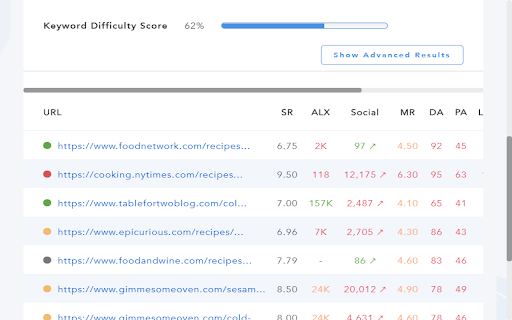
Visiting a website and want to quickly check its metrics and backlinks? Simply click on the SERPed icon next to your browser bar and you will see all this data, instantly. You will see the Moz metrics, as well as the Majestic graph, SERPed Rank, Alexa Rank, social signals and IP address.

You can even run a "Content Analysis", as well as check the "Top Backlinks", run a "URL Audit" and check the "Domain Health".

With this extension, you can use SERPed.net tools, right from your browser, including:

 • "What Ranks Where" to find what keywords the site or page you are
   visiting ranks for;

 • "Keyword Analyzer" to get an idea of the level of competition, in organic
   results, of any keyword;

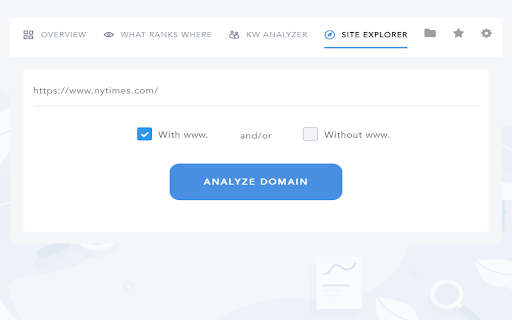
 • "Site Explorer" to know more about a specific website or domain.

Furthermore, the plugin allows you to quickly add backlinks to "Backlinks Manager", so we start monitoring them for you. That way if a backlink suddenly becomes inactive or nofollow, or is de-indexed, you will quickly find out...

You can also enable the SERPed.net button in Google results, to perform an analysis of the keyword you are searching for, and find out its search volume, cost-per-click, level of competition (in both paid and organic results) and more.

The OMG Command Center Chrome extension is regularly updated. For more information, please visit our blog at https://www.serped.com/

If you are not a member yet, please visit our website at https://serped.net/

Terms of Service - https://serped.net/legal/terms.php
Technical
- Version
- 5.2
- Manifest
- V3
- Size
- 65.29KiB
- Min Chrome
- 88
- Languages
- 1
- Featured
- No
Metadata
- ID
- cbhgbpnnbggeapbndkedeiaejfgipdia
- Developer ID
- u5bc021c67dec34250906fd2711fb23fa
- Developer Email
- [email protected]
- Created
- Feb 23, 2017
- Last Updated (Store)
- May 6, 2025
- Last Scraped
- May 17, 2026
- Website
- —
- Support URL
- —
- Privacy Policy
- https://serped.net/legal/privacy.php
Similar extensions
Alternatives to OMG SEO Plugin, ranked by description similarity.

SERPed.net SEO Plugin
The SERPed.net Chrome extension allows you to check metrics and backlinks, find keyword ideas and analyze competition on the fly.
422
★ 4.2
Open SEO Stats(Formerly: PageRank Status)
Shows the web rank and SEO stats for current webpage, quick access to index pages, link stats, security info and more
200.0K
★ 4.6

SEO CENTER Extension
SEO checker: Title, meta description, language, word count, sitename, robots tag, canonical, heading, image alt, all link and more.
2.0K
★ 5.0

Ai SEO Meta Show
Displays the meta title and description of the current webpage.
101
★ 5.0

SERP Analyzer
Analyze SERP positions, simulate geolocation, and extract SEO data (PAA, Suggest, Related) with built-in AI writing prompts.
619
★ 5.0

SEO DOM Monitor
Monitor and detect dynamically added content on web pages for SEO analysis and identify hidden content search engines might miss.
269
★ 5.0

Extension Data
Quickly see stats for any chrome extension
113
★ 5.0

SEO Assistant
Analyze webpages for SEO metrics.
1
Data sourced from the Chrome Web Store · last verified May 17, 2026.