Bookmark Clock v2
Adds a bookmark with the current time
As of May 2026, Bookmark Clock v2 has 226 users and a 1.00/5 rating from 3 reviews in the Workflow & Planning category.
Usersdown 1.7 percent−1.7%
226
226
Ratingno change0%
1.00
3 reviews
Reviewsno change0%
3
Version
1.0
Manifest V3
History
2 snapshotsTracking since Apr 29, 2026.
View as table
| Date | Users | Rating | Reviews | Version |
|---|---|---|---|---|
| Apr 29, 2026 | 230 | 1.00 | 3 | 1.0 |
| May 26, 2026 | 225 | 1.00 | 3 | 1.0 |
| Now | 226 | 1.00 | 3 | 1.0 |
Permissions & access
- Permissions
- bookmarksstorage
- Host access
- None declared
Screenshots

About
A great way to know the time without having to look down at the dock. Especially useful if you have the dock set to autohide.

Will update a bookmark with the current time, in your local time zone.

To use:
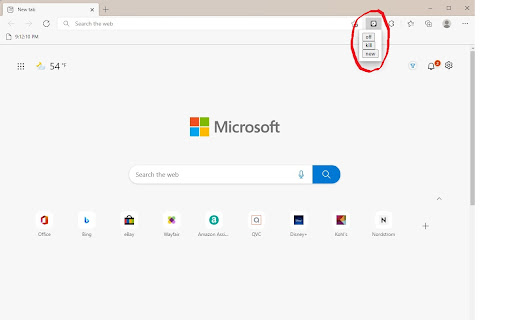
1) Press the extension icon
2) Click "new"
3) Click "turn on"
4) Open or reload any tab other than chrome.google.com or any chrome:// or edge://
5) Enjoy

New:
This will create a new bookmark, titled "Clock," where the time will appear, in your bookmark bar. You can move this bookmark anywhere you like, but I recommend keeping it in the main bookmark bar. If you cannot see any bookmarks, press CTRL + SHIFT + B to enable the bookmark bar. You can press this multiple times and every bookmark created will work.

Turn On/Off:
Toggles the bookmark updating. Allows you to edit or open bookmarks in the bookmarks bar, or if it is distracting.

***
Important Info:
If you have no existing bookmarks the "new" button doesn't work.
Does not work on system tabs (chrome://, etc)
Syncs with every device you are signed into.
No user data is collected at all.

FAQ:
HELP I CAN'T LOOK IN BOOKMARK FOLDERS OR RIGHT CLICK BOOKMARKS:
 - Turn off the extension by clicking the icon and clicking "turn off." You can turn it back on whenever.
Technical
- Version
- 1.0
- Manifest
- V3
- Size
- 6.07KiB
- Min Chrome
- 88
- Languages
- 1
- Featured
- Yes
Metadata
- ID
- cbabljagchnniaibdlhllgafeflmecdn
- Developer ID
- u6842cc9d5fa9e0a6f31db16f7a089f39
- Developer Email
- [email protected]
- Created
- Nov 10, 2021
- Last Updated (Store)
- Feb 4, 2022
- Last Scraped
- May 26, 2026
- Website
- —
- Support URL
- —
- Privacy Policy
- —
Similar extensions
Alternatives to Bookmark Clock v2, ranked by description similarity.
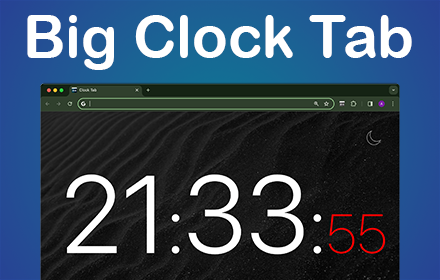
Clock Tab
Boost productivity with Clock Tab, a Chrome Extension showcasing a big clock on your new tab. Be organized and efficient with ease
3.0K
★ 4.8

Date Today for Google Chrome
The best clock to see the current day and time at a glance, with an option to display a digital clock.
10.0K
★ 4.5
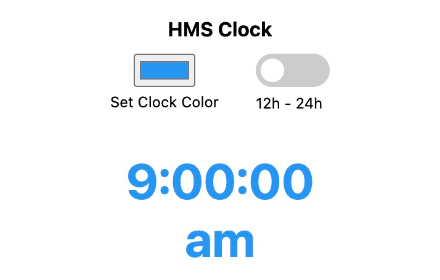
HMS Clock
Hour-Minute-Second, Digital Clock
313
★ 3.7

Wingman Clock
Wingman Clock: Keep track of time with style. A sleek and reliable Chrome extension for your daily time management needs.
20.0K
★ 3.9
Date Time
Displays the day, date, and time for
8.0K
★ 3.8

World clock
Bring the world closer with dual city clocks—making it easy to balance work, travel, and loved ones abroad.
8

Timebar: A world clock and meeting planner for your side panel
Convert time zones, plan meetings & create calendars events from the side panel. Works with Google, Apple, Outlook & more calendars.
210
★ 5.0

The Global Time Tab
Stay in sync with the world by setting up multiple clocks of different time zones in new tab.
30.0K
★ 5.0
Data sourced from the Chrome Web Store · last verified May 26, 2026.