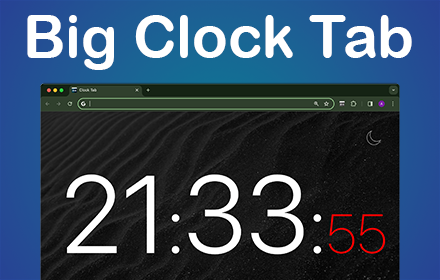
Clock Tab
Boost productivity with Clock Tab, a Chrome Extension showcasing a big clock on your new tab. Be organized and efficient with ease
As of June 2026, Clock Tab has 3,000 users and a 4.75/5 rating from 12 reviews in the Workflow & Planning category.
Usersno change0%
3.0K
3,000
Ratingup 0.4 percent+0.4%
4.75
12 reviews
Reviewsup 9.1 percent+9.1%
12
Version
1.0.0
Manifest V3
History
1 snapshotsTracking since May 24, 2026.
View as table
| Date | Users | Rating | Reviews | Version |
|---|---|---|---|---|
| May 24, 2026 | 3.0K | 4.73 | 11 | 1.0.0 |
| Now | 3.0K | 4.75 | 12 | 1.0.0 |
Permissions & access
- Permissions
- storagetopSitesfavicon
- Host access
- None declared
Screenshots

About
🕒 clock tab is the ultimate Chrome Extension for time management enthusiasts. Whether you need a simple clock or a big timer for presentation, our clock has you covered with its array of features designed to keep you on track and organized.

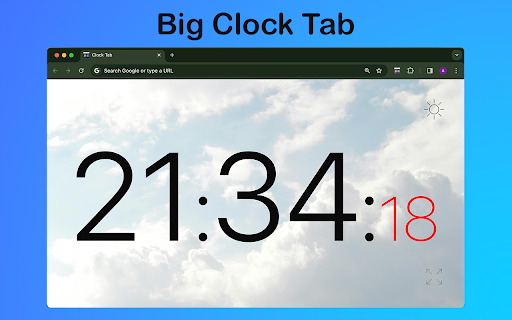
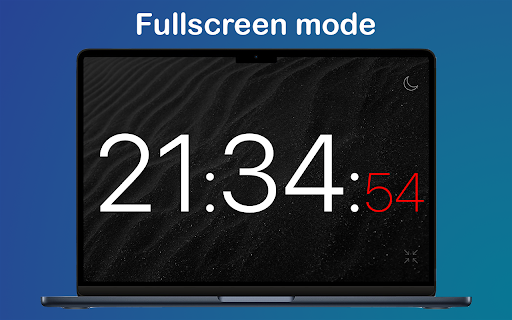
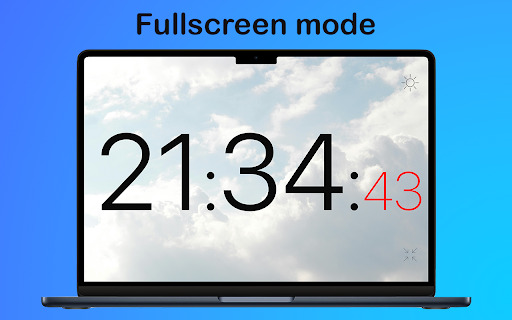
Clock tab features like a simple and clear layout, dark and light themes for customization, and the option for full page or fullscreen mode, enhancing user experience with easy navigation, visual variety, and immersive viewing.

1️⃣ Straightforward and uncluttered layout, making it easy to navigate and understand.
2️⃣ The dark and light themes provide a choice of visual styles to suit different preferences and environments.
3️⃣ The full page or fullscreen mode allows for a more immersive experience, with minimal distractions.

Clock tab caters to diverse preferences, offering a user-friendly interface with themes and immersive display options.

💠 Efficient Time Management
➤ In today's fast-paced world, having a reliable display on your new tab page can make all the difference.
➤ With us, you can access essential timekeeping tools without ever leaving your browser.

♻️ Presentation Assistance
- Display a big digital clock online in full-screen mode while giving presentations
- Allowing presenters to maintain control over timing
- Ensure presenters stay within allocated limits.

❇️ Flexible Time Management
Stay organized and efficient with intuitive layout that allows you to manage your time effectively.
From online time to full-screen displays, clock tab provides the flexibility you need to stay on top of your schedule.

⚡ Precision Time Tracking
Experience the convenience of having a clock with seconds displayed prominently on your new tab page.
With clock tab, you can track time down to the second, ensuring precision in all your activities.

✨ Meeting Aid
▸ Utilize the full-screen mode to display a large digital clock online during virtual meetings
▸ Ensuring participants can easily keep track your life without distractions.

🔥 Enhanced Productivity Features
- Say goodbye to cluttered tabs and hello to streamlined productivity.

⭐ Time Management Hub
You can transform your new tab into a hub of productivity.
Stay focused and efficient with clock tab by your side.

🔹Elevated Browsing Experience
Don't settle for a standard new tab page when you can have this chrome extension that elevates your browsing experience.
Enjoy the convenience of having essential timekeeping tools at your fingertips whenever you open a new tab.

🟢 Empowering Time Management Solution Package
➤ Clock tab is not just about displaying the current time; it's about empowering you to manage your time effectively.
➤ Whether you need a simple clock or advanced time-tracking features.

✅ Your Productivity Tool for Efficiency
▸ In conclusion, this app is more than just a chrome extension; it's a productivity tool that helps you make the most of every minute.
▸ Stay organized, stay focused, and stay on top of your schedule.

📌 Frequently Asked Questions:

❓ How do I install the extension?
💡 To install extension, just click on the "Add to Chrome" button and the extension will be added to your browser. You can then access it by opening a new page.

❓ Is this extension available on other browsers besides Chrome?
💡 Currently, the clock tab is specifically designed for Google Chrome and is available exclusively on the Chrome Web Store.

❓ Can I use extension offline?
💡 Once the extension is installed, you can continue to use it even if your device temporarily loses internet access.
Technical
- Version
- 1.0.0
- Manifest
- V3
- Size
- 2.29MiB
- Min Chrome
- 88
- Languages
- 52
- Featured
- No
Metadata
- ID
- coehlfdplbcehabbpnmoenbgefldifgf
- Developer ID
- u9b17d02fab4cc99fbb715842b0a4eab4
- Developer Email
- [email protected]
- Created
- Mar 16, 2024
- Last Updated (Store)
- Dec 20, 2025
- Last Scraped
- Jun 3, 2026
- Website
- —
- Support URL
- —
Similar extensions
Alternatives to Clock Tab, ranked by description similarity.

Timer, Alarm ,Countdown and Stopwatch for Google Chrome™
A simple Timer, Alarm ,Countdown and Stopwatch for Google Chrome
21

Timer Countdown
An easy-to-use interface for the Countdown clock Timer—to manage time! After all, you'll be redirected to the last active tab.
10.0K
★ 4.8

TabTimer
Stay on track with Tab Timer! Set a timer on any tab & get alerts or auto-close it. Perfect for focus & screen time control!
370
★ 5.0
Time Tracker - Stopwatch
Track your time with Time Tracker - Stopwatch
67

Time Tracker
An easy to use time tracker for keeping track of time. Tracker with sound notification and different settings.
897
★ 5.0

Time Tracker: Track Time Spent on Sites
Check how much time you spend on different sites to better your time management
3

Tab Organizer: Productivity Tool
Tab manager and productivity tool for Chrome. Group tabs by domain and rules, save tabs, restore tabs, sort tabs, customize colors.
2.0K
★ 3.5

Time Tracker by slideluxe.com
A simple time tracker to boost productivity
3
Data sourced from the Chrome Web Store · last verified Jun 3, 2026.