
EZ Apply
An extension that makes use of ChatGPT's intelligence for filling job applications.
As of May 2026, EZ Apply has 13 users in the Workflow & Planning category.
Usersdown 18.8 percent−18.8%
13
13
Ratingno change0%
—
— reviews
Reviewsno change0%
—
Version
1.0.1
Manifest V3
History
2 snapshotsTracking since Apr 29, 2026.
View as table
| Date | Users | Rating | Reviews | Version |
|---|---|---|---|---|
| Apr 29, 2026 | 16 | — | — | 1.0.1 |
| May 26, 2026 | 15 | — | — | 1.0.1 |
| Now | 13 | — | — | 1.0.1 |
Permissions & access
- Permissions
- contextMenusscriptingstorage
- Host access
- None declared
Screenshots

About
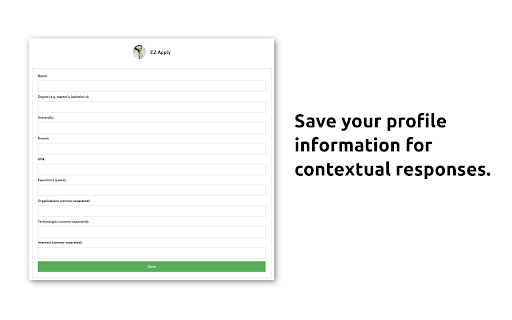
The Chrome extension, "EZ Apply" utilises the power of the ChatGPT API to assist users in efficiently completing forms.
With the extension, users have access to the following features:

- Generating Responses: The extension offers a convenient feature for generating personalised responses to questions on job application forms. By simply highlighting the question with your mouse, right-clicking, and selecting "Get a response" from the “EZ Apply with ChatGPT” option  the extension utilises the ChatGPT API to generate a response tailored to the profile of the user. This generated response is automatically copied to your clipboard, allowing you to easily paste it into the appropriate text box.

- Paraphrasing: The paraphrasing feature utilises the ChatGPT API to rephrase text written by the user. This can be useful when a candidate wants to convey their ideas in a different way. To use this feature, simply highlight the desired text, right-click, and select the "Paraphrase" feature from the “EZ Apply with ChatGPT” option. The rephrased text will automatically replace the original text in the text box.

Creators:
- Faizan Shaikh (https://www.linkedin.com/in/faizanshaikh17/)
- Rahul Pillai (https://linkedin.com/in/thegeekylad)

The project is open source and can be found at: https://github.com/faizan171997/ez-apply-extension.
Technical
- Version
- 1.0.1
- Manifest
- V3
- Size
- 126KiB
- Min Chrome
- 88
- Languages
- 1
- Featured
- No
Metadata
- ID
- caicpmfolickejnkkbbaahailechjpjl
- Developer ID
- u56e054a9db9111f78bc3600b3cf234ad
- Developer Email
- [email protected]
- Created
- Jan 19, 2023
- Last Updated (Store)
- Jan 20, 2023
- Last Scraped
- May 26, 2026
- Website
- —
- Support URL
- —
- Privacy Policy
- —
Similar extensions
Alternatives to EZ Apply, ranked by description similarity.

Easy Apply Bots
Fills out job applications for you. Get your time back, get interviews, get hired.
213
★ 2.0

UpGPT | ChatGPT for Upwork
Write a proposal for an Upwork job using ChatGPT
15
ChatGPT Rewriter
Use ChatGPT to rewrite your texts
957
★ 2.0

ChatGPT Slack Reply Generator
Generates replies in Slack using ChatGPT
15

FrogGPT
Connect to your openai.com account and use ChatGPT on any webpage.
26

Apply - Auto-Fill Accelerator Applications
Fill accelerator applications automatically using your saved startup data
3

AI Search Assistant for Google & Email Writer
Get AI answers beside Google results. Write, rewrite, summarize, and improve emails or messages anywhere.
1.0K
★ 5.0

EasyGPT
A Chrome extension that generates personalized LinkedIn messages using ChatGPT API.
1.0K
★ 5.0
Data sourced from the Chrome Web Store · last verified May 26, 2026.