
chromeIPass
KeePass integration for browser Chrome using KeePassHttp
As of June 2026, chromeIPass has 6,000 users and a 4.57/5 rating from 7 reviews in the Privacy & Security category.
Usersup 20.0 percent+20.0%
6.0K
6,000
Ratingno change0%
4.57
7 reviews
Reviewsno change0%
7
Version
3.3.0
Manifest V3
90-day change · In the last 90 days this extension gained 1.0K users, 1 version update, changed permissions.
History
7 snapshotsTracking since Apr 5, 2026.
View as table
| Date | Users | Rating | Reviews | Version |
|---|---|---|---|---|
| Apr 5, 2026 | 5.0K | 4.57 | 7 | 3.2.0 |
| Apr 16, 2026 | 4.0K | 4.57 | 7 | 3.3.0 |
| Apr 27, 2026 | 4.0K | 4.57 | 7 | 3.3.0 |
| May 7, 2026 | 4.0K | 4.57 | 7 | 3.3.0 |
| May 11, 2026 | 5.0K | 4.57 | 7 | 3.3.0 |
| May 18, 2026 | 6.0K | 4.57 | 7 | 3.3.0 |
| May 28, 2026 | 7.0K | 4.57 | 7 | 3.3.0 |
| Now | 6.0K | 4.57 | 7 | 3.3.0 |
Changelog
- Apr 5, 2026host_permissions
http://*/*, https://*/*, http://localhost:19455/, http://localhost/, https://raw.github.com/
http://*/*, https://*/*
Permissions & access
- Permissions
- activeTabcontextMenusclipboardWritetabswebRequestwebRequestAuthProviderstorage
- Host access
- http://*/*, https://*/*
Screenshots


About
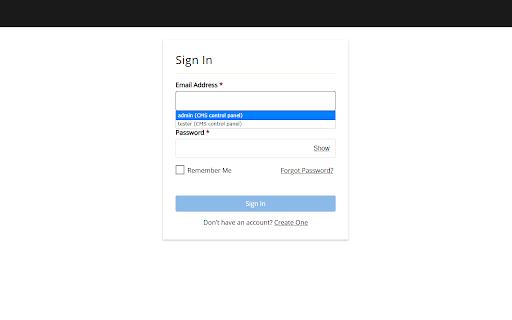
chromeIPass is a lightweight browser extension that connects your web browser (Google Chrome) to your local KeePass (or KeePassXC) database (via the KeePassHttp plugin) — enabling seamless, secure autofill of usernames and passwords on websites you visit.

Changes:
3.0.0 - initial release of revamped (manifest v3) good old chromeIPass developed by Perry Nguyen and Lukas Schulze

Support:
* Please post any questions or support issues at the github messenger/tracker (the "Developer Website" link to the right)

Features:
* Secure integration with KeePass using the KeePassHttp plugin (https://github.com/alan-null/keepasshttp/ download from https://github.com/alan-null/keepasshttp/releases)
* Automatically detect and fill login forms in Chrome by using entries stored in KeePass.
* Support for multiple logins at a single site (intuitive pageAction-based workflow)
* Context menu entries for manually selecting username and password fields to fill
* Notifications are always displayed whenever passwords are retrieved from KeePass, in some instances it is even possible to deny and allow access. (When the host names do not match exactly, user interaction is required to allow access; the decision can be remembered).
* Open source, available for inspection at https://github.com/alan-null/chromeIPass

Requirements:
* KeePass 2 (http://keepass.info) version 2.17 or newer
* KeePassHttp (https://github.com/alan-null/keepasshttp/ download at https://github.com/alan-null/keepasshttp/releases)

Directions:
1) Install KeePass
2) Install KeePassHttp by dropping KeePassHttp.plgx into the KeePass Program Files directory (i.e. C:\Program Files (x86)\KeePass Password Safe 2\Plugins)
2a) Log into KeePass
2b) Verify KeePassHttp has been installed correctly by checking Tools > Plugins
3) Navigate to any page containing a password
4) Click the KeePass icon in the URL bar and click the "Connect" button
5) Switch to the KeePass window and enter a descriptive name for your "Chrome Browser" into the dialog that popped up and click save.
6) Your passwords are now securely retrieved from KeePass and automatically entered into password forms and fields when needed.
7) Passwords in KeePass should be entered with the "Title" containing the domain or host name for the site in question; KeePassHttp does some basic pattern matching, for example "google.com" would match http://login.google.com/ if there were such a thing.
8) If you are ever lost, click on the KeePass icon in the URL bar and it will let you know status as well as any available options.

*It is recommended to disable the builtin Chrome password management when using this extension.*
Technical
- Version
- 3.3.0
- Manifest
- V3
- Size
- 476KiB
- Min Chrome
- 88
- Languages
- 1
- Featured
- No
Metadata
- ID
- bocdfmfhfcobbagfcbimemeclglilcbk
- Developer ID
- u1d0e3600e1857a9f39d6db3ea57de363
- Developer Email
- [email protected]
- Created
- Oct 31, 2025
- Last Updated (Store)
- Apr 1, 2026
- Last Scraped
- Jun 22, 2026
- Website
- —
- Support URL
- https://github.com/alan-null/chromeIPass
- Privacy Policy
- —
Similar extensions
Alternatives to chromeIPass, ranked by description similarity.

KeePassHelper Password Manager
Helper extension for KeePass to find and insert credentials, generate passwords, or save new logins without manual copy and paste
40.0K
★ 4.0

Kee - Password Manager
Kee adds private, secure and easy password management features which save time and keep your private data more secure.
80.0K
★ 4.4

PasswordMaker Pro
Flexible password generator using a cryptographic hash algorithm of your choice - Fully Compatible with PasswordMaker.org
1.0K
★ 4.4

Browserpass
Browser extension for zx2c4's pass (password manager)
3.0K
★ 4.7

Passman
Now Share Password More Securly.
—

EuSonLito - Password Manager
Easy Connect from Chrome with your own Password Manager Platform
45

Sekure Password
Store and manage your passwords. Sign into sites quicker with the autofill feature.
12
★ 5.0

OneckPass
Secure password manager with zero-knowledge encryption
5
Data sourced from the Chrome Web Store · last verified Jun 22, 2026.