
ChatGPT Power - Supercharge ChatGPT
Folders, search, export, prompt library, and productivity tools for ChatGPT
As of June 2026, ChatGPT Power - Supercharge ChatGPT has 4 users and a 5.00/5 rating from 1 reviews in the Workflow & Planning category.
Usersup 33.3 percent+33.3%
4
4
Ratingno change0%
5.00
1 reviews
Reviewsno change0%
1
Version
1.0.1
Manifest V3
History
1 snapshotsTracking since Jun 3, 2026.
View as table
| Date | Users | Rating | Reviews | Version |
|---|---|---|---|---|
| Jun 3, 2026 | 3 | 5.00 | 1 | 1.0.1 |
| Now | 4 | 5.00 | 1 | 1.0.1 |
Permissions & access
- Permissions
- storageactiveTab
- Host access
- https://chat.openai.com/*, https://chatgpt.com/*, https://api.gumroad.com/*
Screenshots




About
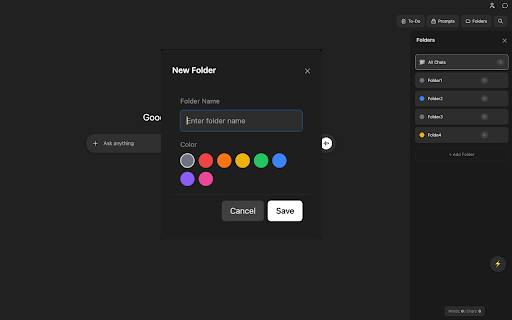
ChatGPT Power supercharges your ChatGPT experience with powerful organization, productivity, and export features.

ORGANIZE YOUR CONVERSATIONS
- Create folders to organize your ChatGPT conversations
- Drag and drop chats between folders
- Bulk move multiple conversations at once
- Pin important folders for quick access
- Search across all your conversations instantly

PROMPT LIBRARY
- Save your favorite prompts for reuse
- Organize prompts in categories
- Quick insert prompts with one click
- Import/export your prompt collection

EXPORT CONVERSATIONS
- Export chats as Markdown, PDF, or plain text
- Copy entire conversations to clipboard
- Share conversations with formatted output
- Preserve code blocks and formatting

PRODUCTIVITY TOOLS
- Pomodoro timer for focused work sessions
- Word and character counter
- Auto-save draft feature
- Quick actions menu for common tasks
- Keyboard shortcuts for power users

TO-DO LIST
- Built-in task manager
- Pin important tasks
- Archive completed items
- Drag and drop to reorder

CUSTOMIZATION
- Light and dark theme support
- Adapts to ChatGPT's interface
- Clean, non-intrusive design

KEYBOARD SHORTCUTS
- Ctrl+B: Toggle folders sidebar
- Ctrl+Shift+F: Search conversations
- /: Quick prompts menu

PRIVACY FOCUSED
- All data stored locally in your browser
- No external servers or tracking
- Your conversations stay private

Transform your ChatGPT into a productivity powerhouse. Perfect for researchers, developers, writers, and anyone who uses ChatGPT daily.
Technical
- Version
- 1.0.1
- Manifest
- V3
- Size
- 108KiB
- Min Chrome
- 88
- Languages
- 1
- Featured
- No
Metadata
- ID
- boadmpgcibaekkfjllnahedejfgeehga
- Developer ID
- uceb7b9de3239656bed3a5cdf2f647b51
- Developer Email
- [email protected]
- Created
- Jan 14, 2026
- Last Updated (Store)
- Jan 14, 2026
- Last Scraped
- Jun 3, 2026
- Website
- —
- Support URL
- https://nitrotech.app
- Privacy Policy
- https://nitrotech.app/privacy
Similar extensions
Alternatives to ChatGPT Power - Supercharge ChatGPT, ranked by description similarity.

ChatGPT Bookmark & Prompt Manager
ChatGPT Bookmark & Prompt Manager gives you control so you can find anything instantly, save what matters, reuse and share prompts.
75
★ 4.9

GPTOrganizer
Enhance your ChatGPT experience, manage chats in folders, save messages, pin messages, and more
14
★ 2.3

ChatGPT Folders, Search & Prompts - Easy Folders: Projects & Chat Organizer
ChatGPT with Organized Projects, Folders, Search, Bookmarks, Prompts Manager, Prompts Library, Custom Instruction Profiles.
10.0K
★ 4.0

Cloud Folders & Search, Organize for ChatGPT
Effortlessly organize your ChatGPT history with cloud-synced folders, powerful deep search, and bookmarks. Never lose a chat again.
18
★ 5.0

ChatGPT Clarity
Pin ChatGPT messages, ask follow-up questions, and organize conversations in a beautiful sidebar with grid layout.
—

ClaudePower - Supercharge Claude.ai
Folders, search, export, prompt library, and productivity tools for Claude.ai
11
ChatGPT Helper
Boost productivity with new workflow & easy access to frequent prompts using our innovative ChatGPT extension.
532
★ 5.0

Easy AI Organizer
Organize your chats from Chat GPT in folders.
6
Data sourced from the Chrome Web Store · last verified Jun 3, 2026.