
Plus: Live screenshots of any app or website
Capture, share and save data with live screenshots of any app or website.
As of May 2026, Plus: Live screenshots of any app or website has 10,000 users and a 3.67/5 rating from 24 reviews in the Workflow & Planning category.
Usersno change0%
10.0K
10,000
Ratingno change0%
3.67
24 reviews
Reviewsno change0%
24
Version
4.9.1
Manifest V3
History
1 snapshotsTracking since Apr 25, 2026.
View as table
| Date | Users | Rating | Reviews | Version |
|---|---|---|---|---|
| Apr 25, 2026 | 10.0K | 3.67 | 24 | 4.9.1 |
| Now | 10.0K | 3.67 | 24 | 4.9.1 |
Permissions & access
- Permissions
- cookiesfontSettingsstoragewebRequest
- Host access
- *://*/*
Screenshots
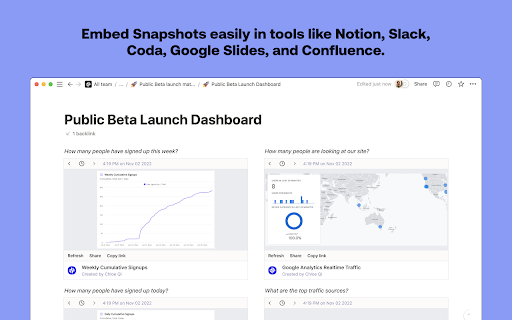
About
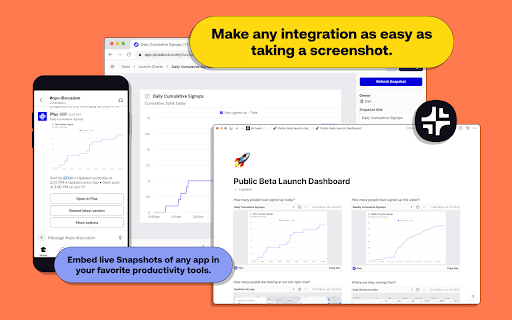
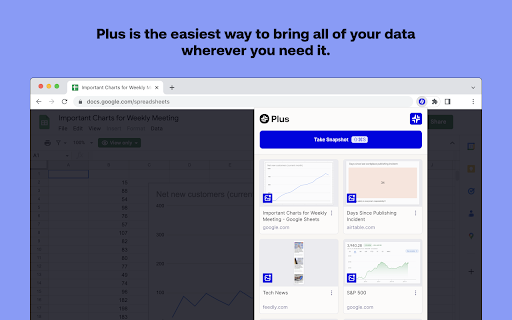
Plus is the easiest way to bring all of your data wherever you need it, and makes any integration as simple and intuitive as taking and sharing a screenshot.

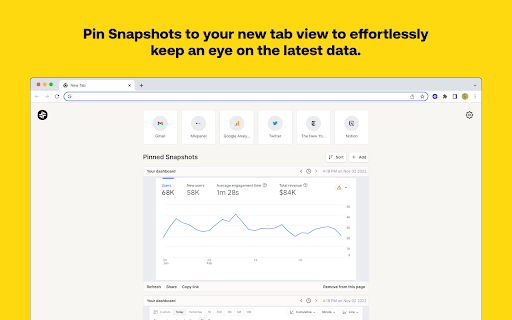
Plus New Tab: Pin live Snapshots to your new tab view to effortlessly keep an eye on the latest data. Now you always have an up-to-date view of everything you need to know every time you open a new tab.

How it works:
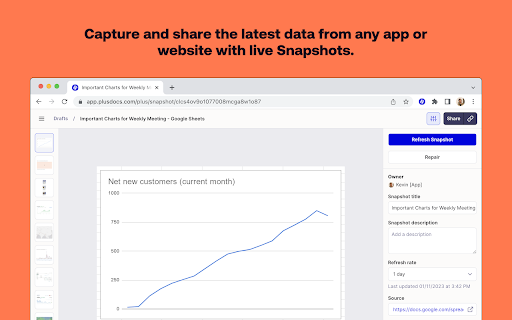
1. Take screenshots of the websites, apps and dashboards that you and your team want to stay updated on.
2. Choose how often Plus should automatically update the snapshots.
3. Embed the screen grabs in the productivity tools you use every day to create one unified view of all your data.
4. Share the consolidated data with your team or clients. You can also use the Slack integration to automatically share up-to-date screenshots with your team.
5. Pin the screenshots that are most important to you in Plus’s new tab extension to get a live feed of all your snapshots whenever you open a new tab.

Features:
• Always fresh data: Our automated screenshots ensure that your data is always up-to-date
• Plus New Tab: Stay updated on the latest data by pinning Snapshots to your new tab view.
• Version history - keep track of historical versions of all of your snapshots
• Embed anywhere - use your screen grabs in all of your favorite tools
• Share links - easily share data by linking to automated screenshots
• Build pages - build custom pages by bringing together live screenshots within Plus or your favorite productivity tool

Key use cases:
• Build no code dashboards - combine automated snapshots within productivity tools to create dashboards from different data sources
• Automated metrics reporting - use our Slack integration to automatically share metrics with your team via up-to-date screenshots
• Share data with clients - report key metrics to clients without the need to share logins
• Create a data library for your team - save automated snapshots of all your team’s key dashboards in one place

Most popular integrations:
• Collaboration: Notion, Slack, Confluence, Coda, Slite, Obsidian.
• Presentation: Google Slides, Canva, Tome, Fermat.

Plus is the fastest way to build dashboards, share data, and automate reports. All without the need for any complicated technical integrations.

About Plus:
At Plus, we’re building an easier way to capture, see, and share information across different sources. Modern companies use hundreds of apps to get work done. We help teams move faster by making it easy to capture and share their most important information.

Plus is the easiest way to bring all of your team’s data wherever you need it. Our goal is to make any data integration as simple and intuitive as sharing a screenshot.
Technical
- Version
- 4.9.1
- Manifest
- V3
- Size
- 3.69MiB
- Min Chrome
- 88
- Languages
- 1
- Featured
- Yes
Metadata
- ID
- bnebanooamokkihfjepphafoekheipfh
- Developer ID
- uaa3724257bcc2d297863d39f7fe630ae
- Developer Email
- [email protected]
- Created
- May 9, 2021
- Last Updated (Store)
- May 26, 2023
- Last Scraped
- May 21, 2026
- Website
- plusdocs.com
- Support URL
- https://guide.plusdocs.com
- Privacy Policy
- https://www.plusdocs.com/privacy-policy
Similar extensions
Alternatives to Plus: Live screenshots of any app or website, ranked by description similarity.

Quick Snap
Quick Snap: Capture screenshots, upload them in google drive seamlessly.
219
★ 5.0

ScreenLink - Share Screenshots Instantly
Take screenshots and instantly get shareable Google Drive links
17

SnipFlow - Smart Screenshot Assistant
Capture screenshots and get instant AI-powered answers. Perfect for homework help and quick problem solving.
1

Snapilot - Full Page Screenshot
Full-featured webpage screenshot tool, supporting full-page scrolling, area selection, and image editing.
1

Jumpshare: Free Screen Recorder & Screenshots
The best screen recorder, screenshot capture and annotation tool
3.0K
★ 3.8

ZoomSphere
Capture and customize screenshots & share them via ZoomSphere.
87
★ 5.0

Simple Screen Capture: Full Page Screenshot
Simple Screen Capture is a handy Chrome Extension that allows you to effortlessly capture full page screenshots with just a click.
5.0K
★ 4.3

CaptureNShare: Capture, Record, Edit & Share
Transforms your screen into a canvas—effortlessly record, edit, and share high-quality screenshots and videos like a pro!
38
★ 4.9
Data sourced from the Chrome Web Store · last verified May 21, 2026.