
PickText OCR — Copy Text from Images by OneClickPDF
Extract text from any image or screenshot. Works offline. Your images never leave your device.
As of June 2026, PickText OCR — Copy Text from Images by OneClickPDF has 45 users in the Productivity category.
Usersup 1400.0 percent+1400.0%
45
45
Ratingno change0%
—
— reviews
Reviewsno change0%
—
Version
1.0.1
Manifest V3
History
10 snapshotsTracking since Apr 6, 2026.
View as table
| Date | Users | Rating | Reviews | Version |
|---|---|---|---|---|
| Apr 6, 2026 | 3 | — | — | 1.0.1 |
| Apr 18, 2026 | 5 | — | — | 1.0.1 |
| Apr 25, 2026 | 7 | — | — | 1.0.1 |
| May 3, 2026 | 10 | — | — | 1.0.1 |
| May 9, 2026 | 12 | — | — | 1.0.1 |
| May 14, 2026 | 32 | — | — | 1.0.1 |
| May 20, 2026 | 31 | — | — | 1.0.1 |
| May 26, 2026 | 30 | — | — | 1.0.1 |
| Jun 2, 2026 | 28 | — | — | 1.0.1 |
| Jun 8, 2026 | 34 | — | — | 1.0.1 |
| Now | 45 | — | — | 1.0.1 |
Permissions & access
- Permissions
- activeTabtabscontextMenusstorageoffscreenclipboardWritescripting
- Host access
- https://cdn.jsdelivr.net/*, <all_urls>
Screenshots



About
Extract text from any image, screenshot, or region on any webpage — instantly, privately, and completely offline.

OneClickPDF OCR Reader uses Tesseract.js WebAssembly to run OCR entirely in your browser. No images are uploaded to any server. Ever.

━━━━━━━━━━━━━━━━━━━━━━━
HOW TO USE
━━━━━━━━━━━━━━━━━━━━━━━

• Click the extension icon → drop or browse for an image → get text
• Right-click any image on a webpage → "Extract text from image"
• Right-click a page → "Screenshot & OCR this page"
• Right-click a page → "OCR selected region" → draw a rectangle around text

━━━━━━━━━━━━━━━━━━━━━━━
FEATURES
━━━━━━━━━━━━━━━━━━━━━━━

✦ 4 ways to capture text
  Upload an image, right-click any image on a page, screenshot the visible tab, or draw a region to OCR just part of a page.

✦ 16 languages
  English, French, German, Spanish, Italian, Portuguese, Dutch, Polish, Russian, Japanese, Chinese (Simplified & Traditional), Korean, Arabic, Hindi, Turkish.
  English is bundled. Other languages download automatically on first use.

✦ Auto language detection
  Not sure what language the image is in? Hit "Auto" and the extension detects the script for you.

✦ Image preprocessing
  Toggle grayscale, contrast stretching, or Otsu binarization to improve OCR accuracy on scanned documents, photos, or low-contrast images.

✦ Table detection & CSV export
  Automatically detects table structures in OCR results. Export detected tables as CSV with one click.

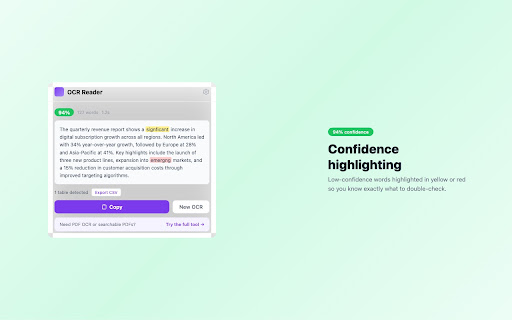
✦ Confidence scoring
  See word-level confidence highlighted in green (high), yellow (medium), or red (low). Overall confidence displayed as a badge.

✦ OCR history
  Your last results are saved locally. Recall, copy, or delete them anytime. Configurable limit (10–100 entries).

✦ Editable results
  Edit the recognized text directly in the results panel before copying.

✦ Copy to clipboard
  One-click copy. That's it.

━━━━━━━━━━━━━━━━━━━━━━━
PRIVACY
━━━━━━━━━━━━━━━━━━━━━━━

• All OCR processing runs locally using WebAssembly. No images or text are sent to any server.
• Language packs (other than English) are downloaded from jsDelivr CDN on first use and cached locally.
• History and settings are stored in chrome.storage.local on your device only.
• No analytics. No tracking. No ads.
• The extension contains links to oneclickpdf.net but does not transmit any data to our servers.

━━━━━━━━━━━━━━━━━━━━━━━
PERMISSIONS EXPLAINED
━━━━━━━━━━━━━━━━━━━━━━━

• activeTab — capture the current tab for screenshot OCR
• contextMenus — add right-click menu items
• storage — save your settings and OCR history locally
• offscreen — run Tesseract.js WASM in a hidden document (Chrome requires this for Canvas/WASM)
• clipboardWrite — copy results to your clipboard
• scripting — inject the region selection overlay when you choose "OCR selected region"

━━━━━━━━━━━━━━━━━━━━━━━
SUPPORTED FORMATS
━━━━━━━━━━━━━━━━━━━━━━━

JPG, PNG, WEBP, BMP, GIF

━━━━━━━━━━━━━━━━━━━━━━━
ABOUT
━━━━━━━━━━━━━━━━━━━━━━━

Built by the team behind OneClickPDF (oneclickpdf.net) — 59 free browser-based PDF tools. Same privacy-first philosophy: your files stay on your device.

Need PDF OCR or searchable PDFs? Try our full OCR tool at oneclickpdf.net/tools/ocr

Questions or feedback? [email protected]
Technical
- Version
- 1.0.1
- Manifest
- V3
- Size
- 1.48MiB
- Min Chrome
- 88
- Languages
- 1
- Featured
- No
Metadata
- ID
- bnbggajnleefogbinpgehjfckbimhfgk
- Developer ID
- u19562a29e369fce83ac1f40f6ef75900
- Developer Email
- [email protected]
- Created
- Mar 4, 2026
- Last Updated (Store)
- Mar 12, 2026
- Last Scraped
- Jun 8, 2026
- Website
- oneclickpdf.net
- Privacy Policy
- https://oneclickpdf.net/privacy
Similar extensions
Alternatives to PickText OCR — Copy Text from Images by OneClickPDF, ranked by description similarity.

SnapText OCR - Image to Text
Extract text from any image on screen. Right-click images, select screen areas, or paste from clipboard.
15

OCR Eye
Extract text from any image on the web. Right-click an image to detect and copy text.
5

Text Capture OCR
Capture text from images using OCR and copy to clipboard
199
★ 5.0

Image Text Extractor - Free OCR Tool
Extract text from any image with OCR. Screen capture, file upload, right-click support. Free tool for PDFs, screenshots & documents.
27

SelectText
Select smarter, not harder
480
★ 5.0

Text From Image Extractor
Drag to select a region; copies merged DOM + OCR text to clipboard.
4
★ 5.0

Screenshot to Text(OCR) - Image text extractor
Optical Character Recogition(OCR). Extract text from screenshot with 1 click. Export text from images, PDFs, etc.
10.0K
★ 3.3

CopyCat — Smart Copy & OCR
Snip any area to OCR text from images, copy all page text, grab selections, or extract links. By Aleph Creative.
27
Data sourced from the Chrome Web Store · last verified Jun 8, 2026.