Text Capture OCR
Capture text from images using OCR and copy to clipboard
As of June 2026, Text Capture OCR has 199 users and a 5.00/5 rating from 2 reviews in the Productivity category.
Usersup 26.8 percent+26.8%
199
199
Ratingno change0%
5.00
2 reviews
Reviewsup 100.0 percent+100.0%
2
Version
1.0
Manifest V3
History
3 snapshotsTracking since Apr 20, 2026.
View as table
| Date | Users | Rating | Reviews | Version |
|---|---|---|---|---|
| Apr 20, 2026 | 157 | 5.00 | 1 | 1.0 |
| May 11, 2026 | 161 | 5.00 | 1 | 1.0 |
| Jun 6, 2026 | 178 | 5.00 | 2 | 1.0 |
| Now | 199 | 5.00 | 2 | 1.0 |
Permissions & access
- Permissions
- activeTabclipboardWritescripting
- Host access
- <all_urls>
Screenshots

About
Text Capture OCR - Extract Text from Images

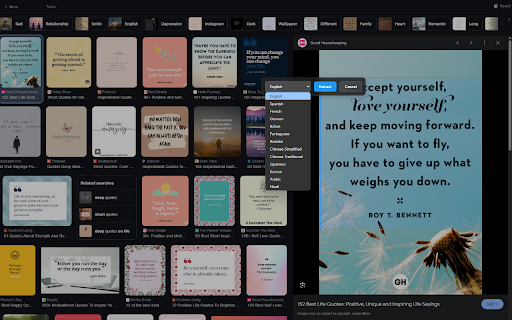
Easily extract text from any image or visual content on web pages with this powerful OCR (Optical Character Recognition) tool. Perfect for students, researchers, and professionals who need to quickly digitize text from images, screenshots, or web content.

Key Features:
• Simple Selection: Click and drag to select any area containing text
• Multi-Language Support: Extract text in 13 languages including:
  - English, Spanish, French, German
  - Chinese (Simplified & Traditional)
  - Japanese, Korean
  - Arabic, Hindi, and more
• Real-Time Processing: See extraction progress as it happens
• Instant Copy: Automatically copies extracted text to your clipboard
• User-Friendly Interface: Clean, intuitive design with visual feedback
• Privacy-Focused: All processing happens locally in your browser

How to Use:
1. Click the extension icon
2. Select the area containing text
3. Choose your language (if not English)
4. Click Extract
5. Text is automatically copied to your clipboard!

Perfect for:
• Converting image-based text to editable format
• Extracting text from screenshots
• Digitizing portions of web pages
• Capturing text from images that prevent selection

Free to use, no account required. Works offline after initial setup.

Note: This extension requires permissions to access tab contents only when activated, ensuring your privacy and security.
Technical
- Version
- 1.0
- Manifest
- V3
- Size
- 12.16MiB
- Min Chrome
- 88
- Languages
- 1
- Featured
- No
Metadata
- ID
- bjoghhicfgdnabbfmlehgojpdbjlfjmo
- Developer ID
- u2f00fb56b4ced41708029f1149340a84
- Developer Email
- [email protected]
- Created
- Apr 3, 2025
- Last Updated (Store)
- Apr 3, 2025
- Last Scraped
- Jun 6, 2026
- Website
- —
- Support URL
- —
- Privacy Policy
- —
Similar extensions
Alternatives to Text Capture OCR, ranked by description similarity.

Image Text Extractor - Free OCR Tool
Extract text from any image with OCR. Screen capture, file upload, right-click support. Free tool for PDFs, screenshots & documents.
27

Text From Image Extractor
Drag to select a region; copies merged DOM + OCR text to clipboard.
4
★ 5.0

ImageXtract - Copy Text from Image
It Allow to extract text from a selected area on webpages
2.0K
★ 3.4

SelectText
Select smarter, not harder
480
★ 5.0

Screenshot to Text(OCR) - Image text extractor
Optical Character Recogition(OCR). Extract text from screenshot with 1 click. Export text from images, PDFs, etc.
10.0K
★ 3.3

SnapText
Quickly extract text from images with one click!
4

InstantOCR
Capture screenshots, extract text from images and videos, and copy it instantly.
9
★ 5.0

SnapText OCR - Image to Text
Extract text from any image on screen. Right-click images, select screen areas, or paste from clipboard.
15
Data sourced from the Chrome Web Store · last verified Jun 6, 2026.