
Outlook Rules Manager
Adds import and export buttons to Outlook Web's rules settings. Bulk-manage inbox rules using JSON files. Independent project.
As of June 2026, Outlook Rules Manager has 19 users in the Productivity category.
Usersdown 5.0 percent−5.0%
19
19
Ratingno change0%
—
— reviews
Reviewsno change0%
—
Version
1.0.0
Manifest V3
History
9 snapshotsTracking since Apr 1, 2026.
View as table
| Date | Users | Rating | Reviews | Version |
|---|---|---|---|---|
| Apr 1, 2026 | 20 | — | — | 1.0.0 |
| Apr 17, 2026 | 25 | — | — | 1.0.0 |
| Apr 22, 2026 | 32 | — | — | 1.0.0 |
| Apr 27, 2026 | 39 | — | — | 1.0.0 |
| May 4, 2026 | 37 | — | — | 1.0.0 |
| May 10, 2026 | 36 | — | — | 1.0.0 |
| May 15, 2026 | 25 | — | — | 1.0.0 |
| May 21, 2026 | 19 | — | — | 1.0.0 |
| May 28, 2026 | 17 | — | — | 1.0.0 |
| Now | 19 | — | — | 1.0.0 |
Permissions & access
- Permissions
- None declared
- Host access
- https://outlook.office.com/*, https://outlook.office365.com/*, https://outlook.live.com/*
Screenshots



About
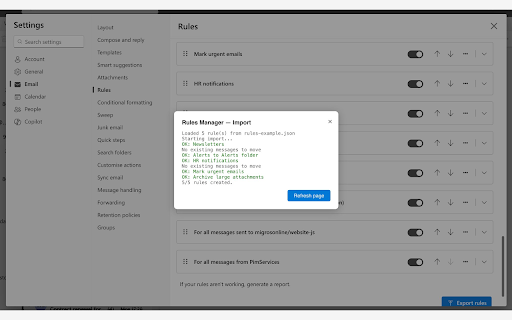
Outlook Rules Manager adds Import and Export buttons directly into Outlook Web's rules settings panel (Settings > Mail > Rules), letting you bulk-manage your inbox rules without clicking through the UI one by one.

Export rules:
Select any of your existing inbox rules and download them as a ready-to-use JSON file — perfect for backups, sharing with colleagues, or migrating between accounts.
                                                                                                                                                                                                                      Import rules:
Import from previously exported rules or create a JSON file with your rule definitions and import them all at once.
The extension automatically creates missing folders and supports a wide range of conditions and actions:
  - Conditions: sender contains, from address, subject contains, body contains, header contains, sent to, has attachments, importance
  - Actions: move to folder, copy to folder, delete, mark as read, set importance, forward to, stop processing

How it works:
The extension runs entirely in your browser. It uses Outlook Web's own session to communicate with the Outlook API. No external servers, no data collection, no account setup required. Just open your rules settings on your outlook interface as you usually do and the buttons are now there.

  JSON example
  [
    { "name": "Newsletters", "senderContains": ["[email protected]"], "moveToFolder": "Reading" },
    { "name": "Mark urgent", "subjectContains": ["URGENT", "ACTION REQUIRED"], "markImportance": "High" },
    { "name": "HR notifications", "fromAddresses": ["[email protected]"], "moveToFolder": "HR", "markAsRead": true }
  ]

Privacy & security:
  - No external servers: everything stays between your browser and Microsoft's API
  - No data collection: the extension does not track, store, or send any user data
  - No background process: only active on Outlook Web pages
  - Uses the same permissions as the Outlook page itself

Not affiliated with or endorsed by Microsoft.
Technical
- Version
- 1.0.0
- Manifest
- V3
- Size
- 19.24KiB
- Min Chrome
- 110
- Languages
- 1
- Featured
- No
Metadata
- ID
- bmjfcocmhponlgcfbcnofeijdllhchfa
- Developer ID
- udb91a6f620023bfe99e71a1722d63453
- Developer Email
- [email protected]
- Created
- Feb 19, 2026
- Last Updated (Store)
- Feb 22, 2026
- Last Scraped
- Jun 6, 2026
- Website
- —
- Support URL
- —
Similar extensions
Alternatives to Outlook Rules Manager, ranked by description similarity.

Bulk Outlook Email to PDF Exporter
Export single or multiple Outlook emails and conversations to PDF
248
★ 4.0

Microsoft Account Auto-Picker
Automatically selects the correct Microsoft account based on the service you are accessing.
70
★ 5.0

Lidar
Create rules to automatically scrape websites as you browse.
4

Outlook Calendar Automation
Automate calendar invites for Outlook with role-based templates, custom time windows, and timezone-aware scheduling
42
★ 5.0

MS Teams Chat Exporter
Export Microsoft Teams conversations to IRC-style plain text format
48

Email-Exporter by p2ilab
An extension to scrape and export emails from web pages
16
★ 5.0

Outlook Bulk Mail Merge
Send personalized bulk emails from Excel/CSV using your Outlook account.
27

Gmail Regex Rules Manager
Automatically manage Gmail emails with regex-based rules for labels and actions
19
★ 5.0
Data sourced from the Chrome Web Store · last verified Jun 6, 2026.