
IBM RPA Web Recorder
Create a RPA Automation script by recording browser actions
As of June 2026, IBM RPA Web Recorder has 1,000 users and a 3.00/5 rating from 2 reviews in the Developer Tools category.
Usersno change0%
1.0K
1,000
Ratingno change0%
3.00
2 reviews
Reviewsno change0%
2
Version
1.2.3
Manifest V3
Permissions & access
- Permissions
- alarmstabsscriptingactiveTab
- Host access
- <all_urls>
Screenshots

About
Overview

The web recorder is a tool in IBM RPA Studio that record your actions on a browser,
automatically adding the equivalent command in your script. You can use the web
recorder to map elements or record your actions in a website.
This extension enables IBM RPA Automation to aid on developing scripts targeting web
browser automation.

Using web recorder
1. Log in to IBM RPA Studio.
2. Create a new script or open an existing script.
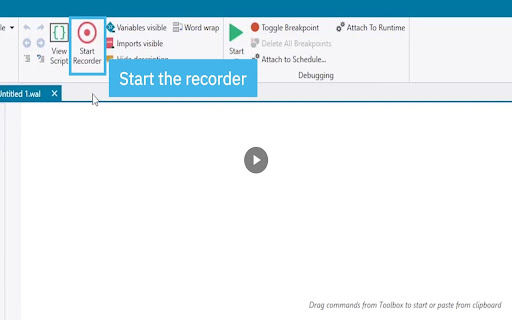
3. On the Home tab, click Start Recorder.
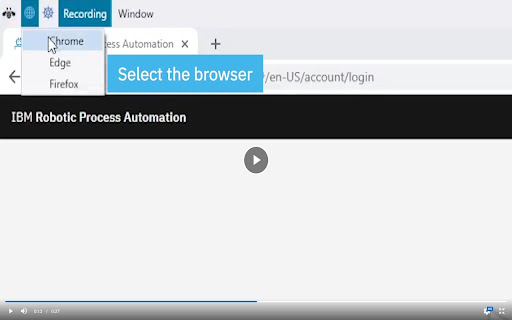
4. Click the Activate Web Recorder icon.
5. Select a browser option:
o Chrome
o Edge
o Firefox
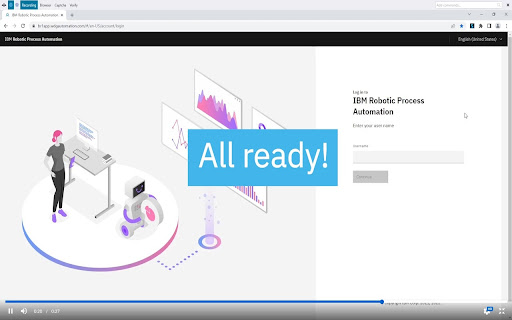
6. In your selected browser, click the Web Recorder extension to activate it:
o If the icon is gray, the plug-in is installed and working.
o If the icon is blue, the recorder is sending commands to IBM RPA Studio
when activated by the recorder for the selected browser.
o If the icon is red, the plug-in is installed, but failing to communicate with
the IBM RPA service.
Technical
- Version
- 1.2.3
- Manifest
- V3
- Size
- 78.1KiB
- Min Chrome
- 88
- Languages
- 1
- Featured
- No
Metadata
- ID
- blajkkcceijnkjgcoeipldglonnnpnlm
- Developer ID
- u51ff44efa27a7abcd9ea085c0a7f5075
- Developer Email
- [email protected]
- Created
- Oct 1, 2019
- Last Updated (Store)
- Feb 28, 2024
- Last Scraped
- Jun 7, 2026
- Website
- —
- Support URL
- —
Similar extensions
Alternatives to IBM RPA Web Recorder, ranked by description similarity.

Playwright Chrome Recorder
Playwright extension for DevTools that allows you to export tests directly from the Recorder panel.
10.0K
★ 2.8

SauceLabs Low Code Test Recorder
Selenium Test Generator for creating low-code tests in the SauceLabs Low Code Test Recorder.
236

RF Recorder
A browser extension that records user action and scans the page to generate RobotFramework scripts
40

Robotframework-recorder
Exporter for Chrome Recorder targeting Robotframework (Browser and Selenium libraries)
250

Applications Manager Web Transaction (RBM) Recorder
Applications Manager Web Transaction (RBM) Recorder
81
★ 5.0

Login Recorder for Burp Suite
Improve your Burp Suite scan coverage by manually capturing how to perform complex actions on your website.
30.0K
★ 4.0

Playwright Test Recorder
Record user interactions and generate Playwright test scripts
61

WebPageTest Recorder Extension
An extension for Chrome Recorder to export a recorder session as a WebPageTest Custom Script
2.0K
★ 4.3
Data sourced from the Chrome Web Store · last verified Jun 7, 2026.