
KillBait Checker Extension
Check the current page with KillBait to detect clickbait and misleading content.
As of June 2026, KillBait Checker Extension has 8 users and a 5.00/5 rating from 4 reviews in the News & Weather category.
Usersup 60.0 percent+60.0%
8
8
Ratingno change0%
5.00
4 reviews
Reviewsno change0%
4
Version
1.0.0
Manifest V3
History
5 snapshotsTracking since Apr 1, 2026.
View as table
| Date | Users | Rating | Reviews | Version |
|---|---|---|---|---|
| Apr 1, 2026 | 5 | 5.00 | 4 | 1.0.0 |
| Apr 16, 2026 | 6 | 5.00 | 4 | 1.0.0 |
| Apr 27, 2026 | 7 | 5.00 | 4 | 1.0.0 |
| May 24, 2026 | 7 | 5.00 | 4 | 1.0.0 |
| Jun 3, 2026 | 6 | 5.00 | 4 | 1.0.0 |
| Now | 8 | 5.00 | 4 | 1.0.0 |
Permissions & access
- Permissions
- storagetabsscripting
- Host access
- https://server1.killbait.com/*, https://killbait.com/*
Screenshots



About
What does this extension do?

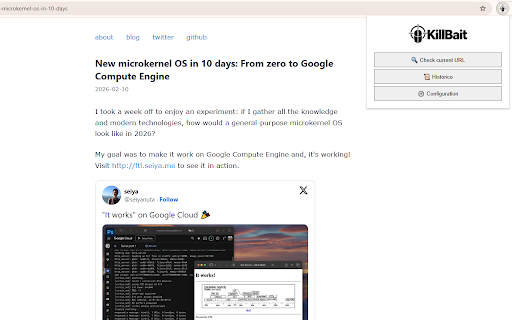
The KillBait browser extension allows users to analyze news articles on demand to determine whether they contain clickbait or sensationalist elements, and to receive a clear, AI-generated summary focused on the facts.

When the user is visiting a news article, they can open the extension and choose to analyze the current URL. The extension sends the URL to the KillBait service only at the user’s request. If the article has already been analyzed, the result is shown immediately. Otherwise, the analysis is queued and can be checked later.

All analyzed articles are stored locally in the extension’s history so users can easily review past results, compare analyses, or reopen previously checked news items.

Why should users install it?

Avoid misleading headlines: The extension helps users quickly identify whether a news article is potentially clickbait or exaggerated.

Clear summaries: It provides concise, AI-generated summaries that focus on relevant facts instead of sensational framing.

Language flexibility: Users can choose the language in which they want the summary, regardless of the original language of the article.

User participation: Users can vote on whether an article is clickbait or not, helping improve the collective evaluation over time.

Non-intrusive design: The extension does nothing automatically in the background and never interrupts browsing.

How does user interaction work?

The extension only runs when the user clicks it.

No pages are scanned automatically.

No background crawling or periodic network requests are performed.

Every action (analysis, voting, viewing history) is explicitly initiated by the user.

What does the icon badge mean?

The number shown on the extension icon represents how many news articles the user has submitted today for analysis.
The badge resets automatically every day.

The icon color provides a quick visual indicator:

Green: Plenty of submissions available.

Orange: Approaching the daily limit.

Red: Daily limit reached.

This helps users manage their usage without opening the extension.

Performance and resource usage

The extension is designed to be extremely lightweight:

It does not maintain persistent connections.

It does not run background tasks.

It only stores minimal local data (settings and history).

Network requests occur only when the user explicitly requests an analysis.

As a result, it has no noticeable impact on browser performance.

Privacy and data handling

URLs are sent to the KillBait service only when the user chooses to analyze them.

No personal browsing data is collected automatically.

Local storage is used only to save user settings, usage counters, and analysis history.

Data is never sold or shared with third parties.

A full privacy policy is available at:
https://killbait.com/legal/privacy-policy
Technical
- Version
- 1.0.0
- Manifest
- V3
- Size
- 49.14KiB
- Min Chrome
- 88
- Languages
- 1
- Featured
- No
Metadata
- ID
- bkjoplgpodebcehbdpgjmokdoiifcdhd
- Developer ID
- u8c611ec70e3a76e255729f15d8daae6a
- Developer Email
- [email protected]
- Created
- Feb 13, 2026
- Last Updated (Store)
- Feb 13, 2026
- Last Scraped
- Jun 3, 2026
- Website
- killbait.com
- Support URL
- —
- Privacy Policy
- https://killbait.com/legal/privacy-policy
Similar extensions
Alternatives to KillBait Checker Extension, ranked by description similarity.

Bias Buster
Analyze and rewrite biased news articles
7
★ 5.0

Remedia
Remedia is a crowdsourcing platform designed to fight clickbate titles, fake news and false claims
28
★ 5.0

The Genuine Journal
The Genuine Journal shows bias ratings and explanations on news articles directly in your browser.
4

ChatGPT Anti Clickbait News- Generate less biased headlines
Generate a detailed and accurate headline from a news article and replace the origional headline.
11

News Analyzer
Analyzes news content for polarization, tone, vocabulary neutrality, conspiracy narratives, opinion-fact balance and calls to action
10

SlantSense: News Narrative Finder
See the story beneath the story—narrative summary, techniques, and groups in one click.
9
★ 5.0

Spin trace Article Analyzer
Analyze news articles for bias, emotion, and polarization using Spin trace
11
★ 5.0

NoBizz: TLDR
NoBizz: TLDR for news articles
—
Data sourced from the Chrome Web Store · last verified Jun 3, 2026.