
Epygi Click To Call Extension
Epygi’s Click To Call extension is for making one-click calls via Epygi IP PBX to phone numbers on web pages.
As of June 2026, Epygi Click To Call Extension has 64 users and a 5.00/5 rating from 5 reviews in the Workflow & Planning category.
Usersup 14.3 percent+14.3%
64
64
Ratingno change0%
5.00
5 reviews
Reviewsno change0%
5
Version
2.1.0
Manifest V3
History
3 snapshotsTracking since Apr 20, 2026.
View as table
| Date | Users | Rating | Reviews | Version |
|---|---|---|---|---|
| Apr 20, 2026 | 56 | 5.00 | 5 | 2.1.0 |
| May 11, 2026 | 65 | 5.00 | 5 | 2.1.0 |
| Jun 6, 2026 | 65 | 5.00 | 5 | 2.1.0 |
| Now | 64 | 5.00 | 5 | 2.1.0 |
Permissions & access
- Permissions
- storagecontextMenus
- Host access
- http://*/*, https://*/*
Screenshots
About
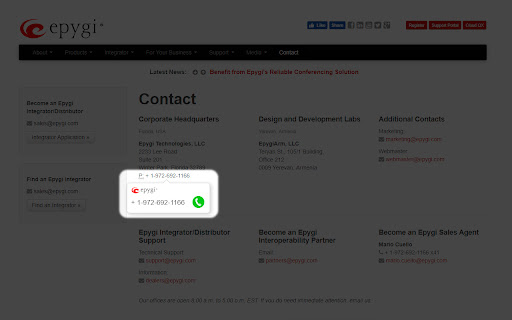
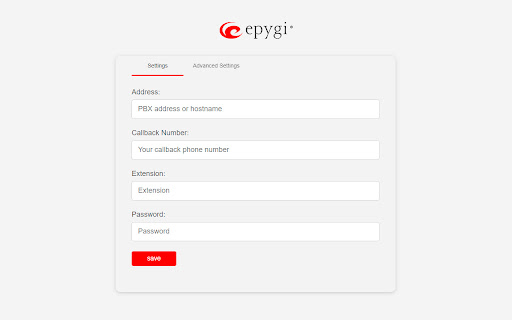
Epygi’s Click To Call Chrome extension detects the phone numbers on the web page. When the user hovers over a phone number, callout pops up with the detected phone number and the “Call” icon. Once the user clicks on the “Call” icon, user’s PBX extensions will ring. As soon as the user answers, the call will connect to the phone number on the web page.

If the phone number has not been detected on the web page, the user can always select the number and right click to open a window with Epygi’s Call record to make a call.
Technical
- Version
- 2.1.0
- Manifest
- V3
- Size
- 257KiB
- Min Chrome
- 88
- Languages
- 1
- Featured
- No
Metadata
- ID
- biooccafopkmgfglhlgldhcmlfnpnnep
- Developer ID
- ud3f2e405c3ec150fc453423e10be6f9a
- Developer Email
- [email protected]
- Created
- Jun 17, 2019
- Last Updated (Store)
- Apr 7, 2025
- Last Scraped
- Jun 6, 2026
- Website
- —
- Support URL
- http://support.epygi.com
- Privacy Policy
- https://www.epygi.com/privacy-policy/
Similar extensions
Alternatives to Epygi Click To Call Extension, ranked by description similarity.

Click2Call: Phone Number Dialer
Detects, Highlights (with custom color), and Converts every phone number on a webpage into a clickable call link via tel: protocol.
79
★ 5.0

TeleVoIPs
Integration powered by TeleVoIPs
168

Cely
Click2call integration of the Cely desktop application. Allows you to call the selected phone on the web page.
373
★ 5.0

net2phone for Chrome
A net2phone browser extension to connect with net2phone features.
2.0K
★ 5.0

net2phone Canada for Chrome
A net2phone browser extension to connect with net2phone features.
681
★ 4.2

Click To Call Chrome Extension
This chrome extension use for click to call any number from chrome browser developed by TechExtension (www.techextension.com).
6.0K
★ 3.4

Aircall Dialer
Dial and call phone numbers from any webpage, or add them to an automated calling list.
100.0K
★ 2.8

CallSwitch Call
Use CallSwitch to call numbers in Chrome.
7.0K
★ 5.0
Data sourced from the Chrome Web Store · last verified Jun 6, 2026.