Unknown
As of May 2026, Unknown has — users.
Usersno change0%
—
—
Ratingno change0%
—
— reviews
Reviewsno change0%
—
Version
—
90-day change · In the last 90 days this extension changed permissions.
History
5 snapshotsTracking since Apr 1, 2026.
View as table
| Date | Users | Rating | Reviews | Version |
|---|---|---|---|---|
| Apr 1, 2026 | 279 | 4.20 | 5 | 1.0.6 |
| Apr 18, 2026 | 274 | 4.20 | 5 | 1.0.6 |
| Apr 28, 2026 | 309 | 4.20 | 5 | 1.0.6 |
| May 10, 2026 | 325 | 4.20 | 5 | 1.0.6 |
| May 22, 2026 | 382 | 4.20 | 5 | 1.0.6 |
| Now | — | — | — | — |
Changelog
- May 22, 2026description
Dr.FLARE Reloaded - The Ultimate Cloudflare Debugging Tool

The beloved Dr.FLARE extension is back. After the original was removed from the Chrome Web Store due to outdated Manifest V2 compatibility, Dr.FLARE Reloaded brings back all the features you loved, completely rebuilt for modern browsers with intelligent enhancements.

Transform your Cloudflare optimization journey with the most advanced debugging extension available. Dr.FLARE Reloaded provides comprehensive insights into your Cloudflare-powered website’s performance, cache efficiency, and optimization opportunities.

Key Features

Visual Cache Analysis
	•	Smart Image Marking: Instantly see which images are served from Cloudflare cache
	•	Green overlay: Cache HIT - served from Cloudflare’s edge
	•	Red overlay: Cache MISS - not cached, served from origin
	•	Faded overlay: Not served via Cloudflare at all
	•	Interactive Hover Popups: Detailed cache information with intelligent miss reason analysis

Advanced DevTools Panel
	•	Comprehensive Request Analysis: Track all network requests with Cloudflare-specific metrics
	•	Cache Miss Intelligence: Understand why requests aren’t cached with detailed explanations
	•	Performance Metrics: See bandwidth savings, cache hit ratios, and optimization impact
	•	Interactive Tables: Resizable columns, customizable views, and detailed request breakdowns

Intelligent Cache Miss Detection
	•	Root Cause Analysis: Automatic detection of cache miss reasons including dynamic content patterns, missing cache headers, query parameters, cookie dependencies, and origin server issues
	•	Actionable Recommendations: Get specific suggestions to improve cache efficiency

Real-Time Performance Insights
	•	Live Statistics: Monitor cache performance as you browse
	•	Bandwidth Savings: See how much Cloudflare is saving you
	•	Request Categorization: Understand your traffic patterns
	•	CDN Performance: Track edge server efficiency

How to Use
	1.	Install the extension and visit any Cloudflare-powered website
	2.	Open Developer Tools (F12) and navigate to the “Dr.FLARE Reloaded” tab
	3.	Refresh the page (F5) to start collecting data
	4.	Hover over images to see instant cache status and analysis
	5.	Explore the DevTools panel for comprehensive performance insights

Visual Indicators
	•	Green Filter: Images served from Cloudflare cache (optimal performance)
	•	Red Filter: Images not cached (performance opportunity)
	•	Faded Filter: Images not served via Cloudflare (configuration needed)

DevTools Panel Features
	•	Overview Tab: High-level performance metrics and cache statistics
	•	Uncached Requests: Detailed analysis of cache misses with intelligent recommendations
	•	All Requests: Complete request log with Cloudflare-specific insights
	•	Feedback: Contact information and community resources

Technical Highlights
	•	Manifest V3 Compatible: Built for modern Chrome browsers
	•	Real-Time Analysis: Live monitoring without performance impact
	•	Intelligent Detection: Advanced algorithms for cache miss analysis
	•	User-Friendly Interface: Clean, intuitive design with dark/light theme support
	•	Privacy Focused: No data collection, all analysis happens locally

Perfect For
	•	Web Developers: Optimize Cloudflare configurations
	•	DevOps Engineers: Monitor CDN performance
	•	Site Owners: Understand Cloudflare benefits
	•	Performance Analysts: Identify optimization opportunities
	•	Cloudflare Users: Maximize cache efficiency

Support & Community
Dr.FLARE Reloaded is a complete rebuild and enhancement of the original Dr.FLARE extension, which was removed from the Chrome Web Store due to outdated Manifest V2 compatibility. This new version brings all the beloved features back with modern improvements and intelligent cache analysis.

Developed by this:matters, a certified Cloudflare Partner Agency based in Switzerland, specializing in Cloudflare optimization and performance solutions.
Contact: [email protected]

Why Choose Dr.FLARE Reloaded?
	•	Most Advanced: Intelligent cache miss analysis with actionable recommendations
	•	Always Updated: Regular updates with new Cloudflare features
	•	Community Driven: Built by developers, for developers
	•	Performance Focused: Minimal impact on browsing speed
	•	Comprehensive: From visual indicators to detailed analytics
(empty)
- May 22, 2026short_description
Advanced Cloudflare cache analysis and debugging tool with intelligent cache miss detection and performance insights.
(empty)
- May 22, 2026name
Dr.FLARE Reloaded
Unknown
- May 22, 2026category
productivity/developer
(empty)
- May 22, 2026host_permissions
<all_urls>
(empty)
- May 22, 2026permissions
storage, webNavigation, scripting, clipboardWrite
(empty)
Permissions & access
- Permissions
- None declared
- Host access
- None declared
Technical
- Version
- —
- Manifest
- —
- Size
- —
- Min Chrome
- —
- Languages
- 0
- Featured
- No
Metadata
- ID
- bhpghgoeaedhpmadepoadfbljmbhbikk
- Developer ID
- —
- Developer Email
- —
- Created
- —
- Last Updated (Store)
- —
- Last Scraped
- May 22, 2026
- Website
- —
- Support URL
- —
- Privacy Policy
- —
Similar extensions
Alternatives to Unknown, ranked by description similarity.

Fastr Workspace
Chrome extension for Fastr Frontend experiences and Fastr Optimize analytics
9

ReloadScope - API Monitor & Network Tracker
Track, analyze & debug REST/JSON API requests. HTTP Network Inspector with session management, HAR export & request replay.
301
★ 5.0

CDN Detector
抓取當前網站的 HTTP Response Header、TLS 證書 Issuer、Remote IP,並判斷是否使用 CDN,提供詳細的快取效能分析與影片播放品質監控。
28

Network Diagnostics Dashboard
Tab-based dashboard for network diagnostics with a modern UI.
16

WebLoad Troubleshooter
Diagnose page load issues caused by content filters, blocked scripts, and failed dependencies.
35

DevBoost
All-in-one developer toolkit for web testing, debugging, and optimization.
21
★ 5.0

Hard Refresh
Use hard refresh to quickly clear cache, clear cookies and refresh page with just one click.
2.0K
★ 4.0
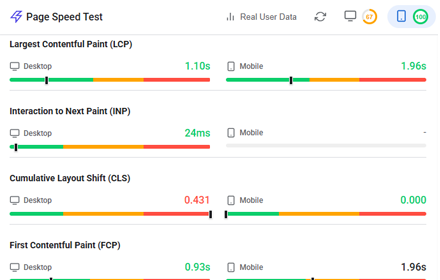
Website Page Speed Test - Core Web Vitals and Real User Data (CrUX) reports
Analyze website performance with Core Web Vitals, resource analysis, and optimization suggestions
158
Data sourced from the Chrome Web Store · last verified May 22, 2026.