
REM calculator for Webflow
Convert PX values to REM units in Webflow with custom base width. Press space to transform values in width, margins and etc.
As of May 2026, REM calculator for Webflow has 166 users in the Developer Tools category.
Usersup 16.9 percent+16.9%
166
166
Ratingno change0%
—
— reviews
Reviewsno change0%
—
Version
0.1.0
Manifest V3
History
3 snapshotsTracking since Apr 1, 2026.
View as table
| Date | Users | Rating | Reviews | Version |
|---|---|---|---|---|
| Apr 1, 2026 | 142 | — | — | 0.1.0 |
| Apr 29, 2026 | 144 | — | — | 0.1.0 |
| May 26, 2026 | 156 | — | — | 0.1.0 |
| Now | 166 | — | — | 0.1.0 |
Permissions & access
- Permissions
- storageactiveTabscripting
- Host access
- https://*.webflow.com/*
Screenshots
About
Calculate px to rem inside Webflow designer.
Before start, make sure you have embed code: html { font-size: 1vw; }

HOW TO USE:
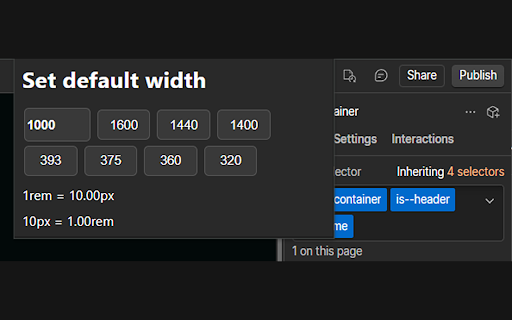
1. Enter base width in px of your design or select width options.
2. In input like margin, padding, width, height, etc.. enter number in PX and press 'Space' key.
3. Get REM size in your input.

(PX size / PX base width) * 100 = REM
Technical
- Version
- 0.1.0
- Manifest
- V3
- Size
- 11.37KiB
- Min Chrome
- 88
- Languages
- 1
- Featured
- Yes
Metadata
- ID
- bhfnnhhohijiicjkcpgphmodfaehmijj
- Developer ID
- u80c77018de3824d8ecb8e34d4e4c621a
- Developer Email
- [email protected]
- Created
- Jun 17, 2022
- Last Updated (Store)
- Feb 24, 2025
- Last Scraped
- May 26, 2026
- Website
- —
- Support URL
- https://t.me/kobro
- Privacy Policy
- —
Similar extensions
Alternatives to REM calculator for Webflow, ranked by description similarity.

Px to Rem Converter
Converts px values to rem units.
21

PX => REM; REM => PX
PX / REM bidirectional converter
38
★ 5.0

PX - REM Converter
Convert between pixels and rem units (bi-direction). Easily copy and paste.
24

Wizardry Technique Converter
Keyboard shortcuts for EM, REM, and Percentage conversions in Webflow
4.0K
★ 4.7

FontMeter
Overlay computed typography information on any webpage
4

CSS PX, REM, EM, VH, VW Converter
Shows CSS size properties for elements
89
★ 5.0

Pixel to REM
Easily convert pixels to REM or vise-versa
422
★ 3.5

remCalc
A small tool for web developers.
17
★ 5.0
Data sourced from the Chrome Web Store · last verified May 26, 2026.