
Convert PDF to Excel
Convert PDF to Excel online. PDF file to XLSX documents and 100% free.
As of May 2026, Convert PDF to Excel has 10,000 users and a 1.64/5 rating from 11 reviews in the Workflow & Planning category.
Usersno change0%
10.0K
10,000
Ratingdown 3.5 percent−3.5%
1.64
11 reviews
Reviewsup 10.0 percent+10.0%
11
Version
3.0.0
Manifest V3
History
2 snapshotsTracking since Apr 29, 2026.
View as table
| Date | Users | Rating | Reviews | Version |
|---|---|---|---|---|
| Apr 29, 2026 | 10.0K | 1.70 | 10 | 3.0.0 |
| May 26, 2026 | 10.0K | 1.70 | 10 | 3.0.0 |
| Now | 10.0K | 1.64 | 11 | 3.0.0 |
Permissions & access
- Permissions
- notificationsstorage
- Host access
- https://*.qwerpdf.com/
Screenshots

About
Convert PDF to Excel online. PDF file to XLSX documents and 100% free.
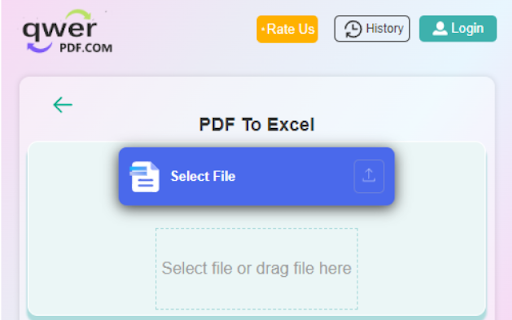
Select and upload the PDF file you need to convert in the PDF to Excel converter.
we will quickly convert the PDF document to Excel & XLSX file as it's online.

Our features:
Convert PDF to Excel: Convert your PDF to Excel documents(XLSX) with incredible accuracy.
Convert Excel to PDF: Convert Excel to PDF, XLSX to PDF, Excel to PDF
XLSX & Excel online Editor: Open and edit your Excel documents without install any software.

How to Convert PDF to Excel?

1.Install the Convert PDF to Excel  extension

2.Find the Convert PDF to Excel  extension in the upper right corner of the browser and click it, and click the "PDF to Excel" icon in the pop-up window.

3.Select or drag the file you want to convert to the dotted frame area,The file will automatically start uploading and converting.

4.Wait for the conversion process,do not close your browser Wait until your files are uploaded and processed,this might take a few minutes.You can close this page to do other things, The extension will notify you when the file conversion is complete.

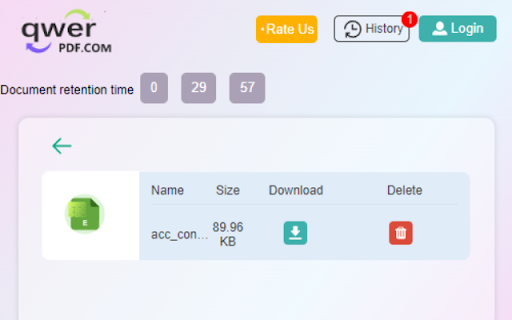
5.Download after successful conversion.Click the file icon in the upper left corner of the extension to enter the file list, where all your converted files will be displayed, find the file you want to download, click the download button, the download page will pop up. Note that the file will only be temporarily on our server Save for 30 minutes, then it will be deleted automatically, please download it in time.

By installing this extension you agree to the data protection regulations (https://qwerpdf.com/privacy-policy.html).
Technical
- Version
- 3.0.0
- Manifest
- V3
- Size
- 702KiB
- Min Chrome
- 88
- Languages
- 24
- Featured
- Yes
Metadata
- ID
- bhaeffhiollngcgdhoepmdckmeadgnbk
- Developer ID
- u7138150034cf37bff863418079dae456
- Developer Email
- [email protected]
- Created
- Dec 27, 2021
- Last Updated (Store)
- Sep 1, 2023
- Last Scraped
- May 26, 2026
- Website
- https://qwerpdf.com/
- Support URL
- https://qwerpdf.com/contact-us.html
- Privacy Policy
- https://qwerpdf.com/privacy-policy.html
Similar extensions
Alternatives to Convert PDF to Excel, ranked by description similarity.

PDF to Excel
Convert PDF Files to Excel Online in Seconds!
10.0K
★ 3.3
Convert PDF to Word
Convert PDF to Word online. PDF file to DOCX documents and 100% free.
7.0K
★ 1.6
Excel to PDF Converter
Convert Excel sheets(xlsx, xls) to PDF documents.
2.0K
★ 4.6

PDF Table to Excel
PDF Table to Excel easily extracts tables from PDFs into clean and organized Excel or CSV files.
598
★ 4.2

Online PDF Converter
Converter tool that supports PDF, Word, Excel, PPT, JPG. Convert PDF to different formats and vice versa in one click.
20.0K
★ 3.9
PDF to Word
Convert PDF files to Word online in seconds!
70.0K
★ 3.9
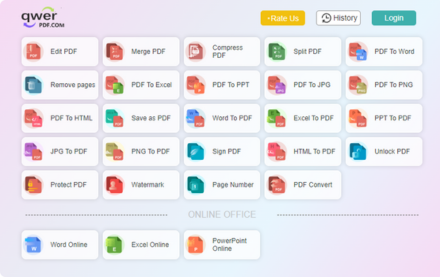
Qwer PDF
Qwer PDF extension is Online Convert PDF To Word & Excel, PPT & PDF Editor - 100% Free. Power Up Your Productivity.
30.0K
★ 4.1
Xodo | PDF Editor, Converter & Merger
Free PDF tool to edit, convert, compress, merge, combine, crop, and redact PDF files.
40.0K
★ 3.8
Data sourced from the Chrome Web Store · last verified May 26, 2026.