
Goniometer
Virtual Goniometer by Ryan Mo
As of May 2026, Goniometer has 1,000 users and a 3.82/5 rating from 11 reviews in the Productivity category.
Usersno change0%
1.0K
1,000
Ratingno change0%
3.82
11 reviews
Reviewsno change0%
11
Version
0.0.14
Manifest V3
History
2 snapshotsTracking since Apr 20, 2026.
View as table
| Date | Users | Rating | Reviews | Version |
|---|---|---|---|---|
| Apr 20, 2026 | 1.0K | 3.82 | 11 | 0.0.14 |
| May 5, 2026 | 1.0K | 3.82 | 11 | 0.0.14 |
| Now | 1.0K | 3.82 | 11 | 0.0.14 |
Permissions & access
- Permissions
- activeTabscripting
- Host access
- None declared
Screenshots

About
This virtual goniometer is an easy to use tool for clinicians to measure angles of joint range of motion during live virtual care sessions.

After opening the extension by clicking on the icon, please click the "Start Measuring" button. Next, press the "\" (backslash) key on the keyboard to begin taking measurements.

When finished, click the "Stop Measuring" button. While taking measurements, you will be unable to interact with other buttons in the video call until the Stop Measuring button is clicked.

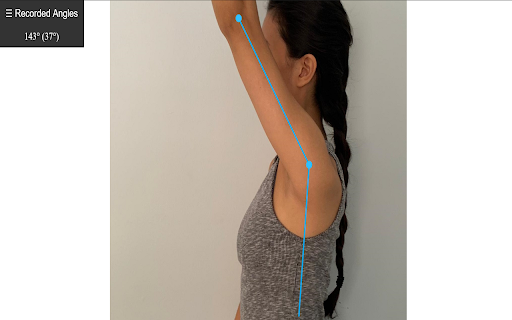
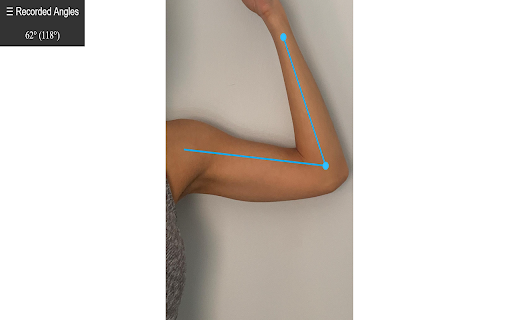
Click to mark the points of your stationary goniometer arm, the axis of rotation, and the measuring arm.

As you are measuring there will be a live display of the current angle, with the supplementary angle in brackets.

Find all measured angles recorded in the left side panel, and easily copy all values with the copy button.

To hide the "Recorded Angles" tab in the top left corner of the page, press the "`" (backquote or backtick) key which is next to the number 1 on the keyboard.

This extension should work on any video conferencing platform that uses Chrome. So far, it has been tested on Zoom, MS Teams, OTN, Adracare, and Doxy. If there are other platforms that do not currently work and you would like to have it supported, please send me an email and I will get back to you when possible.

To use the goniometer on photos from your computer, use the following instructions:
- Right click the extension icon in the top right of your browser > click manage extensions > click allow access to file URLs
- Drag and drop the image into the Chrome browser

You should now be able to use the extension on local images.
Technical
- Version
- 0.0.14
- Manifest
- V3
- Size
- 13.31KiB
- Min Chrome
- 88
- Languages
- 1
- Featured
- No
Metadata
- ID
- bgohdobpmnajfkhonaimnelpglcplhei
- Developer ID
- u54d3df8863d4191ce71d465f96a1743a
- Developer Email
- [email protected]
- Created
- Jun 2, 2020
- Last Updated (Store)
- Sep 24, 2025
- Last Scraped
- May 30, 2026
- Website
- —
- Support URL
- —
- Privacy Policy
- —
Similar extensions
Alternatives to Goniometer, ranked by description similarity.

Online protractor
Use Online protractor tool to measure angle online. Virtual protractor online is perfect for accurate and quick angle measurement.
8.0K
★ 4.9

Protractor for Google Chrome
Overlay protractor tool for measuring angles on any webpage.
302
★ 1.0

On-screen Ruler
On-screen resizable, draggable, rotatable and customizable ruler - perfect for anyone who needs precise measurements at a glance.
339
★ 4.0

Floating Protractor
Measure angles on any webpage with a floating protractor tool
92
★ 5.0
Split Screen for Google Chrome
You can easily split and separate tabs, split interface layout, and resize tabs by columns and rows. Multi-monitor support
300.0K
★ 3.8

SightCall VISION Chrome Extension
Benefit from the full SightCall VISION experience through this extension for a desktop console.
50.0K
★ 3.9

Viact Meeting Recorder
Record the meeting like google meet for Viact
1

Viact Meeting Recorder
Record the meeting like google meet for Viact
1
Data sourced from the Chrome Web Store · last verified May 30, 2026.