Split Screen for Google Chrome
You can easily split and separate tabs, split interface layout, and resize tabs by columns and rows. Multi-monitor support
As of May 2026, Split Screen for Google Chrome has 300,000 users and a 3.75/5 rating from 397 reviews in the Productivity category.
Usersno change0%
300.0K
300,000
Ratingup 0.3 percent+0.3%
3.75
397 reviews
Reviewsup 0.5 percent+0.5%
397
Version
3.0.0
Manifest V3
History
2 snapshotsTracking since Apr 30, 2026.
View as table
| Date | Users | Rating | Reviews | Version |
|---|---|---|---|---|
| Apr 30, 2026 | 300.0K | 3.74 | 395 | 3.0.0 |
| May 28, 2026 | 300.0K | 3.74 | 396 | 3.0.0 |
| Now | 300.0K | 3.75 | 397 | 3.0.0 |
Permissions & access
- Permissions
- system.displaywindowsstorage
- Host access
- None declared
Screenshots


About
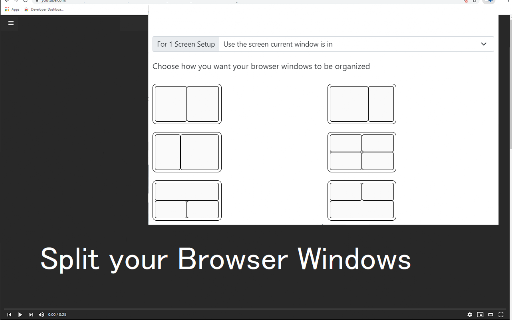
This extension splits your browser windows into two with just 2 clicks.
The ratio of the windows can be adjusted according to your needs.

This extension is great for presenters who need to use Google Meet/Zoom and need to split their screen so that they can see their presentation & also see the faces of their students/attendees of the Google Meet call.

Most of our users are on hangouts meet and want to see the faces of the attendees while they are doing screen sharing.

This extension/feature is great for teachers who are teaching online classes at the moment. You can monitor your students via "Grid Mode in Google Meet" on one tab and do "screen sharing" in another Chrome tab which contains your teaching materials.

Split the current browser window into a pair so it acts like a dual monitor setup. Try dualless mode today using this extension. Our software works well with google hangouts meet

Permissions Required - Please note we do NOT read your browsing data, the only reason we use the browsing tabs permission is to allow the software extension to split your current Chrome Browser Windows into 2+ windows.

This extension is useful for users who do not have dual monitors and want to split their browser windows into different sections, mainly when you're on a call using google meet app

To begin using the software, simply do the following

1) Install our software extension
2) Click on the extension icon
3) Choose the layout ratio you wish to use for this split screen extension
4) Our software will split screen and display the browser into the split screen ratio you selected

If you have any feedback for us for our extension which is meant to work with google video conference, please contact us.

Disclaimer: Please note this extension is NOT made by Google and is made by an independent development team. All copyrights belong to their respective owners. Google doesn’t endorse or sponsor this Chrome extension. Split Screen is not owned by, it is not licensed by and is not a subsidiary of Google Inc.
Technical
- Version
- 3.0.0
- Manifest
- V3
- Size
- 471KiB
- Min Chrome
- 88
- Languages
- 40
- Featured
- Yes
Metadata
- ID
- dnollkdkikklpdganoecjcmmlddbennb
- Developer ID
- uffc47e4084cc703423f74ec3ea33043a
- Developer Email
- [email protected]
- Created
- Aug 23, 2020
- Last Updated (Store)
- Oct 17, 2023
- Last Scraped
- May 28, 2026
- Support URL
- —
- Privacy Policy
- —
Similar extensions
Alternatives to Split Screen for Google Chrome, ranked by description similarity.

Tab Redesign - Split-Screen Layout
Achieve precise multi-window split-screen functionality with a single click.
1.0K
★ 4.2

Split Screen Extension
Split screen functionality for Chrome
139
★ 5.0

Split Screen on Mac
Use Split Screen on Mac: seamlessly resize tab. Have a split screen on a macbook to get boosted productivity!
7.0K
★ 4.0
Dualless
Dualless - For those who don't have dual monitor.
1.0M
★ 4.0

Split screen Tab
Enjoy your new Split screen Tab on every new tab
77
★ 1.0

Quad Tabs - Split your Browser
Convert four tabs into separate browser windows with Alt+Shift+Q and remembers the layout per display.
250

Split Screen
Dynamically splits the current tab into multiple windows side by side on the current screen.
386
★ 5.0

BuriSplit - Multi-Tab Grid View
Split screen view for Chrome - Work with multiple tabs in grid layout (2x2, 3x3, 4x4)
88
★ 5.0
Data sourced from the Chrome Web Store · last verified May 28, 2026.