
Selection Copilot
Copilot for multi select, and copy content as text/markdown/html(with Tex equations)
As of June 2026, Selection Copilot has 57 users and a 5.00/5 rating from 3 reviews in the Productivity category.
Usersup 9.6 percent+9.6%
57
57
Ratingno change0%
5.00
3 reviews
Reviewsno change0%
3
Version
1.4.3
90-day change · In the last 90 days this extension 1 version update.
History
8 snapshotsTracking since Apr 1, 2026.
View as table
| Date | Users | Rating | Reviews | Version |
|---|---|---|---|---|
| Apr 1, 2026 | 52 | 5.00 | 3 | 1.4.2 |
| Apr 8, 2026 | 51 | 5.00 | 3 | 1.4.2 |
| Apr 22, 2026 | 57 | 5.00 | 3 | 1.4.2 |
| May 2, 2026 | 54 | 5.00 | 3 | 1.4.2 |
| May 10, 2026 | 53 | 5.00 | 3 | 1.4.2 |
| May 21, 2026 | 49 | 5.00 | 3 | 1.4.3 |
| Jun 4, 2026 | 51 | 5.00 | 3 | 1.4.3 |
| Jun 9, 2026 | 54 | 5.00 | 3 | 1.4.3 |
| Now | 57 | 5.00 | 3 | 1.4.3 |
Permissions & access
- Permissions
- None declared
- Host access
- None declared
Screenshots

About
Selection Copilot supercharges your text selection experience with powerful multi-selection and smart copying capabilities.

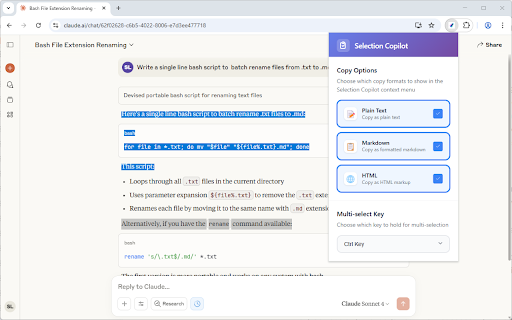
Multi-Selection
- Hold Ctrl or Alt to select multiple text ranges across any webpage
- Visual highlights show all your selections at once
- Perfect for gathering information from different parts of a page

Smart Copy Options
- Plain Text - Clean, formatted text without markup
- Markdown - Perfect for documentation, notes, GitHub, and messages generated by ChatGPT or Gemini
- HTML - Preserve original formatting, structure, and HTML tags
- Ctrl+C Override - Can overwrite Ctrl+C with one of 3 options above

Quick Selection
- Select <main> - Instantly select the main content area of any webpage
- Select <article> - Quickly select article content with one click

Intelligent Features
- Table Support - Automatically converts HTML tables to markdown format
- Visual Highlights - See all your selections with system-matched colors
- LaTex Support - When Copy as Markdown, support convert rendered maths equations back to LaTex when using ChatGPT or Gemini.

Basic Operations
1. Select text normally on any webpage
2. Hold your chosen key (Ctrl/Alt) for additional selections
3. Right-click and choose your copy format
4. Paste anywhere with perfect formatting

Customizable Settings
- Choose between Ctrl or Alt for multi-selection
- Enable/disable copy formats in context menu
- Choose what operation to do for Ctrl+C
- Choose your preferred language
- Clean, modern settings interface

Privacy & Security
- No data collection - everything stays on your device
- No internet permissions - works completely offline

Transform your browsing experience with smarter text selection and copying!
Technical
- Version
- 1.4.3
- Manifest
- —
- Size
- 51.13KiB
- Min Chrome
- 88
- Languages
- 10
- Featured
- No
Metadata
- ID
- bgiabibopkcbmeacboogncclinfpanfo
- Developer ID
- u1b9e8335064ac77e40b7add33b469fd5
- Developer Email
- [email protected]
- Created
- Aug 18, 2025
- Last Updated (Store)
- May 2, 2026
- Last Scraped
- Jun 9, 2026
- Website
- metaphorprojects.link
- Support URL
- —
- Privacy Policy
- —
Similar extensions
Alternatives to Selection Copilot, ranked by description similarity.

One-Click Select & Copy
Use shortcut key + one click to select or copy a word, sentence/line, or paragraph on any webpage.
15

Click-Line
Boost text selection with a smart popup, mouse gestures for back/forward, and scroll-to-zoom control.
37
★ 5.0

MultiLine Text Selection
Make, copy, and search multiple concurrent text selections.
10.0K
★ 3.7

Auto Copy on Select
Автоматично копіює виділений текст у буфер.
12

Multi Copy Cat
A right panel extension for copying and managing multiple text snippets
15
★ 5.0

Smart Clipboard
Ultimate productivity tool: Auto-copy selections, quick-paste (Alt+Click), and access clipboard history seamlessly on any site.
10
★ 5.0

Auto Copy
Automatically copy selected text to clipboard with configurable options
43

QuickClip
Auto-copy text on double-click or selection. Keep a local history of copied items.
4
★ 5.0
Data sourced from the Chrome Web Store · last verified Jun 9, 2026.