
WriteHuman - History Replay for Google Docs
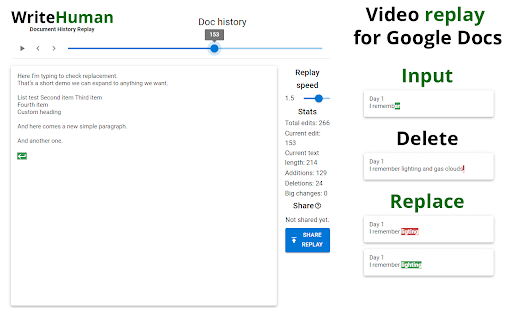
WriteHuman lets you watch the writing of any Google Doc (that you’re given access to, or the editor of) from start to finish.
As of May 2026, WriteHuman - History Replay for Google Docs has 10,000 users and a 4.27/5 rating from 15 reviews in the Productivity category.
Usersno change0%
10.0K
10,000
Ratingdown 9.0 percent−9.0%
4.27
15 reviews
Reviewsup 15.4 percent+15.4%
15
Version
1.0.1
Manifest V3
History
1 snapshotsTracking since Apr 29, 2026.
View as table
| Date | Users | Rating | Reviews | Version |
|---|---|---|---|---|
| Apr 29, 2026 | 10.0K | 4.69 | 13 | 1.0.1 |
| Now | 10.0K | 4.27 | 15 | 1.0.1 |
Permissions & access
- Permissions
- activeTab
- Host access
- None declared
Screenshots
About
It loads the video substantially faster than Draftback & other playback Google Doc revision history tools.
Simply install the plugin and then click “Load replay” and within 2 seconds you can watch a video from start to finish of the writing process.

This extension is not anti-AI, it’s just about transparency. Whether you allow zero AI used by your students or employees or partial AI usage, WriteHuman can give you a look into that process and ensure your rules are adhered to.

“But what if they generate the text on another device and then slowly type it out in the Google Doc?”
That’s a good point, but watch back the history of one of your own pieces of writing and you’ll see that genuine authorship looks very different than slowly typing out a piece of writing from another screen. Genuine authorship shows movement to different sections of the document, lots of backspacing, lots of deletions and rewrites, etc. And the good news is all of that is viewable within WriteHuman.

Most importantly, we DO NOT track the time spent on a document (as of now) as I currently do not believe it is necessary to discern human effort vs AI cheating. However, we will revisit this in the future if it is requested. I have concerns about bias if less time is spent, or a project is started close to the deadline, and I have discussed these concerns with educators and they've confirmed they could be true.

Feature requests? [email protected].

HOW TO USE
1. Install.
2. Open any Google document you have edit access to.
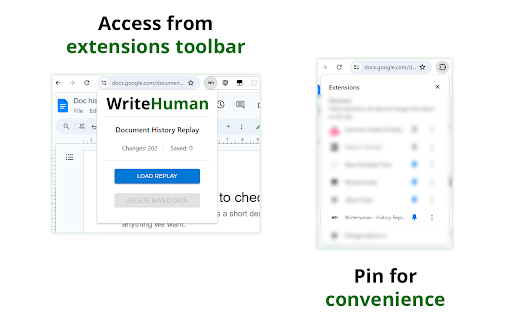
3. Click the extension icon in the extension area of Chrome to the right of the address bar.
You might need to open the list of all extensions if you have many installed. It's the puzzle icon in the extensions area. Pin WriteHuman for convenience.
4. Click load replay then view replay.

DATA PRIVACY & COLLECTION
The extension DOESN'T collect any of your personal data. It only fetches document changes on the level of text - nothing about who and when did those changes. By default, all fetched data is stored locally on your computer.

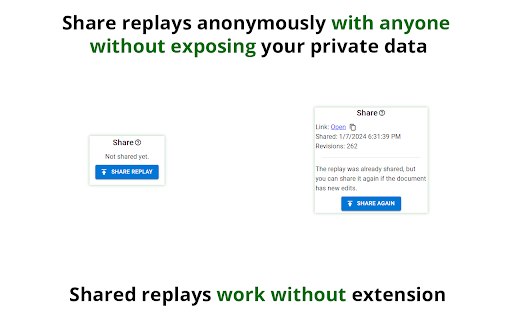
You can upload the replay using the share feature, but even then it doesn't use any of your personal data: the online sharing uploads only raw changes data and assigns it a random link so you can share it with others. Unless you give this link to someone - it's impossible to find your replay online. All shared replays are also automatically deleted in 30 days.
Technical
- Version
- 1.0.1
- Manifest
- V3
- Size
- 397KiB
- Min Chrome
- 88
- Languages
- 1
- Featured
- Yes
Metadata
- ID
- bfaogmhmapcefhmkdablidkcgkgnhghl
- Developer ID
- u5263bdec2f9c29bf6ad8f6d8f0f10ecb
- Developer Email
- [email protected]
- Created
- Jan 9, 2024
- Last Updated (Store)
- Jan 17, 2024
- Last Scraped
- May 26, 2026
- Website
- —
- Support URL
- —
- Privacy Policy
- —
Similar extensions
Alternatives to WriteHuman - History Replay for Google Docs, ranked by description similarity.

Whats in Docs
Track student writing process and revision history in Google Docs
—

Ghost Writer - Free
Make AI write and type for you. Effortlessly bypass revision history based AI detection.
238
★ 5.0

TrickleType
Gradually trickle your text into Google Docs with natural, human-paced typing.
152
★ 3.0

Clipworks - ChatGPT for Youtube, Summaries, Chapters, Transcripts
Create clips, chat with videos, get summaries, chapters, and transcripts.
20

DocLens
Writing-process playback and grading tool for Google Docs
2
★ 5.0

Just Human
Show that you wrote it. Analyzes your typing style on X.com and generates a proof link that the content was produced by a human
2
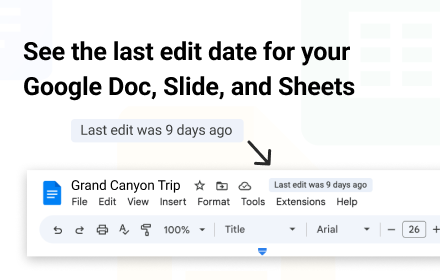
When Was Last Edit?
This extension shows when the doc was last edited
289
★ 4.5

Tell Me Human - Text Analysis
Analiza textos fácilmente utilizando IA / Analyze texts easily using AI
4
★ 5.0
Data sourced from the Chrome Web Store · last verified May 26, 2026.