
Miljo
Help you differentiate mulitple Salesforce Orgs
As of May 2026, Miljo has 31 users and a 5.00/5 rating from 3 reviews in the Workflow & Planning category.
Usersdown 6.1 percent−6.1%
31
31
Ratingno change0%
5.00
3 reviews
Reviewsno change0%
3
Version
0.0.1.3
Manifest V3
History
3 snapshotsTracking since Apr 1, 2026.
View as table
| Date | Users | Rating | Reviews | Version |
|---|---|---|---|---|
| Apr 1, 2026 | 33 | 5.00 | 3 | 0.0.1.3 |
| Apr 29, 2026 | 32 | 5.00 | 3 | 0.0.1.3 |
| May 26, 2026 | 35 | 5.00 | 3 | 0.0.1.3 |
| Now | 31 | 5.00 | 3 | 0.0.1.3 |
Permissions & access
- Permissions
- storageactiveTabscriptingtabsdeclarativeContent
- Host access
- https://*.salesforce.com/*, https://*.force.com/*
Screenshots


About
Welcome to Miljö, a beautiful and helpful chrome plugin for Salesforce professionals.

It is hard to work with multiple Salesforce orgs and quickly tell them apart. E.g., a scratch or developer org looks very similar to a production org.
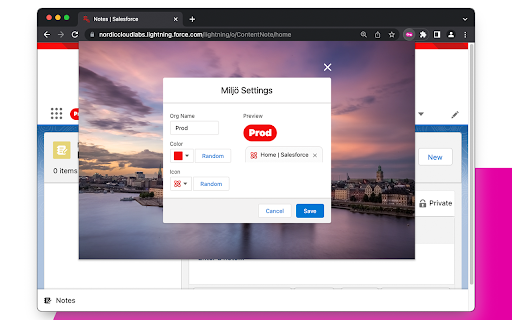
Miljö helps you tell them apart by giving them different names, colours, and icons. There are some extra goodies added as well.

Main Features
- Name the org, create a badge next to the app name in your org
- Assign an org colour that is used for the badge, favicon, login page, and production banner
- Add a favicon, using slds utility icons
- Warnings banner for production orgs

Additional Features
- Login window
    - Expand the login window to display the full username
    - The org colour as the background
- Print org type at the top of the screen
- Works in both Classic and Lightning Experience

How it works
1. Click on the icon when you are at one of your Salesforce org to open the settings
2. Enter a Name and select the colour and icon
3. Save to apply the change

Troubleshooting
The plugin icon does not appear in the toolbar.
You might need to pin the plugin to have easier access. Click on chrome's extension icon (puzzle piece). Then, click on the pin icon next to Miljo.

Thanks to
SLDS design resources
Beautiful photos from Unsplash by @micaelwidell and @raphaeldas
Technical
- Version
- 0.0.1.3
- Manifest
- V3
- Size
- 7.28MiB
- Min Chrome
- 88
- Languages
- 1
- Featured
- Yes
Metadata
- ID
- bemielpooiedlbjigecgcengagoedfpi
- Developer ID
- u920eedca63afc83fc892e7d70c979169
- Developer Email
- [email protected]
- Created
- Oct 25, 2021
- Last Updated (Store)
- Sep 18, 2022
- Last Scraped
- May 26, 2026
- Website
- nordiccloudlabs.com
- Support URL
- —
- Privacy Policy
- https://www.nordiccloudlabs.com/privacy-policy
Similar extensions
Alternatives to Miljo, ranked by description similarity.

Salesforce Login Manager
Login to Salesforce Org with a single click using this Chrome Extension, effortlessly granting users instant access.
276
★ 5.0

SFMC Menu
A simple menu for quick access to SFMC tools.
79

Enhance Salesforce Header
This extension displays logged in Org/User name, current time and Logout, Dev Console, My Settings and My Profile as separate links.
148
★ 4.6

Force.com LOGINS
Helps you manage Salesforce login credentials and lets you login with 1 click.
20.0K
★ 4.3

MarketoMate: Consistent naming, compliant assets, tidy instance!
Automate your naming conventions. Ensure every Marketo asset is compliant, searchable, and organized.
20
★ 5.0
Salesforce Shortcuts
Provides quick shortcuts to most used URLs in Salesforce Orgs
77
★ 5.0

Salesforce User Language Switcher
Salesforce User Language Switcher: A Chrome extension which lets you switch your current user's language with just one click.
1.0K
★ 5.0

SALES Force THEME
Changes the color of case statuses in Salesforce. A simple visual overlay – works only on Salesforce pages
4
Data sourced from the Chrome Web Store · last verified May 26, 2026.