
Google Calendar Event Blur
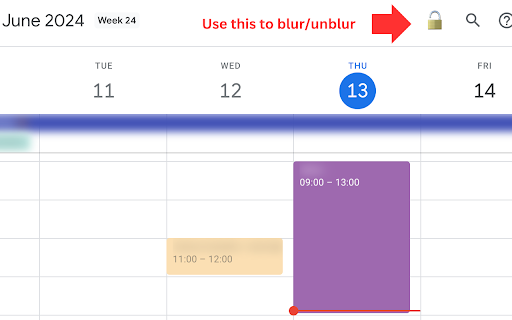
We blur your Google Calendar event names so you can safely take screenshots and share them.
As of June 2026, Google Calendar Event Blur has 264 users and a 5.00/5 rating from 2 reviews in the Productivity category.
Usersup 0.8 percent+0.8%
264
264
Ratingno change0%
5.00
2 reviews
Reviewsno change0%
2
Version
1.4
Manifest V3
History
8 snapshotsTracking since Apr 16, 2026.
View as table
| Date | Users | Rating | Reviews | Version |
|---|---|---|---|---|
| Apr 16, 2026 | 262 | 5.00 | 2 | 1.4 |
| Apr 27, 2026 | 265 | 5.00 | 2 | 1.4 |
| May 4, 2026 | 264 | 5.00 | 2 | 1.4 |
| May 10, 2026 | 259 | 5.00 | 2 | 1.4 |
| May 15, 2026 | 267 | 5.00 | 2 | 1.4 |
| May 21, 2026 | 270 | 5.00 | 2 | 1.4 |
| May 27, 2026 | 269 | 5.00 | 2 | 1.4 |
| Jun 9, 2026 | 262 | 5.00 | 2 | 1.4 |
| Now | 264 | 5.00 | 2 | 1.4 |
Permissions & access
- Permissions
- activeTabscriptingstorage
- Host access
- None declared
Screenshots


About
This Chrome extension blurs the names of events in Google Calendar, allowing users to safely take and share screenshots without revealing sensitive information.

How To Use:

- Use the LOCK emoji next to the search button to blur event names (see screenshot below)

Key Features:

- Blur Event Names: Automatically blurs event names in Google Calendar to protect privacy in screenshots.
- Toggle Blur: Users can toggle the blur effect on and off with a button embedded in the Google Calendar interface.
- User-Friendly Interface: Simple and intuitive controls with enable/disable buttons in the extension's popup menu.
- Feedback Option: Direct link to provide feedback to the developer if the extension stops working due to changes in Google Calendar's CSS.
Technical
- Version
- 1.4
- Manifest
- V3
- Size
- 9.2KiB
- Min Chrome
- 88
- Languages
- 1
- Featured
- No
Metadata
- ID
- bdpgjkaeeamhppnplcomkdalokmnnicj
- Developer ID
- u3cb4c0336184a180c86983360407ecf6
- Developer Email
- [email protected]
- Created
- Jun 9, 2024
- Last Updated (Store)
- Mar 6, 2026
- Last Scraped
- Jun 9, 2026
- Website
- https://estevecastells.com/
- Support URL
- https://llmpulse.ai/
Similar extensions
Alternatives to Google Calendar Event Blur, ranked by description similarity.

Blurly: One-Click Element Blurring for Screen Sharing
The easiest way to blur web content. Protect your sensitive data for screen recordings and calls
8

BlurLock – Privacy Blur by Oflox®
Automatically blur sensitive information like emails, phone numbers, Aadhaar numbers and more on webpages. Built by Oflox®.
6

BlurIt - Instant Privacy Blur
Capture any screen and instantly blur sensitive information with pro-grade tools.
7

blur.uno
Blur sensitive information in screenshots instantly. Perfect for content creators, developers, and anyone sharing screens.
5
★ 5.0

Privacy
Blur any content on any website to protect your privacy. Click or drag to blur elements manually.
2

BlurIt — Screenshot & Auto-Redact
One-click screenshots with auto PII blur. Emails, phones, credit cards & IDs redacted before saving. 100% local.
4
★ 5.0

SafeBlur
Blur sensitive info (emails, phones, dates, keywords) on webpages during screen recording or sharing.
2

Smart Screenshot + Blur
Capture screenshots and quickly blur/redact sensitive information with auto-detection of PII. Privacy-first, local-only processing.
47
★ 5.0
Data sourced from the Chrome Web Store · last verified Jun 9, 2026.