
To-Do List
Edit, create, delete and view your task list - with high and low priority included
As of May 2026, To-Do List has 51 users and a 5.00/5 rating from 2 reviews in the Productivity category.
Usersdown 3.8 percent−3.8%
51
51
Ratingno change0%
5.00
2 reviews
Reviewsno change0%
2
Version
1.0.1
Manifest V3
History
3 snapshotsTracking since Apr 1, 2026.
View as table
| Date | Users | Rating | Reviews | Version |
|---|---|---|---|---|
| Apr 1, 2026 | 53 | 5.00 | 2 | 1.0.1 |
| May 2, 2026 | 50 | 5.00 | 2 | 1.0.1 |
| May 31, 2026 | 45 | 5.00 | 2 | 1.0.1 |
| Now | 51 | 5.00 | 2 | 1.0.1 |
Permissions & access
- Permissions
- None declared
- Host access
- None declared
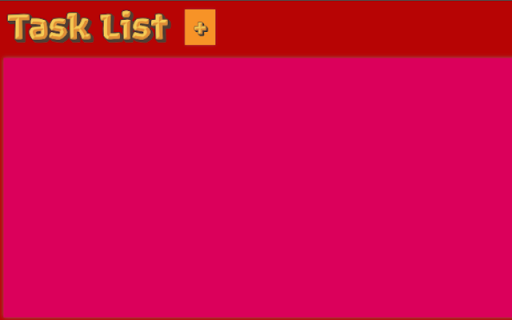
Screenshots


About
To-Do List Application Description:

Introducing our user-friendly To-Do List application that allows you to effortlessly manage your tasks and priorities. Whether you're a busy professional, a student with assignments, or simply someone looking to stay organized, our application empowers you to create, edit, delete, and view your tasks with high and low priority settings. Here's how our To-Do List app can streamline your daily life:

1. Create Tasks:
Add new tasks quickly and easily.
Specify task names, descriptions, and due dates.
Assign high or low priority to each task, helping you focus on what matters most.

2. Edit Tasks:
Need to make changes to a task? Our app allows you to edit task details, such as names, descriptions, and due dates.
Adjust the priority of a task as its importance changes.

3. Delete Tasks:
When a task is completed or no longer needed, you can delete it from your list.
Keep your task list clutter-free and organized.

4. View Tasks:
Effortlessly browse through your tasks to see what's on your plate.
Sort tasks by priority, due date, or completion status for a clear overview. Easily filter tasks to focus on either high-priority or low-priority items, helping you stay on top of your most important responsibilities.

5. Priority Settings:
Prioritize your tasks by assigning them as high or low priority.
High-priority tasks are prominently displayed, ensuring you tackle your most urgent responsibilities first.
Low-priority tasks are there for you to manage at your convenience.
Technical
- Version
- 1.0.1
- Manifest
- V3
- Size
- 28.0KiB
- Min Chrome
- 88
- Languages
- 1
- Featured
- Yes
Metadata
- ID
- bdnoddliddpkjdkmlhamdkfghjieekio
- Developer ID
- ub84cf7b558fbaf2fcc997fba0f0d8383
- Developer Email
- [email protected]
- Created
- Nov 8, 2023
- Last Updated (Store)
- Jun 12, 2024
- Last Scraped
- May 31, 2026
- Website
- —
- Support URL
- —
Similar extensions
Alternatives to To-Do List, ranked by description similarity.

ToDo List with Notifications
A simple to-do list extension with notification and reminder features.
22

Daily Task Manager & Time Tracker Manager
Manage daily tasks, track time, and boost productivity with a simple all-in-one task and time tracker.
13

Online To-do App
Effortlessly manage tasks with our quick, user-friendly online to-do list – no signup required.
6
★ 3.0
My To-Do List
A simple Chrome extension to manage your tasks with motivational feedback.
11
★ 4.5

To-Do List
A simple to-do List!
506
★ 5.0

To-Do List Extension
ToDoList is a straightforward Chrome extension that helps you stay organized and on top of your tasks. With its intuitive…
8

To-Do List
Organize effortlessly with our To-Do List. Edit tasks, set priorities and search instantly. Enjoy dark mode and features - for FREE!
52
★ 5.0

To-Do List Manager
A simple offline to-do list manager.
45
★ 5.0
Data sourced from the Chrome Web Store · last verified May 31, 2026.