Debugger for Adobe Analytics
Prints to JavaScript console what data is sent to Adobe Analytics.
As of May 2026, Debugger for Adobe Analytics has 30,000 users and a 4.36/5 rating from 56 reviews in the Workflow & Planning category.
Usersno change0%
30.0K
30,000
Ratingno change0%
4.36
56 reviews
Reviewsno change0%
56
Version
1.4.6
Manifest V3
History
1 snapshotsTracking since May 2, 2026.
View as table
| Date | Users | Rating | Reviews | Version |
|---|---|---|---|---|
| May 2, 2026 | 30.0K | 4.36 | 56 | 1.4.6 |
| Now | 30.0K | 4.36 | 56 | 1.4.6 |
Permissions & access
- Permissions
- webRequest
- Host access
- *://*/b/ss/*
Screenshots

About
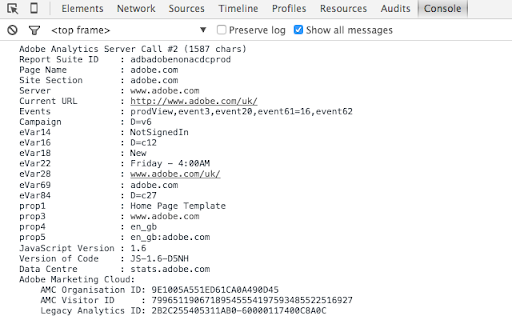
To see what data is being sent in JS console:
- On Windows press ctrl+shift+j
- On Mac press alt+cmd+j

Adobe Analytics Debugger for POST and GET requests. Prints following info:
- displays all page load data, link events, file downloads
- shows information about data collection servers and informs if it is an RDC server or not
- provides recommendations on how to improve the implementation
- displays Adobe Marketing Cloud visitor ID and Adobe Marketing Cloud organisation ID
Technical
- Version
- 1.4.6
- Manifest
- V3
- Size
- 17.19KiB
- Min Chrome
- 88
- Languages
- 1
- Featured
- Yes
Metadata
- ID
- bdingoflfadhnjohjaplginnpjeclmof
- Developer ID
- udedad49f7fa87e2bc805b8935b50c1f2
- Developer Email
- [email protected]
- Created
- Mar 10, 2013
- Last Updated (Store)
- Aug 27, 2024
- Last Scraped
- May 31, 2026
- Website
- —
- Support URL
- —
- Privacy Policy
- —
Similar extensions
Alternatives to Debugger for Adobe Analytics, ranked by description similarity.

Activity Map v3
View key site metrics in an intuitive visual format.
4.0K
★ 2.6

Ad Tracker v1.26 BETA
Provides a clean output of all GTM ad request/response info. Not compatible with AMP or video ads. By Mark Bland (C) 2025
164
★ 5.0

Segment Helper Tool
Easily overview your Segment events when they are fired.
315

Commander
You can execute custom JS Script to read useful information out of the current webpage
6

In-Page Piano Analytics
In-Page Piano Analytics
2.0K
★ 3.4

Microsoft Clarity Live
Watch how people are engaging with your site - right from your site.
90.0K
★ 2.8

Time Audit AI API
Tracks time spent on websites and syncs with an external API.
3

Product Manager Helper
Access essential Product Management tools without disrupting your workflow. Screenshots, bug reports and more - just a click away.
7
★ 5.0
Data sourced from the Chrome Web Store · last verified May 31, 2026.