
neetoInvisible
neetoInvisible let's you test your website's user experience.
As of May 2026, neetoInvisible has 2 users in the Developer Tools category.
Usersdown 50.0 percent−50.0%
2
2
Ratingno change0%
—
— reviews
Reviewsno change0%
—
Version
2.2.10
Manifest V3
History
2 snapshotsTracking since Apr 1, 2026.
View as table
| Date | Users | Rating | Reviews | Version |
|---|---|---|---|---|
| Apr 1, 2026 | 4 | — | — | 2.2.10 |
| May 1, 2026 | — | — | — | 2.2.10 |
| Now | 2 | — | — | 2.2.10 |
Permissions & access
- Permissions
- storagetabsmanagement
- Host access
- None declared
Screenshots
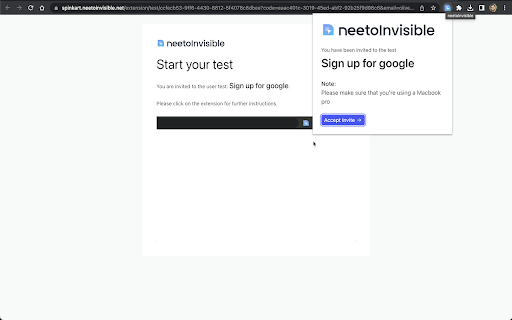
About
neetoInvisible lets you test your website's user experience. Using neetoInvisible you can create a test that contains some tasks for your testers. Invite the testers, who will use this extension as guide through the test. The extension also records the tester's screen and audio. This lets you get a better idea of how users interact with your websites and how to improve the user experience.

Tester's have to install this extension in order to take the test they are invited to. The test will gather user name and email to start the test. Before starting the test, the tester has to give permission to record their screen and audio. Once the tester selects a screen, the recording starts. The user will be taken to the website to be tested. The extension will show each task that the user needs to perform in order to complete the test. Some tasks may also the user for input. Once the test is finished, the extension stops the recording and saves the responses.

The following are the different types of tasks supported by neetoInvisible. Each task prompts the tester to perform an action and enter a response in the extension. Tasks can be skippable as configured when creating the test.

Simple Task
This task simply provides a prompt to the tester to perform an action but takes no input.

Written
This task requires the tester to enter a textual response.

Single choice
This task requires the tester to select a single choice from a set of choices.

Multiple choice
This task requires the tester to select a multiple choices from a set of choices.

Rating scale
This task requires the tester to give a rating on something.

Redirect to URL
This task automatically redirects the tester to a different page.

Testers can be invited via email or be made accessible through a link.
Technical
- Version
- 2.2.10
- Manifest
- V3
- Size
- 3.02MiB
- Min Chrome
- 88
- Languages
- 1
- Featured
- No
Metadata
- ID
- bcmpjgjooaalcgfpjakcajmienkmjaih
- Developer ID
- uad6a047e922c7658e2e1e326e2e9e3f2
- Developer Email
- [email protected]
- Created
- Jan 3, 2024
- Last Updated (Store)
- Aug 9, 2024
- Last Scraped
- May 31, 2026
- Website
- —
- Support URL
- https://neetoinvisiblehelp.neetokb.com/
- Privacy Policy
- https://neeto.com/legal/privacy-policy/
Similar extensions
Alternatives to neetoInvisible, ranked by description similarity.
Testing Taxi Assistant
QA/Testing assistant sidebar for Chrome. Go deeper. Get more done.
85
★ 5.0

neetoTrail
neetoTrail creates trails of assets
—
UXtweak
Uxtweak's browser extension for website usability testing studies
1.0K
★ 5.0

theTestRo
theTestRo is a powerful tool that simplifies test automation by recording and replaying user actions on any web application.
28
★ 5.0

Endtest - Codeless Automated Testing
Record your Web Tests and add them to your Endtest account.
1.0K
★ 4.6

Katalon TrueTest
This extension captures all user interactions on the website by Katalon TrueTest.
336
★ 5.0

Click 'n Test - Hacker Mode
Right-click to inject test data with a hacker-style interface
16

Test Buggy
AI-powered test case & bug report generator. Record your browser actions and let AI create professional QA documentation.
74
★ 5.0
Data sourced from the Chrome Web Store · last verified May 31, 2026.