TableXport: AI Table Extractor
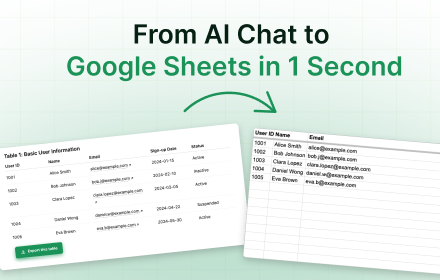
Export tables from ChatGPT, Claude, Gemini, and DeepSeek to Excel or Google Sheets in one click.
As of June 2026, TableXport: AI Table Extractor has 9 users in the Workflow & Planning category.
Usersdown 30.8 percent−30.8%
9
9
Ratingno change0%
—
— reviews
Reviewsno change0%
—
Version
1.0.1
Manifest V3
90-day change · In the last 90 days this extension 1 version update, changed permissions.
History
7 snapshotsTracking since Apr 19, 2026.
View as table
| Date | Users | Rating | Reviews | Version |
|---|---|---|---|---|
| Apr 19, 2026 | 13 | — | — | 1.0.0 |
| May 3, 2026 | 15 | — | — | 1.0.0 |
| May 9, 2026 | 13 | — | — | 1.0.1 |
| May 20, 2026 | 8 | — | — | 1.0.1 |
| May 27, 2026 | 9 | — | — | 1.0.1 |
| Jun 3, 2026 | 8 | — | — | 1.0.1 |
| Jun 9, 2026 | 10 | — | — | 1.0.1 |
| Now | 9 | — | — | 1.0.1 |
Changelog
- May 3, 2026short_description
Export tables from any website to Excel, CSV, Word, or Google Sheets
Export tables from ChatGPT, Claude, Gemini, and DeepSeek to Excel or Google Sheets in one click.
- May 3, 2026name
TableXport
TableXport: AI Table Extractor
- May 3, 2026host_permissions
https://chat.openai.com/*, https://chatgpt.com/*, https://claude.ai/*, https://gemini.google.com/*, https://bard.google.com/*, https://chat.deepseek.com/*, https://deepseek.com/*, https://*.supabase.co/*, https://*.chromiumapp.org/*
*://*.chatgpt.com/*, *://claude.ai/*, *://gemini.google.com/*, *://*.deepseek.com/*
- May 3, 2026permissions
storage, downloads, notifications, identity
storage, tabs, activeTab, clipboardWrite
Permissions & access
- Permissions
- storagetabsactiveTabclipboardWrite
- Host access
- *://*.chatgpt.com/*, *://claude.ai/*, *://gemini.google.com/*, *://*.deepseek.com/*
Screenshots


About
Working with AI like ChatGPT, Claude, Gemini, or DeepSeek, you’ve probably faced one big problem:
copying and cleaning tables manually is slow and frustrating.

TableXport solves this in just one click. Instantly export any AI-generated table into:
 • Excel (perfect for formulas and analytics),
 • CSV (ideal for databases and BI tools),
 • DOCX (for reports and presentations)

The extension is built for marketers, analysts, researchers, and product managers — anyone who values time and productivity.

📌 The main goal of TableXport is simple: eliminate the boring copy-paste routine and let you focus on real work instead of formatting
Technical
- Version
- 1.0.1
- Manifest
- V3
- Size
- 95.44KiB
- Min Chrome
- 88
- Languages
- 1
- Featured
- No
Metadata
- ID
- bcbjkpalaglbclfhidoknmngpmdmafgm
- Developer ID
- u2c411d8ab6d8fbc0e5abb53472d98e6a
- Developer Email
- [email protected]
- Created
- Sep 24, 2025
- Last Updated (Store)
- Apr 28, 2026
- Last Scraped
- Jun 9, 2026
- Website
- —
- Support URL
- —
- Privacy Policy
- https://www.tablexport.com/privacy
Similar extensions
Alternatives to TableXport: AI Table Extractor, ranked by description similarity.

Gentables: AI Sheets for Unstructured Data
Gentables: AI Sheets for Unstructured Data
103
★ 5.0

TableClipper
Copy any website table to your clipboard & paste into Google Sheets in one click.
14

AI Exporter: Save Claude,ChatGPT,Gemini to PDF, Docs, MD and More
Export ChatGPT, Claude, Gemini and NotebookLM chats to PDF/Word/Markdown/Txt. Supports content selection, and Notion sync, download.
100.0K
★ 4.8

Snapsheet - 1-Click HTML Table to CSV Exporter
Automatically detects HTML tables and injects a floating 'Export to CSV' button.
8
★ 5.0

Instant Table Converter
Instantly convert HTML tables to Excel, CSV, JSON, or Markdown locally.
5

Page2Table AI - Web Scraper & Data Extractor (Export to Excel)
One-click to intelligently convert lists and tables from any webpage into an interactive Excel data workbench.
256
★ 5.0

Table to CSV Exporter
Easily export HTML tables to Excel-compatible CSV files with UTF-8 support
104
★ 3.0

GPTitan
Create new Google Sheets documents directly from Chat GPT tables
5
Data sourced from the Chrome Web Store · last verified Jun 9, 2026.