Tiny Suspender
Unload / suspend / hibernate idle tabs to reduce memory and cpu usage.
As of June 2026, Tiny Suspender has 20,000 users and a 4.02/5 rating from 125 reviews in the Workflow & Planning category.
Usersno change0%
20.0K
20,000
Ratingno change0%
4.02
125 reviews
Reviewsno change0%
125
Version
2.1.0
Manifest V3
History
2 snapshotsTracking since Apr 19, 2026.
View as table
| Date | Users | Rating | Reviews | Version |
|---|---|---|---|---|
| Apr 19, 2026 | 20.0K | 4.02 | 125 | 2.1.0 |
| May 13, 2026 | 30.0K | 4.02 | 125 | 2.1.0 |
| Now | 20.0K | 4.02 | 125 | 2.1.0 |
Permissions & access
- Permissions
- activeTabtabscontextMenusstoragealarms
- Host access
- None declared
Screenshots



About
Unload idle tabs to free your precious memory and cpu resources!

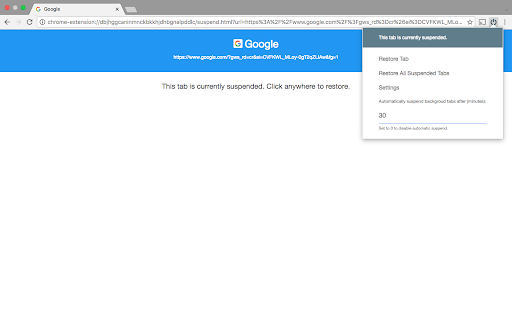
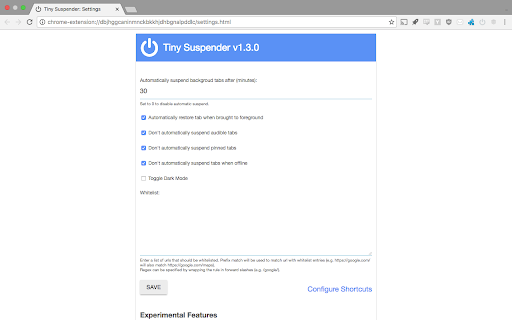
Tiny Suspender will automatically suspend/hibernate background tabs for you, greatly reducing overall system resource usage without you having to take any action. You can set how long to wait before suspending idle tabs and configure a whitelist to exclude certain pages from automatic suspension.

Features:

- Form Detection: Tiny Suspender will try to detect active forms to avoid automatically suspending page with unsubmitted data

- Audio Detection (optional): prevent autosuspending tabs that play music in the background.

- Snooze: Temporarily prevent autosuspension on a specific tab or domain

- Whitelist: Excludes specifics domains, pages, tabs or pinned tabs.

- Keyboard Shortcuts: Suspend tabs without moving your hand away from your keyboard.

- Optionally use Chrome's native tab discard feature to save even more resources when your background tabs get suspended.

- Allow opening links in a new suspended tab

- Dark Mode theme (optional)

Feedback is always welcome!
- Source code and issue tracking are available at https://github.com/arifwn/TinySuspender
- Due to limitation of Chrome Web Store developer portal, extension developers are not automatically notified every time a user leave a feedback to report an issue. Please use email or github issue report ( https://github.com/arifwn/TinySuspender/issues ) if you need fast response.

--------------------------------

Chrome Permissions used in this extension:

- tabs & activeTab: allows various tab suspension/restore features and form detection feature.

- contextMenus: allows adding "suspend tab" menu item and "open link in new suspended tab" in right click context menu.

- storage: allows saving extension configuration

- alarm: allows centralized and more reliable autosuspension timer

- chrome://favicon/* : allows retrieving suspended page's favicon.

--------------------------------

Changelog:

- v2.1.0:
    - Added dimmed favicon in all suspended tabs; updated background tabs suspension behavior (Thanks Dsouravcom for the pull request on github!)

- v2.0.4:
    - Added new keyboard shortcut actions that applied to all windows
    - Keyboard shortcuts are now only applied to the last active window
    - Misc. bug fixes and improvements to TinySuspender's internals

- v2.0.3:
    - Misc. bug fixes

- v2.0.2:
    - Manifest v3 support
    - Added support to temporarily whitelist a domain from suspension
    - Added Incognito Mode support
    - Added context menu option to open links in a new suspended tab
    - Fixed icon update behavior

- v1.3.0:
    - Added dark mode toggle (thanks Abdusco for the pull request on github!)

- v1.2.0:
    - Happy new year!
    - Added an option to skip autosuspension when offline
    - Added support for keyboard shortcuts
    - Tiny Suspender will now try to restore tab scroll position

- v1.1.0:
    - Added option to skip pinned tabs from automatic suspension
    - "Suspend All Tabs" and "Suspend Other Tabs" now will skip whitelisted pages.
    - Added experimental support for Chrome native tab discard feature. Enable it from the settings screen.

- v1.0.1: Minor bugfix

- v1.0.0: We have reached version 1!
    - improved autosuspension timer by using Chrome's alarm api. Requires new permission.
    - UI improvements. Now you can always see tab suspension status from the popup. Status is also reflected as color-coded icon
    - improved form detection.
    - added an option to enable autorestore when a suspended tab is brought to foreground.
    - added an option to prevent autosuspending audible tabs. Useful for online music player.


- v0.1.4: fix a bug in suspension procedure.

- v0.1.3: removed unnecessary permissions.

- v0.1.2: switching away from unloaded page willl trigger automatic suspend timer.

- v0.1.1: fixed bug in whitelisting and auto-suspension feature.
Technical
- Version
- 2.1.0
- Manifest
- V3
- Size
- 36.52KiB
- Min Chrome
- 88
- Languages
- 1
- Featured
- Yes
Metadata
- ID
- bbomjaikkcabgmfaomdichgcodnaeecf
- Developer ID
- ucbe204e9988e6010ff66aa82cc658c76
- Developer Email
- [email protected]
- Created
- May 8, 2016
- Last Updated (Store)
- Oct 3, 2025
- Last Scraped
- Jun 6, 2026
- Website
- sainsmograf.com
- Support URL
- https://github.com/arifwn/TinySuspender
- Privacy Policy
- —
Similar extensions
Alternatives to Tiny Suspender, ranked by description similarity.

Tab Suspender
Automatically suspend inactive tabs to save memory
115
★ 5.0

Tab Suspender
Save memory by suspending inactive tabs with smart management.
10

Suspender MV3
Suspend tabs
176
★ 4.8

Tab Minder
Automatically suspends inactive tabs after a period of time.
3

Tab Suspender
Optimize browser performance with Tab Suspender.
659
★ 3.8

Drowzy - Tab Suspender & Memory Saver
Auto-suspend inactive tabs to save up to 80% RAM. Lightweight, private, no tracking. Tabs are never lost.
517
★ 5.0

Memory Saver
Reduce Chrome's memory usage by setting inactive tabs to sleep or system memory is low
10.0K
★ 3.5

Tab Suspender – Free Up RAM & Boost Browser Speed
Keep your browser fast with Tab Suspender! Suspend inactive tabs,free up memory,reduce lag,rename tabs, and manage data efficiently.
7.0K
★ 4.7
Data sourced from the Chrome Web Store · last verified Jun 6, 2026.