Copresent
Allows multiple people to present the same Google Slides presentation.
As of June 2026, Copresent has 318 users in the Productivity category.
Usersup 132.1 percent+132.1%
318
318
Ratingno change0%
—
— reviews
Reviewsno change0%
—
Version
1.4.0
Manifest V3
90-day change · In the last 90 days this extension 2 version updates, changed permissions.
History
12 snapshotsTracking since Apr 1, 2026.
View as table
| Date | Users | Rating | Reviews | Version |
|---|---|---|---|---|
| Apr 1, 2026 | 137 | 5.00 | 1 | 1.2.0 |
| May 1, 2026 | 140 | 5.00 | 1 | 1.2.0 |
| May 7, 2026 | 144 | — | — | 1.3.0 |
| May 11, 2026 | 136 | — | — | 1.3.0 |
| May 14, 2026 | 133 | — | — | 1.3.0 |
| May 18, 2026 | 128 | — | — | 1.3.0 |
| May 23, 2026 | 127 | — | — | 1.3.0 |
| May 27, 2026 | 138 | — | — | 1.3.0 |
| Jun 1, 2026 | 137 | — | — | 1.3.0 |
| Jun 6, 2026 | 138 | — | — | 1.3.0 |
| Jun 10, 2026 | 140 | — | — | 1.3.0 |
| Jun 20, 2026 | 150 | — | — | 1.3.0 |
| Now | 318 | — | — | 1.4.0 |
Changelog
- Jun 20, 2026description
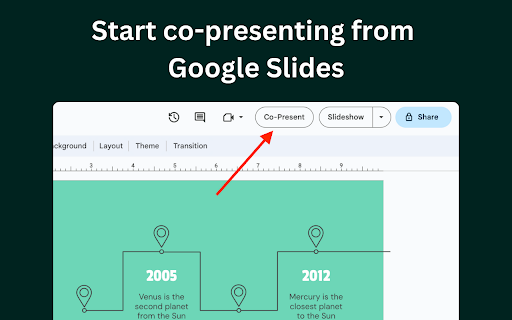
Control Google Slides together — no more "next slide please." Copresent lets multiple presenters advance slides and view speaker notes from any device, using a single shared link. Only one person installs the extension. Everyone else gets a secure link to a hosted remote control that works instantly in any browser — desktop or mobile. No downloads, no sign-ups, no extra apps. FEATURES 📱 Mobile clicker — Swipe left and right on your phone to advance slides. No physical clicker or app needed. 📝 Speaker notes on every device — Co-presenters see their speaker notes directly in the remote clicker, so everyone stays on script. 🤼 Up to 10 simultaneous presenters — Multiple people can control the same presentation at different times during the session. 👩🔧 One install, unlimited access — Only the main presenter needs the Chrome extension. Co-presenters join through a secure shared link. 🔒 Secure sharing — Each presentation generates a unique link. No account required for co-presenters. USE CASES 💼 Investor pitches — Co-founders take turns presenting without awkward handoffs or "next slide" requests. 🏫 Town halls and all-hands — Multiple speakers present seamlessly to a large audience without switching screen shares. 📱 In-room presentations — Use your phone as a wireless clicker. Walk the stage freely, swipe to advance slides, and glance at your speaker notes — all from your pocket. 🎓 Lectures and workshops — Instructors move around the classroom while controlling slides from their mobile device, keeping the audience engaged. 🤝 Client presentations — Multiple team members present their sections with smooth slide transitions and zero "can you go back one?" moments. Works with Google Slides. Set up in under 30 seconds.
Control Google Slides together — no more "next slide please." One person installs the extension; everyone else presents from a single shared link, on any device.

Copresent is the simplest way to present Google Slides as a team. Multiple presenters can advance slides, see the live current slide, and read their speaker notes — from a phone, tablet, or laptop. Only the main presenter installs anything; co-presenters join through a secure link that works instantly in any browser. No downloads, no accounts, no extra apps.

KEY FEATURES
🖼️ See the current slide live in your remote — no need to watch the projector
📱 Turn your phone into a wireless clicker — swipe to advance
📝 Read your speaker notes on every device
🤼 Up to 10 presenters control one deck, taking turns
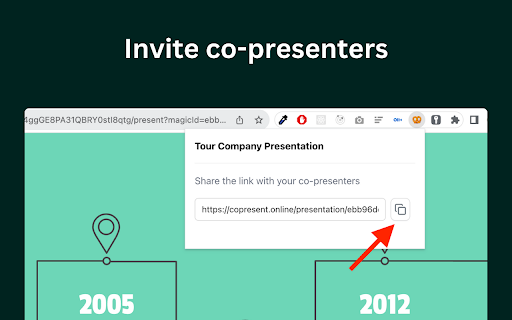
🔗 One shared link — co-presenters join instantly, no sign-up
🆓 Free, and set up in under 30 seconds

🖼️ Live Slide Preview 🖼️
 - Co-presenters see the current slide, rendered live, right in their remote
 - Always know what's on screen — from the back of the room or a second monitor
 - Stays in sync even when your presenting window is in the background
 - Turn it on by connecting your Google account (optional)

📱 Your Phone as a Clicker 📱
 - Swipe left and right to move through your Google Slides
 - Walk the stage or roam the room — no physical clicker needed
 - Works in any mobile browser — nothing to install

🤼 Present Together 🤼
 - Up to 10 co-presenters control the same deck
 - Anyone can advance the slides — no awkward "next slide, please"
 - Everyone sees the same live slide and stays in sync

📝 Speaker Notes Everywhere 📝
 - Your speaker notes appear right in the remote, on every device
 - Stay on script whether you're on stage or holding your phone
 - No flipping back to presenter view

🔗 Share With A Link 🔗
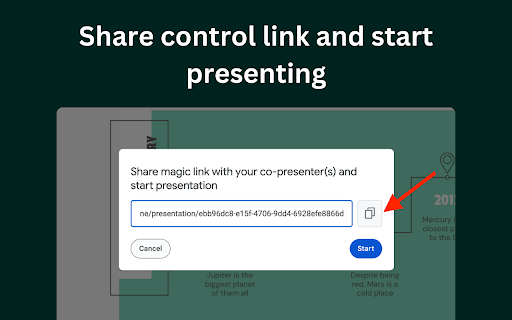
 - Every presentation gets its own secure link
 - Co-presenters open it in any browser — no account, no install
 - Generate a fresh link anytime to revoke the old one

PERFECT FOR
🤝 Client presentations — each team member runs their own section
💼 Investor pitches — co-founders take turns with zero handoff fumbles
🏫 Town halls & all-hands — multiple speakers, one screen share
🎓 Lectures & workshops — roam the room, control slides from your phone
🎤 Solo presenting — just want a phone clicker and your notes? That works too

ABOUT COPRESENT
Copresent makes presenting Google Slides with a team effortless — on stage, in the boardroom, or fully remote. One install, a shared link, and you're in sync.

Works with Google Slides. Set up in under 30 seconds.
- Jun 20, 2026host_permissions
(empty)
https://docs.google.com/*, https://api.copresent.app/*
- Jun 20, 2026permissions
activeTab, tabs
activeTab, tabs, identity, storage
- May 1, 2026description
Remote presenters are able to advance slides without having to say "next slide please" constantly. It removes unnecessary distractions and the presentation delivery becomes much smoother. Once the main presenter installs this extension, they can generate a unique link to the presentation and share it with their co-presenters. FEATURES 🤼♂️ Supports up to 10 simultaneous users that can advance slides at different times. 👩🔧 Only the main presenter needs to install the extension. Co-presenters get a secure link to a hosted remote control. USE CASES 💰 Pitching to investors with co-founders. 🏫 Presenting at Town Hall meetings with multiple presenters.
Control Google Slides together — no more "next slide please." Copresent lets multiple presenters advance slides and view speaker notes from any device, using a single shared link. Only one person installs the extension. Everyone else gets a secure link to a hosted remote control that works instantly in any browser — desktop or mobile. No downloads, no sign-ups, no extra apps. FEATURES 📱 Mobile clicker — Swipe left and right on your phone to advance slides. No physical clicker or app needed. 📝 Speaker notes on every device — Co-presenters see their speaker notes directly in the remote clicker, so everyone stays on script. 🤼 Up to 10 simultaneous presenters — Multiple people can control the same presentation at different times during the session. 👩🔧 One install, unlimited access — Only the main presenter needs the Chrome extension. Co-presenters join through a secure shared link. 🔒 Secure sharing — Each presentation generates a unique link. No account required for co-presenters. USE CASES 💼 Investor pitches — Co-founders take turns presenting without awkward handoffs or "next slide" requests. 🏫 Town halls and all-hands — Multiple speakers present seamlessly to a large audience without switching screen shares. 📱 In-room presentations — Use your phone as a wireless clicker. Walk the stage freely, swipe to advance slides, and glance at your speaker notes — all from your pocket. 🎓 Lectures and workshops — Instructors move around the classroom while controlling slides from their mobile device, keeping the audience engaged. 🤝 Client presentations — Multiple team members present their sections with smooth slide transitions and zero "can you go back one?" moments. Works with Google Slides. Set up in under 30 seconds.
- May 1, 2026short_description
Seamless remote co-presenting for Google Slides.
Allows multiple people to present the same Google Slides presentation.
- May 1, 2026name
Co-Present
Copresent
- May 1, 2026permissions
activeTab, tabs, storage
activeTab, tabs
Permissions & access
- Permissions
- activeTabtabsidentitystorage
- Host access
- https://docs.google.com/*, https://api.copresent.app/*
Screenshots


About
Control Google Slides together — no more "next slide please." One person installs the extension; everyone else presents from a single shared link, on any device.

Copresent is the simplest way to present Google Slides as a team. Multiple presenters can advance slides, see the live current slide, and read their speaker notes — from a phone, tablet, or laptop. Only the main presenter installs anything; co-presenters join through a secure link that works instantly in any browser. No downloads, no accounts, no extra apps.

KEY FEATURES
🖼️ See the current slide live in your remote — no need to watch the projector
📱 Turn your phone into a wireless clicker — swipe to advance
📝 Read your speaker notes on every device
🤼 Up to 10 presenters control one deck, taking turns
🔗 One shared link — co-presenters join instantly, no sign-up
🆓 Free, and set up in under 30 seconds

🖼️ Live Slide Preview 🖼️
 - Co-presenters see the current slide, rendered live, right in their remote
 - Always know what's on screen — from the back of the room or a second monitor
 - Stays in sync even when your presenting window is in the background
 - Turn it on by connecting your Google account (optional)

📱 Your Phone as a Clicker 📱
 - Swipe left and right to move through your Google Slides
 - Walk the stage or roam the room — no physical clicker needed
 - Works in any mobile browser — nothing to install

🤼 Present Together 🤼
 - Up to 10 co-presenters control the same deck
 - Anyone can advance the slides — no awkward "next slide, please"
 - Everyone sees the same live slide and stays in sync

📝 Speaker Notes Everywhere 📝
 - Your speaker notes appear right in the remote, on every device
 - Stay on script whether you're on stage or holding your phone
 - No flipping back to presenter view

🔗 Share With A Link 🔗
 - Every presentation gets its own secure link
 - Co-presenters open it in any browser — no account, no install
 - Generate a fresh link anytime to revoke the old one

PERFECT FOR
🤝 Client presentations — each team member runs their own section
💼 Investor pitches — co-founders take turns with zero handoff fumbles
🏫 Town halls & all-hands — multiple speakers, one screen share
🎓 Lectures & workshops — roam the room, control slides from your phone
🎤 Solo presenting — just want a phone clicker and your notes? That works too

ABOUT COPRESENT
Copresent makes presenting Google Slides with a team effortless — on stage, in the boardroom, or fully remote. One install, a shared link, and you're in sync.

Works with Google Slides. Set up in under 30 seconds.
Technical
- Version
- 1.4.0
- Manifest
- V3
- Size
- 113KiB
- Min Chrome
- 88
- Languages
- 1
- Featured
- Yes
Metadata
- ID
- bbfdjjkhcmdpcjodlhnaijoionkjpiae
- Developer ID
- u19748a258e2b38f79c29aa4c0d5c47e7
- Developer Email
- [email protected]
- Created
- Oct 15, 2023
- Last Updated (Store)
- Jun 20, 2026
- Last Scraped
- Jun 20, 2026
- Website
- copresent.app
- Support URL
- —
- Privacy Policy
- https://www.copresent.app/privacy/
Similar extensions
Alternatives to Copresent, ranked by description similarity.

Remotely
Remotely enables collaborative presentations without requiring additional devices or apps.
18
★ 5.0

NextSlideApp
NextSlideApp
4

Share Google Slides Control
A tool to enable remote shared control of Google Slides presentations
41

Web Presentation Clicker (on-stage.click)
Control your slideshow presentation with your phone in the simplest way possible. No app required.
36
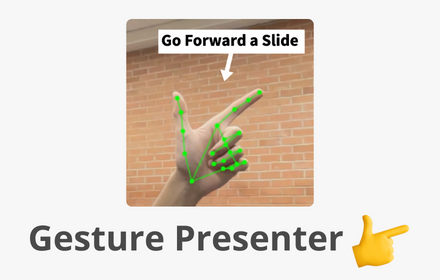
Gesture Presenter - Remote for Slides
Control Slides with just hand gestures!
256
★ 5.0

Slide Booster - Presentation Enhancer
Enhance and boost your presentations. Capture slides, edit content, and improve your presentations with intelligent design tools.
8

Google Slides Dynamic Timer
The perfect timer for Google Slides
—

PowerSlides
Control Google Slides remotely. Pairs with the PowerSlides server to relay slide state and commands to the Even Realities app.
65
Data sourced from the Chrome Web Store · last verified Jun 20, 2026.