Smart Search
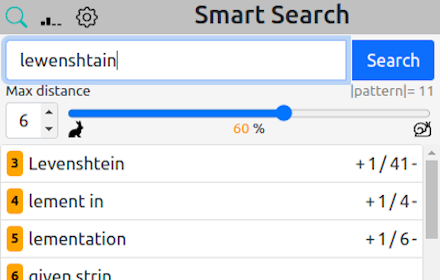
Better than Ctrl+F. It shows also similar matches. Shortkey: Ctrl+Shift+F
As of May 2026, Smart Search has 115 users and a 3.67/5 rating from 3 reviews in the Productivity category.
Usersup 1.8 percent+1.8%
115
115
Ratingup 22.3 percent+22.3%
3.67
3 reviews
Reviewsup 50.0 percent+50.0%
3
Version
0.2
Manifest V3
History
3 snapshotsTracking since Apr 1, 2026.
View as table
| Date | Users | Rating | Reviews | Version |
|---|---|---|---|---|
| Apr 1, 2026 | 113 | 3.00 | 2 | 0.2 |
| Apr 30, 2026 | 114 | 3.00 | 2 | 0.2 |
| May 28, 2026 | 118 | 3.67 | 3 | 0.2 |
| Now | 115 | 3.67 | 3 | 0.2 |
Permissions & access
- Permissions
- activeTabstorage
- Host access
- None declared
Screenshots

About
IMPORTANT:
To ensure the compatibility of this extension, it NEEDS TO BE TESTED ON ANOTHER WEBSITE. This is necessary because certain sites (like this) and their security measures may prevent the extension from accessing and reading their content.

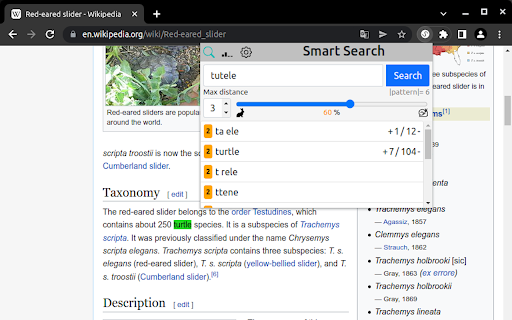
The extension serves as a replacement for the built-in Ctrl+F search functionality, offering the additional capability to find similar matches, starting with the closest matches.

With this extension, misspellings are no longer an issue. It can handle slight variations and still locate the intended search pattern. Moreover, there are no limitations on the length of the search pattern.
Technical
- Version
- 0.2
- Manifest
- V3
- Size
- 1014KiB
- Min Chrome
- 88
- Languages
- 1
- Featured
- Yes
Metadata
- ID
- balbfidapoainadcdfljopngheecfjmg
- Developer ID
- u2fddf083a6c4ddffdb15cac65de7cbd8
- Developer Email
- [email protected]
- Created
- May 8, 2022
- Last Updated (Store)
- Jun 28, 2023
- Last Scraped
- May 28, 2026
- Website
- —
- Support URL
- —
- Privacy Policy
- —
Similar extensions
Alternatives to Smart Search, ranked by description similarity.

BetterSearch
Functionality for searching through html
13

Fuzzy Find
A browser extension to fuzzy search for text on a web page.
16

Fuzzy Page Search
Fuzzy, deduplicated, keyboard-navigable search for any page.
8

Sherloq - Enhanced Find on Page
A better search experience than the default find on page
63
★ 5.0

Advanced Find Extension
Advanced text finding, highlighting, and export extension
82

Advanced Find
Enhanced Ctrl+F. Multi-keyword search, color-coded highlighting, regex support.
138

Smart Finder
AI-Powered Find-in-Page Tool. Replaces Ctrl+F with AI-powered search, pattern detection, multi-color highlighting, and more.
25

Better Ctrl+F
An enhanced version of the default Ctrl+F.
3.0K
★ 4.3
Data sourced from the Chrome Web Store · last verified May 28, 2026.