
Review IT
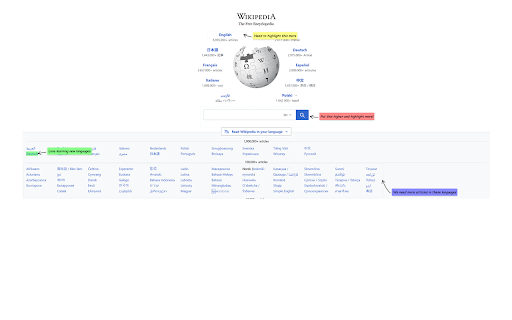
Add comments as overlays on specific elements of a webpage.
As of May 2026, Review IT has 6 users and a 5.00/5 rating from 2 reviews in the Productivity category.
Usersno change0%
6
6
Ratingno change0%
5.00
2 reviews
Reviewsno change0%
2
Version
1.0
Manifest V3
History
2 snapshotsTracking since Apr 30, 2026.
View as table
| Date | Users | Rating | Reviews | Version |
|---|---|---|---|---|
| Apr 30, 2026 | 6 | 5.00 | 2 | 1.0 |
| May 28, 2026 | 5 | 5.00 | 2 | 1.0 |
| Now | 6 | 5.00 | 2 | 1.0 |
Permissions & access
- Permissions
- activeTabstoragedownloads
- Host access
- <all_urls>
Screenshots
About
Review It is a browser extension for Product Managers and other IT product reviewers to add comments, annotations, and take screenshots of web pages. You can highlight specific elements, create region-based annotations, and capture full-page or partial screenshots with ease.
Technical
- Version
- 1.0
- Manifest
- V3
- Size
- 71.66KiB
- Min Chrome
- 88
- Languages
- 1
- Featured
- No
Metadata
- ID
- balaklpjgfoniljjgfnhcifbdefmpndo
- Developer ID
- u88fdfa685a5acc659eb0837c891bfb78
- Developer Email
- [email protected]
- Created
- Mar 31, 2025
- Last Updated (Store)
- Mar 31, 2025
- Last Scraped
- May 28, 2026
- Website
- —
- Support URL
- —
Similar extensions
Alternatives to Review IT, ranked by description similarity.

BuildUX Shot
While conducting UI review, it helps users easily capture & upload screenshots of a website within our Software, BuildUX UI Reviews
32
★ 5.0

UI Comment - Add Comments to Any Website
Add comments, feedback, and annotations to any website. Perfect for team collaboration, design reviews, and website feedback.
18
★ 4.9

Capian
Capian helps you review apps and sites quickly. Perfect for heuristic evaluations, UX/UI reviews, copywriting/marketing/SEO audits.
1.0K
★ 4.1

Feedback Capture
Capture screenshots with visual feedback and export to document.
2

BugSmash Web Extension: Fast feedback capture & sharing.
Turn any webpage, design or dashboard into an interactive feedback space with BugSmash. Add comments and share it with anyone.
510
★ 5.0

Markup – Expert Reviews for Websites
Instant expert reviews for any site — right in your browser
8

Gd Feedback
Take full-page screenshots, highlight text, and add annotations directly on any webpage. Draw, comment, and capture ideas instantly.
3
★ 5.0

Full Page Screenshot Pro
Capture full web pages, annotate them, and export as PNG, JPG, WEBP, or PDF with selection capture, clipboard copy, and rich tools.
5
Data sourced from the Chrome Web Store · last verified May 28, 2026.