
YouTube Community Search
Allows Search of Community Posts
As of May 2026, YouTube Community Search has 268 users in the Productivity category.
Usersup 24.1 percent+24.1%
268
268
Ratingno change0%
—
— reviews
Reviewsno change0%
—
Version
1.1.1
Manifest V3
History
3 snapshotsTracking since Apr 1, 2026.
View as table
| Date | Users | Rating | Reviews | Version |
|---|---|---|---|---|
| Apr 1, 2026 | 216 | — | — | 1.1.1 |
| Apr 30, 2026 | 207 | — | — | 1.1.1 |
| May 28, 2026 | 242 | — | — | 1.1.1 |
| Now | 268 | — | — | 1.1.1 |
Permissions & access
- Permissions
- storageunlimitedStorage
- Host access
- https://studio.youtube.com/*
Screenshots


About
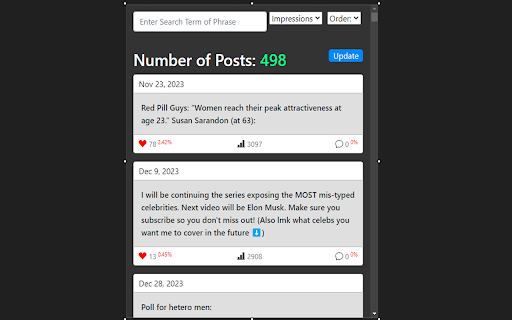
This extension is for YouTube creators who have years of community posts to search through. It allows quick search and filtering of all past community posts.

I created it because I conduct a lot of polls and question posts on my YT community page, but if I want to get access to a poll or post older than a few months or years, there's no way to do that without sitting there scrolling and scrolling.

IMPORTANT: FOLLOW INSTALLATION INSTRUCTIONS BELOW (Or watch the demo video)

Since YouTube doesn't provide post data through their API, I had to create a workaround that downloads the lastest zip file containing your post data. This is why the following instructions are vital to setting up your extension for use.

To install this extension, follow these steps (Or watch the demo video):

1.   Once downloaded, you will have no post data loaded. Click the "update" button to the right --> "Get Latest Data".

2.   This will request your YouTube Channel Id. This can be found in the web url after navigating to your youtube channel in the browser. It usually starts with 'UC' and should be right after "youtube.com/channel/".

2a.  Identify the Channel ID:

    - If the URL follows this format: https://www.youtube.com/channel/UCxxxxxxxxxxxxxxx, the part after /channel/ is your channel ID.
    - Copy the entire string after /channel/. For example, in https://www.youtube.com/channel/UC1234567890abcdef, the channel ID is UC1234567890abcdef.

2b.   For Custom URLs:

    - If you have a custom URL (e.g., https://www.youtube.com/c/YourCustomURL), click on your profile picture, select "YouTube Studio," then navigate to the "Customization" tab, and find your channel ID in the "Basic info" section.
    - Alternatively, in YouTube Studio, go to the "Settings" gear icon at the bottom left, then "Channel" -> "Advanced settings." Your User ID and Channel ID will be listed there.

3.   After entering your ID, your will be taken to your post information in YT analytics. Wait a few seconds for the page to fully load, as there's often a lot of data to load, then click "Download Post Data."

4.   You will be notified when your post data is finished downloading with a red "Download Complete!" message.

5.   Click "Select File" and select the zip file that was just downloaded. It should have the word "Post" in the file name. This will unzip the file in the background, and parse the data for use in your extension. It will also show a preview of the raw data downloaded.

6.   Click "Finish." This will load your posts into your main extension popup.

7.   After you complete this setup, your posts will now load automatically upon use of the extension.

8.   If you ever want to update your post data, simply click Update -> "Get Latest Data" again.

9.   You can also upload your own zip file with Update --> "Upload Zip File" if you want to get your posts zip file yourself (some users may want to select a different time period than 'lifetime,' like 'last 90 days,' or 'past year.' This also affords better accuracy for more recent posts, since 'lifetime' doesn't show some recent posts, since they often have few impressions).
Technical
- Version
- 1.1.1
- Manifest
- V3
- Size
- 148KiB
- Min Chrome
- 88
- Languages
- 1
- Featured
- No
Metadata
- ID
- bakbkfnfpkaidfipoedofcbbaebgbooa
- Developer ID
- u4f9d6ce1db6e9d87cf03f78f0f53a580
- Developer Email
- [email protected]
- Created
- Jul 6, 2024
- Last Updated (Store)
- Feb 15, 2025
- Last Scraped
- May 28, 2026
- Website
- —
- Privacy Policy
- —
Similar extensions
Alternatives to YouTube Community Search, ranked by description similarity.

Y-Videos Scraper: Export Channels, Playlists, Comments & More
Youtube Scraper: Collect video details, captions, Shorts & community posts. Export to CSV, JSON, XLSX easily.
708
★ 3.8

YouTube Search Results Exporter
Export YouTube search results to a CSV file. The free version lets you export up to 20 results — unlimited export coming soon!
26

YT Title Scraper
Scans, sorts, filters, and copies video titles from YouTube.
88
★ 5.0

Youtube Playlist Search
Instantly search inside any YouTube™ playlist.
26
★ 1.0

Youtube Super Search
Simplifies YouTube search with advanced operators
—
★ 1.0

YouTube Bulk Community Post Deleter
Automate the deletion of posts from the YouTube Community tab.
134
★ 4.5

Threads History
Automatically log posts you've seen on Threads
150

YouTube Channels to CSV
Collect YouTube channel information and export to CSV format
40
Data sourced from the Chrome Web Store · last verified May 28, 2026.