
Hover Console
Step up your JavaScript debugging in-browser with Hover Console Extension. Streamline errors and fix bugs instantly - Try it now!
As of June 2026, Hover Console has 292 users and a 5.00/5 rating from 18 reviews in the Developer Tools category.
Usersdown 5.2 percent−5.2%
292
292
Ratingno change0%
5.00
18 reviews
Reviewsno change0%
18
Version
0.27
Manifest V3
History
4 snapshotsTracking since Apr 1, 2026.
View as table
| Date | Users | Rating | Reviews | Version |
|---|---|---|---|---|
| Apr 1, 2026 | 308 | 5.00 | 18 | 0.27 |
| Apr 21, 2026 | 316 | 5.00 | 18 | 0.27 |
| May 6, 2026 | 318 | 5.00 | 18 | 0.27 |
| Jun 4, 2026 | 315 | 5.00 | 18 | 0.27 |
| Now | 292 | 5.00 | 18 | 0.27 |
Permissions & access
- Permissions
- storagetabs
- Host access
- None declared
Screenshots


About
Struggling with JavaScript debugging and console errors in the browser? Tired of losing your valuable data in the tiny console window when you refresh the website?

But don’t worry, Hover Console is here to simplify your coding life. This advanced JavaScript debugger empowers developers to analyze code effectively. Get started today and experience the difference for yourself. Your code deserves the best debugging companion, and Hover Console Extension is just a click away!

🟩 Current Features:

🟢 Supercharged JS Debugger:
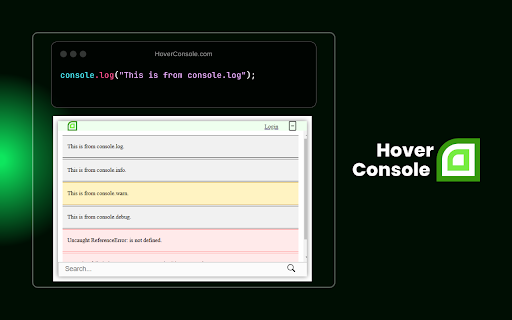
 ↳ Say goodbye to deciphering complex console logs. Hover Console supports all data types, including text, numbers, arrays, and JSON objects, making debugging more intuitive and efficient.

🟢 AI-Powered Error Resolution:
 ↳ Hover Console leverages AI to analyze your code and automatically suggest solutions for errors. It doesn’t just identify the problem but provides intelligent, context-aware recommendations, helping you fix bugs faster and with greater confidence.

🟢 Tabular Data Display:
 ↳ Visualize your data in a structured, easy-to-read format with console.table(). No more scrolling through endless logs—your data is organized and presented clearly in table form.


🟢 Panel Position Control:
 ↳ Tailor your experience by moving the panel where you want it - side, bottom, or your choice!

🟢 Domain-Specific Panel Toggle:
 ↳ Sick of cluttered panels? Hide or show it for a specific domain. Your preferences stick, keeping debugging clean and hassle-free, without affecting other websites.

🟩 What’s New:
↳ Enhanced JS debugger integration for easier error tracking and data visualization.
↳ More precise AI-driven suggestions tailored to common JavaScript debugging challenges.
↳ Improved performance for real-time debugging in complex JavaScript environments.

🟩 What's Coming Next:
 ↳ Our commitment to enhancing your JavaScript debugging experience in the browser doesn't stop here.  More powerful JS debugger features are on the way to make Hover Console even more indispensable for JavaScript developers.

Install "Hover Console" and elevate your JavaScript debugging to a whole new level. Say hello to a more efficient, organized, and enjoyable coding journey with Hover Console by your side.

Get started with the ultimate JavaScript debugger today and experience the difference!


🟩  Should you encounter any issues or have valuable suggestions:
🌎 Join our community: https://fb.com/groups/813948899701642/
✉️ Email us: [email protected]
💬 Chat with us: hoverconsole.com
Technical
- Version
- 0.27
- Manifest
- V3
- Size
- 223KiB
- Min Chrome
- 88
- Languages
- 1
- Featured
- No
Metadata
- ID
- aphoemnhgnocfcelkiiggcjpmklbeloo
- Developer ID
- u17856a1f219fedf810db4938f5cb5301
- Developer Email
- [email protected]
- Created
- Oct 21, 2023
- Last Updated (Store)
- Apr 25, 2025
- Last Scraped
- Jun 4, 2026
- Website
- https://hover-console.com/
- Support URL
- https://hover-console.com/
- Privacy Policy
- https://hover-console.com/privacy-policy
Similar extensions
Alternatives to Hover Console, ranked by description similarity.

Hoverify: All-in-one extension for web developers
All-in-one browser extension that helps you inspect, edit, test, debug, capture, and optimize websites faster.
20.0K
★ 4.1

Console Log Error AI Fixer
Smart console logger that persists errors across reloads, groups duplicates, and provides AI-powered fixes. 100% Private & Local.
26
★ 5.0

JS Error Monitor
Track JavaScript errors in real-time with badge counter, detailed logs, and custom filtering for web developers.
30
★ 5.0

Console Copy
Capture & analyze console logs with on-device AI Assistant (Gemini Nano) and Lighthouse-style Page Analysis. Filters, search, export
56
★ 5.0

JSON Beautifier Pro
Professional JSON Beautifier, Validator, Editor, and Comparator with on-page detection.
11

Hover Debug Overlay
Show overlay with TOP/LEFT/RIGHT/BOTTOM on element hovered with optional element name
20
★ 5.0

Console Viewer
Never miss a console log again. Record, search, and filter console output even when DevTools is closed.
76

Console Dock
A floating console that captures logs, warnings, and errors. Drag to any corner for quick debugging without DevTools.
26
★ 5.0
Data sourced from the Chrome Web Store · last verified Jun 4, 2026.