
Console Viewer
Never miss a console log again. Record, search, and filter console output even when DevTools is closed.
As of June 2026, Console Viewer has 76 users in the Developer Tools category.
Usersup 18.8 percent+18.8%
76
76
Ratingno change0%
—
— reviews
Reviewsno change0%
—
Version
1.0.1
Manifest V3
History
9 snapshotsTracking since Apr 10, 2026.
View as table
| Date | Users | Rating | Reviews | Version |
|---|---|---|---|---|
| Apr 10, 2026 | 64 | — | — | 1.0.1 |
| Apr 20, 2026 | 62 | — | — | 1.0.1 |
| Apr 25, 2026 | 69 | — | — | 1.0.1 |
| May 2, 2026 | 70 | — | — | 1.0.1 |
| May 9, 2026 | 68 | — | — | 1.0.1 |
| May 14, 2026 | 67 | — | — | 1.0.1 |
| May 20, 2026 | 75 | — | — | 1.0.1 |
| May 26, 2026 | 71 | — | — | 1.0.1 |
| Jun 5, 2026 | 75 | — | — | 1.0.1 |
| Now | 76 | — | — | 1.0.1 |
Permissions & access
- Permissions
- storageactiveTabscriptingdebuggerwebNavigation
- Host access
- <all_urls>
Screenshots



About
Console Viewer - Never Miss a Console Log Again

  Ever closed DevTools and missed that crucial error?
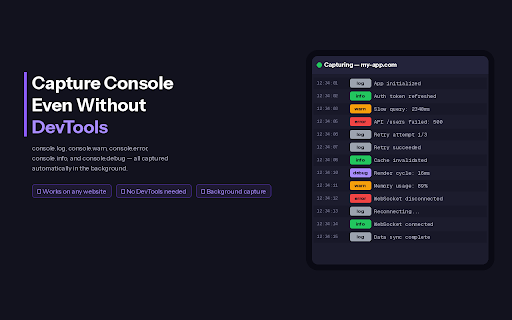
   Console Viewer captures all console output even
  when DevTools is closed, so you never lose
  important debugging information.

  FEATURES

  Record Console Output
  Capture console.log, console.warn, console.error,
  console.info, and console.debug automatically.
  Works on any website without keeping DevTools open.

  Tab-Specific Capture
  Enable capture for specific tabs only. Each tab
  maintains its own capture state - monitor only what
   you need.

  Preserve Logs Across Refreshes
  Keep your logs even when the page reloads. No more
  losing that error message because someone refreshed
   the page.

  Search & Filter
  Quickly find what you're looking for with instant
  search. Filter by log level - errors, warnings,
  info, or debug messages.

  Run JavaScript
  Execute JavaScript directly from the extension
  popup. Test code snippets on any page without
  opening DevTools.

  Light & Dark Mode
  Automatically matches your system theme, with
  manual toggle available.

  Keyboard Shortcuts
  / - Focus search
  Esc - Clear search
  Ctrl+L - Clear logs
  Ctrl+Enter - Run JavaScript

  PERFECT FOR

  - Developers debugging production issues
  - QA teams capturing error logs during testing
  - Anyone who wants to monitor console output
  without DevTools

  PRIVACY

  All data stays local. Console logs are stored only
  in your browser. No data is sent to external
Technical
- Version
- 1.0.1
- Manifest
- V3
- Size
- 49.83KiB
- Min Chrome
- 88
- Languages
- 1
- Featured
- No
Metadata
- ID
- enichikjaocbomajlidhphmocmlnjcai
- Developer ID
- ud96229025685ea8d387a22057c600963
- Developer Email
- [email protected]
- Created
- Feb 18, 2026
- Last Updated (Store)
- Feb 20, 2026
- Last Scraped
- Jun 5, 2026
- Website
- —
- Support URL
- https://allahabadi.dev
Similar extensions
Alternatives to Console Viewer, ranked by description similarity.

Console Copy Tool
Automatically captures and copies formatted console messages from Chrome DevTools
875
★ 5.0

Console Logger
Captures JavaScript console messages from the active tab, displays them live, and automatically saves them to a file.
24

Console Logger
Captures and displays console logs from any webpage.
4

Console Dock
A floating console that captures logs, warnings, and errors. Drag to any corner for quick debugging without DevTools.
26
★ 5.0

Console Copy
Capture & analyze console logs with on-device AI Assistant (Gemini Nano) and Lighthouse-style Page Analysis. Filters, search, export
56
★ 5.0

Console Log Error AI Fixer
Smart console logger that persists errors across reloads, groups duplicates, and provides AI-powered fixes. 100% Private & Local.
26
★ 5.0

Devtrace
Capture, filter, and search console logs. Never lose a debug session again.
1

peek — Visual console.log
Visual console.log overlay for any website. Intercepts console output and displays it in a beautiful floating panel.
19
★ 5.0
Data sourced from the Chrome Web Store · last verified Jun 5, 2026.