
Simple Macro Recorder and Auto Clicker
Record and replay clicks, including dropdown interactions.
As of May 2026, Simple Macro Recorder and Auto Clicker has 8,000 users and a 2.69/5 rating from 42 reviews in the Productivity category.
Usersno change0%
8.0K
8,000
Ratingup 1.1 percent+1.1%
2.69
42 reviews
Reviewsup 10.5 percent+10.5%
42
Version
1.4
Manifest V3
History
3 snapshotsTracking since Apr 21, 2026.
View as table
| Date | Users | Rating | Reviews | Version |
|---|---|---|---|---|
| Apr 21, 2026 | 8.0K | 2.66 | 38 | 1.4 |
| May 6, 2026 | 8.0K | 2.75 | 40 | 1.4 |
| May 17, 2026 | 8.0K | 2.73 | 41 | 1.4 |
| Now | 8.0K | 2.69 | 42 | 1.4 |
Permissions & access
- Permissions
- activeTabstoragecommands
- Host access
- <all_urls>
Screenshots
About
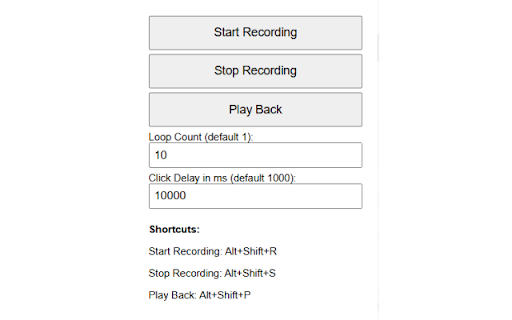
Lets you record mouse clicks and replay over a user-defined set number of iterations, and a user-defined click delay. Works with dropdown/dynamic page elements and can record/playback across page loads/refreshes. Also records and plays back copy/paste keyboard actions.

Simply set your loop count (the number of times the script will run your click sequence before completing), and the click interval (default is 1000ms - 1 second - you can reduce this figure to click faster ie setting this to 1ms means the script will repeat your click sequence 1000x per second, or you can extend this if you need longer delays between clicks ie if you need to wait for page elements to load before a click is actioned).

Then record your click sequence, and play it back according to your playback settings, either using the button on the extension window or using the Hotkeys:

Start Recording: Alt+Shift+R

Stop Recording: Alt+Shift+S

Play Back: Alt+Shift+P

Stop Playback: Alt+Shift+Q

(NOTE: The + symbol denotes that these keys need pressing at the same time to action the Hotkey, not that you need to actually press the '+' key also)

NOTE: YOU MUST REFRESH THE WINDOW YOU WISH TO WORK-ON AFTER INSTALLING THE EXTENSION, IN ORDER FOR THE SCRIPT TO BE INJECTED PROPERLY. THIS IS THE MOST COMMON REASON FOR THE MACRO NOT RESPONDING/WORKING.

TO CHECK THAT THE SCRIPT AS INJECTED, USE F12 ('INSPECT' FUNCTION) AND CHECK THE 'CONSOLE' TAB FOR THE MESSAGE 'Macro Recorder: Content script loaded.' - THIS MEANS THE SCRIPT IS LIVE, AND SHOULD WORK ON THAT PAGE.
Technical
- Version
- 1.4
- Manifest
- V3
- Size
- 9.82KiB
- Min Chrome
- 88
- Languages
- 1
- Featured
- No
Metadata
- ID
- apdmjpaeikhnflphogcijfgboljadpka
- Developer ID
- u3edf3fa3b99c9acd2878488e4f4126c3
- Developer Email
- [email protected]
- Created
- Nov 19, 2024
- Last Updated (Store)
- Oct 2, 2025
- Last Scraped
- May 30, 2026
- Website
- —
- Support URL
- —
- Privacy Policy
- —
Similar extensions
Alternatives to Simple Macro Recorder and Auto Clicker, ranked by description similarity.

Macro Recorder for Chrome™
Record and replay mouse movements, clicks and keyboard actions on any web page.
1.0K
★ 3.8

ClickMacro Recorder
Record and replay multi-step click sequences without coding
25

Auto Clicker - 수강신청 자동 매크로
클릭 위치를 기록하고 자동으로 반복 클릭하는 매크로입니다. 수강신청, 티켓팅, 예매 등 반복 클릭 작업에 최적화되어 있습니다.
515
★ 4.5

Action Replay
Automate browser interactions by recording and replaying user actions.
5.0K
★ 4.4

Macro Recorder & Player
Automate repetitive web tasks by recording, editing, and playing back user interactions.
98

AutoFlow: Web Task Automator
Simple, powerful web automation. Record clicks, typing, and loops to automate repetitive tasks.
52
★ 5.0

Auto Mouse Clicker
Try Auto Mouse Clicker to boost productivity using a simple clicker app with active mover features combining automated clicks macros
5.0K
★ 4.3

Autoclicker
Automate clicking at specified coordinates with configurable intervals
815
★ 3.6
Data sourced from the Chrome Web Store · last verified May 30, 2026.