
Cronofy
Schedule directly from your browser tabs
As of June 2026, Cronofy has 2,000 users and a 5.00/5 rating from 1 reviews in the Workflow & Planning category.
Usersno change0%
2.0K
2,000
Ratingno change0%
5.00
1 reviews
Reviewsno change0%
1
Version
0.22.36
Manifest V3
90-day change · In the last 90 days this extension 8 version updates.
History
10 snapshotsTracking since Apr 1, 2026.
View as table
| Date | Users | Rating | Reviews | Version |
|---|---|---|---|---|
| Apr 1, 2026 | 2.0K | 5.00 | 1 | 0.22.26 |
| Apr 16, 2026 | 2.0K | 5.00 | 1 | 0.22.27 |
| Apr 26, 2026 | 2.0K | 5.00 | 1 | 0.22.27 |
| May 7, 2026 | 2.0K | 5.00 | 1 | 0.22.27 |
| May 11, 2026 | 2.0K | 5.00 | 1 | 0.22.28 |
| May 14, 2026 | 2.0K | 5.00 | 1 | 0.22.29 |
| May 18, 2026 | 2.0K | 5.00 | 1 | 0.22.30 |
| Jun 6, 2026 | 2.0K | 5.00 | 1 | 0.22.31 |
| Jun 10, 2026 | 2.0K | 5.00 | 1 | 0.22.34 |
| Jun 21, 2026 | 2.0K | 5.00 | 1 | 0.22.35 |
| Now | 2.0K | 5.00 | 1 | 0.22.36 |
Permissions & access
- Permissions
- storagesidePaneltabs
- Host access
- None declared
Screenshots
About
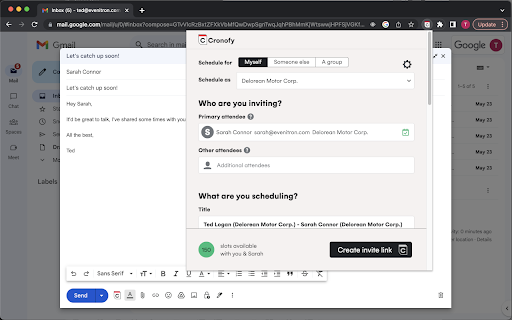
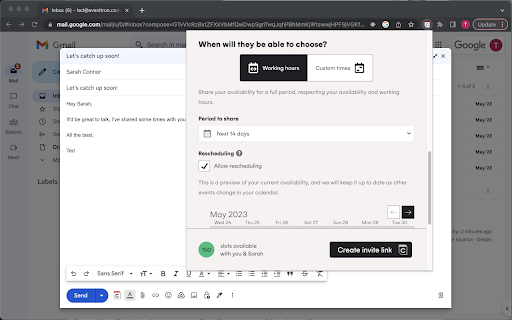
The Cronofy Chrome extension enables you to create personalized invitation links to enhance your Cronofy scheduling experience within Chrome.

It does this by finding the contact details on a web page and prepopulating a scheduling request, saving typing and removing room for error.

The SaaS tools and applications we use everyday are where the contact details of the people we want to meet with are stored. But not all these applications come with the scheduling features you need to create booking links or send calendar invites.

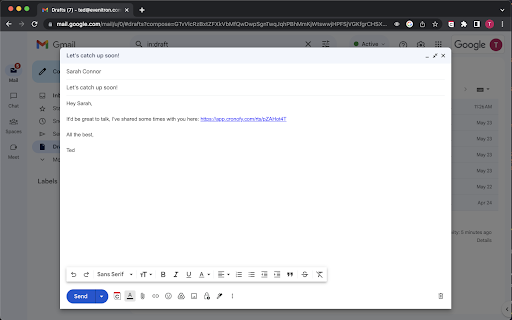
With our Chrome browser extension it doesn't matter. You can look at a client's profile and create a personalized invitation link directly from your CRM for example. Or you can create an invitation link at the same time as you are composing an email.

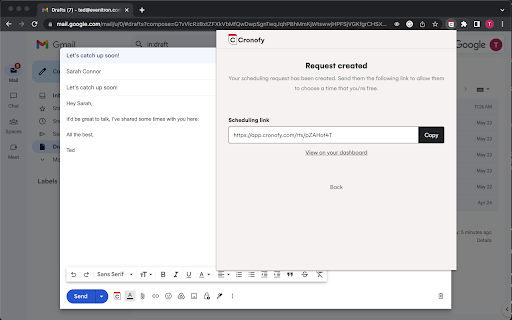
When you share a Cronofy invitation link with someone you do not commit to more than one meeting. The link can only be used to book one event in your calendar.

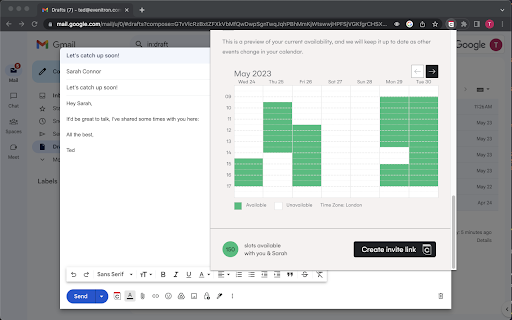
After a contact has clicked on the invitation link you sent them, they will only see the time slots that you've made available and won't access any information about other events in your calendar.

Benefits:

- Personalized scheduling experience
- Security and privacy
- Stay in control of your schedule
- Share your real-time availability
Technical
- Version
- 0.22.36
- Manifest
- V3
- Size
- 1.79MiB
- Min Chrome
- 88
- Languages
- 1
- Featured
- No
Metadata
- ID
- anglfpgnejdnlomjepkpjlfnhigepkip
- Developer ID
- uc746bf6c06eb9cc8608d7a598d44bc0e
- Developer Email
- [email protected]
- Created
- Apr 28, 2020
- Last Updated (Store)
- Jun 16, 2026
- Last Scraped
- Jun 21, 2026
- Website
- cronofy.com
- Support URL
- https://docs.cronofy.com/calendar-users/
- Privacy Policy
- https://docs.cronofy.com/policies/privacy-notice/
Similar extensions
Alternatives to Cronofy, ranked by description similarity.

Calfrenzy - Free Online Appointment Scheduling Software
Schedule 1-to-1 or group meetings directly from your browser. Manage and share booking links instantly with a single click.
84
★ 5.0

Calendly: Meeting Scheduling Software
Schedule meetings without the hassle. Never get double booked. Calendly works with your calendar to automate appointment scheduling.
700.0K
★ 4.3

SavvyCal: Meeting Scheduling Software
Schedule meetings and sync with Google Calendar, Outlook, iCloud, or Fastmail.
1.0K
★ 5.0

Appointlet
Web Extension for Appointlet
1.0K
★ 5.0

Arrangr: Meeting Scheduling Software
Arrangr helps you to schedule meetings! Whether virtual or in-person, 1-on-1 or with a group, Arrangr can help.
208
★ 5.0

OnceHub for Gmail
Book meetings directly from Gmail. Share booking links, personalize invites, and generate one-time slots — no tab switching.
5.0K
★ 4.8

GoodTime Meet
A meeting scheduling tool for business professionals
3.0K
★ 4.6

Calendar: Scheduling Software
Using Calendar.com chrome extension you can easily schedule meetings and share your available times from anywhere.
480
★ 5.0
Data sourced from the Chrome Web Store · last verified Jun 21, 2026.