Grade Calc
A quick and simple grade calculator for professors
As of May 2026, Grade Calc has — users and a 3.00/5 rating from 1 reviews.
Usersno change0%
—
—
Ratingno change0%
3.00
1 reviews
Reviewsno change0%
1
Version
1.0.0 stable
Manifest V2
History
1 snapshotsTracking since May 1, 2026.
Not enough history yet for this metric — the chart fills in as we collect more snapshots.
View as table
| Date | Users | Rating | Reviews | Version |
|---|---|---|---|---|
| May 1, 2026 | — | 3.00 | 1 | 1.0.0 stable |
| Now | — | 3.00 | 1 | 1.0.0 stable |
Permissions & access
- Permissions
- fullscreenstorage
- Host access
- None declared
Screenshots

About
A quick and simple grade calculator, built for professors

✅ Grade Calc is free, with no ads or in app purchases.

✅ Grade Calc is super light weight, and is less than 1mb.

✅ Grade Calc runs offline and remembers your previous session.

====Options====

==Setup==

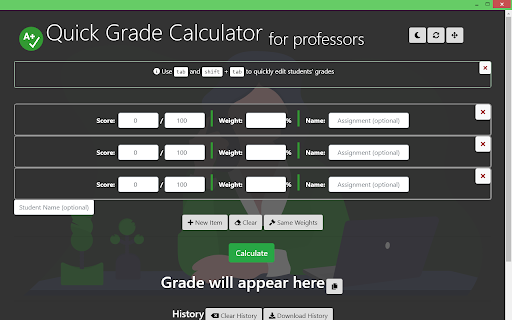
✅ Add as many assignments as you'd like, click "New Item" to add a new one,or the close button on the top of each assignment to remove it

✅ Name your assignments to easily keep track of them

✅ Assign weights to your assignments. If weights no not add up to 100, they will be weighted relative to each other, so if the total weights are 1000, then an assignment worth 200 will be worth 20%

✅ Enter total scores those assignments are out of

✅ Optional: Use the gavel button titled "Same Weights" to make all assignments equally weighted.

==Grading==

✅ Click on the score of the first assignment and start with the first student's grade.

✅ Enter their scores for each assignment and their name, then click "Calculate" to receive their final (or current) grade

✅ Optional: Use tab and shift + tab to easily navigate the student grade inputs, so you can quickly enter students' grades.

✅ Optional: You can click the "Clear" button to clear the inputs for the next student.

==Other Features:==

✅ The top right corner features a night mode button, to darken the screen for late night grading, a refresh button to reload the page, and a fullscreen button, to give you more space to work with

✅ The bottom of the page features a history log, so you can view all of the students' grades at once when you're done.

====Info====

Grade Calc saves your information everytime you calculate, so you can pick up where you left off if you close the app, shutdown your computer, or move to another computer. Clicking the refresh button will clear all storage.

Enjoy the app? Remember to rate and share :)

Problems or questions? Feel free to contact me at [email protected]

V.1.0.0
Technical
- Version
- 1.0.0 stable
- Manifest
- V2
- Size
- 169KiB
- Min Chrome
- 23
- Languages
- 1
- Featured
- No
Metadata
- ID
- amomifflklnjfjcamncbnepiakdfnjca
- Developer ID
- uf39226ea279b145277ef4efcbe6af125
- Developer Email
- [email protected]
- Created
- Jan 18, 2019
- Last Updated (Store)
- Jan 18, 2019
- Last Scraped
- May 30, 2026
- Website
- rgbstudios.org
- Support URL
- —
- Privacy Policy
- —
Similar extensions
Alternatives to Grade Calc, ranked by description similarity.

Infinite Campus Grades++
Alternative Version of FUSD Infinite Campus (with grade simulation)
1.0K
★ 4.7

Focus Grade Calculator
Secure floating grade calculator for Focus gradebook with enhanced privacy protection.
642
★ 4.4

Canvas Analytics
Analytical features for your grades that would skyrocket your school performance.
887
★ 5.0

Google Classroom Grade Calculator | GCGC
Change assignment scores to see how they affect your overall grade.
—
★ 5.0
Easy Grader
Easy Grader – A Chrome Extension calculator to help you grade your students' assignments.
166

Gradescope Grade Calculator
Easy tool to help calculate average assignment grades on Gradescope
487
★ 5.0

Super StudentVUE
Allows you to calculate grades with hypothetical grade changes.
349
★ 3.7

Liquid Lesson
Liquid Lesson lets teachers manage and grade their assignments and bring their student data to life
46
Data sourced from the Chrome Web Store · last verified May 30, 2026.