Webpage to HD Image
Convert any web page or local HTML file into a HD image screenshot. Do you want that a HD full length screenshot? No problem.
As of June 2026, Webpage to HD Image has 415 users and a 5.00/5 rating from 2 reviews in the Workflow & Planning category.
Usersup 41.2 percent+41.2%
415
415
Ratingno change0%
5.00
2 reviews
Reviewsno change0%
2
Version
1.1.7
Manifest V3
90-day change · In the last 90 days this extension 1 version update.
History
13 snapshotsTracking since Apr 1, 2026.
View as table
| Date | Users | Rating | Reviews | Version |
|---|---|---|---|---|
| Apr 1, 2026 | 294 | 5.00 | 2 | 1.1.6 |
| Apr 11, 2026 | 300 | 5.00 | 2 | 1.1.6 |
| Apr 21, 2026 | 300 | 5.00 | 2 | 1.1.7 |
| Apr 28, 2026 | 323 | 5.00 | 2 | 1.1.7 |
| May 8, 2026 | 324 | 5.00 | 2 | 1.1.7 |
| May 11, 2026 | 346 | 5.00 | 2 | 1.1.7 |
| May 15, 2026 | 350 | 5.00 | 2 | 1.1.7 |
| May 20, 2026 | 358 | 5.00 | 2 | 1.1.7 |
| May 24, 2026 | 373 | 5.00 | 2 | 1.1.7 |
| May 29, 2026 | 371 | 5.00 | 2 | 1.1.7 |
| Jun 3, 2026 | 366 | 5.00 | 2 | 1.1.7 |
| Jun 7, 2026 | 371 | 5.00 | 2 | 1.1.7 |
| Jun 13, 2026 | 423 | 5.00 | 2 | 1.1.7 |
| Now | 415 | 5.00 | 2 | 1.1.7 |
Changelog
- May 11, 2026description
Capture dynamic, high-definition screenshots of any webpage.

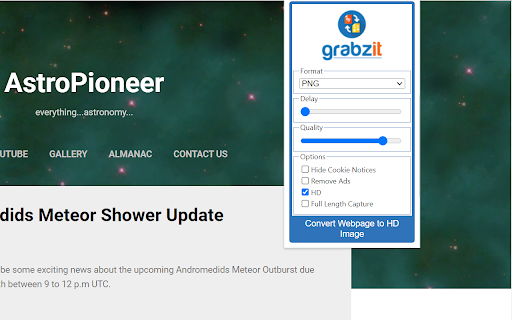
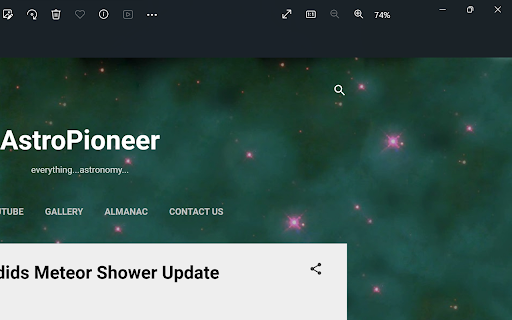
Go beyond your screen's resolution with pixel-perfect screenshots of any website or local HTML file. Our tool gives you the power to capture full-page layouts or specific areas, while intelligently hiding elements like cookie banners for a clean image every time.

New Upgrade: Revolutionary SVG Captures

We are excited to introduce support for Scalable Vector Graphics (SVG)! Unlike standard images, SVGs are vector-based and can be scaled to any size without losing quality, making them perfect for professional reports, presentations, and high-quality web graphics.

All The Formats You Need

In addition to the powerful new SVG format, you can save your captures in a variety of standard image formats to suit any project, including high-quality PNG, web-friendly JPG, TIFF, WEBP, and BMP.

Ready to get started? Install the extension and follow the instructions in the pop-up to sign up and begin creating stunning webpage captures!
Capture dynamic, high-definition screenshots of any webpage.
Go beyond your screen's resolution with pixel-perfect captures of any website or local HTML file. Our tool gives you the power to capture full-page layouts or specific areas, while intelligently hiding elements like cookie banners for a clean image every time.

Perfect for:

- Web designers needing high-res mockups of live websites.
- Creating crisp, professional assets for presentations and reports.
- Archiving website layouts and visual changes.
- Capturing long, scrolling web pages in a single click.

🌟 Revolutionary SVG Captures:
We are excited to introduce support for Scalable Vector Graphics (SVG)! Unlike standard images, SVGs are vector-based and can be scaled to any size infinitely without losing quality. This makes them the ultimate format for professional reports, print materials, and high-quality web graphics.

All The Formats You Need:
In addition to our powerful new SVG format, you can save your captures in a variety of standard image formats to suit any project, including high-quality PNG, web-friendly JPG, TIFF, WEBP, and BMP.

Getting Started & Pricing:
Once installed, simply follow the instructions in the extension popup to create your free GrabzIt account and start capturing.

- Free Tier: Core high-definition image captures are free forever.
- Premium Features: You'll start with a free trial of our Premium tier. Afterward, you can optionally upgrade to automatically hide cookie notices, increase your monthly allowance, and access advanced custom capture settings.

Backed by GrabzIt Limited's enterprise-grade infrastructure. Fast, secure, and reliable.
Permissions & access
- Permissions
- activeTabstoragescriptingdownloads
- Host access
- *://grabz.it/*, file:///*
Screenshots

About
Capture dynamic, high-definition screenshots of any webpage.
Go beyond your screen's resolution with pixel-perfect captures of any website or local HTML file. Our tool gives you the power to capture full-page layouts or specific areas, while intelligently hiding elements like cookie banners for a clean image every time.

Perfect for:

- Web designers needing high-res mockups of live websites.
- Creating crisp, professional assets for presentations and reports.
- Archiving website layouts and visual changes.
- Capturing long, scrolling web pages in a single click.

🌟 Revolutionary SVG Captures:
We are excited to introduce support for Scalable Vector Graphics (SVG)! Unlike standard images, SVGs are vector-based and can be scaled to any size infinitely without losing quality. This makes them the ultimate format for professional reports, print materials, and high-quality web graphics.

All The Formats You Need:
In addition to our powerful new SVG format, you can save your captures in a variety of standard image formats to suit any project, including high-quality PNG, web-friendly JPG, TIFF, WEBP, and BMP.

Getting Started & Pricing:
Once installed, simply follow the instructions in the extension popup to create your free GrabzIt account and start capturing.

- Free Tier: Core high-definition image captures are free forever.
- Premium Features: You'll start with a free trial of our Premium tier. Afterward, you can optionally upgrade to automatically hide cookie notices, increase your monthly allowance, and access advanced custom capture settings.

Backed by GrabzIt Limited's enterprise-grade infrastructure. Fast, secure, and reliable.
Technical
- Version
- 1.1.7
- Manifest
- V3
- Size
- 71.77KiB
- Min Chrome
- 88
- Languages
- 1
- Featured
- Yes
Metadata
- ID
- amgmampijommgjbglhgbhjdkpgpbknon
- Developer ID
- u124e10a91e2cdaa72102129bede56633
- Developer Email
- [email protected]
- Created
- Nov 14, 2023
- Last Updated (Store)
- May 11, 2026
- Last Scraped
- Jun 13, 2026
- Website
- https://grabz.it/
- Support URL
- https://grabz.it/contact/
- Privacy Policy
- https://grabz.it/legal/privacy-policy/
Similar extensions
Alternatives to Webpage to HD Image, ranked by description similarity.

Full Page Screen Capture
Enable this extension to capture screenshots whether it's a visible screen, crop capture andfull-page screen
70.0K
★ 3.9

Full Page Screenshot
Capture full-page screenshots of any webpage
687
★ 1.0

Screenety - Screen Recorder & Annotation Tool
Screenshot tool
154
★ 5.0
Easy Screenshot - a Web Clipper
all-in-on capturing tool for the visual part, the entire page, or a selective area with auto-scrolling and editing support
20.0K
★ 4.2

Easy Screenshot
Capture full-page screenshots instantly. Manually select any part of the page to capture exactly what you need.
4

Full Page Screenshot - Screen Capture
Screenshot tool for making a full page or partial screen capture with further edit, text adding and download.
3.0K
★ 4.3

Free Snipping Tool
Professional snipping tool with full page, selection, and scrolling capture capabilities
40.0K
★ 3.9

Recorder & Screenshot | Sitespedia - Screen Video Recorder & Screenshot
Take screenshots entirely or partially of websites, annotate them, and manage them in a centralized place.
6
Data sourced from the Chrome Web Store · last verified Jun 13, 2026.