
CalendarImages
CalendarImages
As of May 2026, CalendarImages has 287 users and a 2.17/5 rating from 6 reviews in the Workflow & Planning category.
Usersup 8.7 percent+8.7%
287
287
Ratingno change0%
2.17
6 reviews
Reviewsno change0%
6
Version
1.0.1
Manifest V3
History
2 snapshotsTracking since Apr 1, 2026.
View as table
| Date | Users | Rating | Reviews | Version |
|---|---|---|---|---|
| Apr 1, 2026 | 264 | 2.17 | 6 | 1.0.1 |
| May 30, 2026 | 258 | 2.17 | 6 | 1.0.1 |
| Now | 287 | 2.17 | 6 | 1.0.1 |
Permissions & access
- Permissions
- storageactiveTab
- Host access
- https://calendar.google.com/*, https://calendar-images-e9cc9de51205.herokuapp.com/*
Screenshots
About
Visualize Your Events: Google Calendar Image Assistant

Ever wished you could see your plans, literally? Introducing the perfect companion for your Google Calendar: our Image Assistant extension!

Key Features:

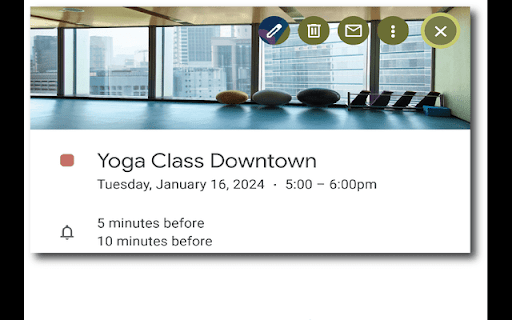
Image Integration: Seamlessly add images to any event in your calendar. Whether it's a photo of the venue, the gear you need, or any relevant visual cue.  Once the event is saved, when you click on the event the image will appear in the tabbed area behind the event name.

Situational Awareness: By adding an image, it's not just a textual event anymore. See the soccer field you'll play on, the conference room for your meeting, or the materials for your craft session. It's about more than memory; it's about visualization.

Mental Rehearsal: Especially beneficial for individuals with executive challenges, this tool assists in preparing mentally by offering a visual representation of what's to come.

Why Install?

Forgetting your yoga mat? Upload an image of it next to your yoga class event. Unfamiliar with the meeting venue? Add a photo of the building. It's all about enhancing your situational awareness, allowing for mental preparation and reducing day-to-day stress.

Join other users who are giving a visual dimension to their plans. Enhance your Google Calendar experience, one image at a time.
Technical
- Version
- 1.0.1
- Manifest
- V3
- Size
- 61.78KiB
- Min Chrome
- 88
- Languages
- 1
- Featured
- No
Metadata
- ID
- amcfgdbpecjkdjpepapliddfgiminmfg
- Developer ID
- u5ce101f35e5bd1620653653eb69de0c4
- Developer Email
- [email protected]
- Created
- Aug 26, 2023
- Last Updated (Store)
- May 7, 2024
- Last Scraped
- May 30, 2026
- Website
- —
- Support URL
- https://www.efpractice.com/
Similar extensions
Alternatives to CalendarImages, ranked by description similarity.

Pic to Event - Image to Calendar Converter
Convert event images to Google Calendar events with one click. Works on Instagram, Facebook, email, and any website.
21
★ 5.0

Shortcut 2 Calendar - Fastest way to Add Events into your Calendar
Automatically Adds Events into your Calendar
119
★ 4.7

Calendar AI - Text & Screenshot to Event
Quickly add events to Google Calendar using natural language or images. Just type or paste a screenshot!
4
★ 3.0

Toolset for Google Calendar™
This extension provides multiple small tools for the Google Calendar™.
2.0K
★ 4.0
Add More Colors to Calendar
Enhance your Google Calendar with a Chrome extension that adds custom colors to each event for a personalized, organized schedule.
5.0K
★ 3.4

Images for Google Jamboard
Creates a new Google Jamboard™ Jam™ and add set of images
1.0K
★ 1.0

Custom Labels & Colors for Calendar
Add custom labels, solid & gradient colors to Google Calendar events for better organization, clarity, and productivity.
462
★ 4.0

Calendify: Add to Calendar w/ AI
Calendify – No More Copy-Pasting Events like it's 1999.
Tired of manually copying and pasting event details into your calendar?…
22
Data sourced from the Chrome Web Store · last verified May 30, 2026.