
FullPage Screenshot
Capture full-page screenshots of websites, including scrollable content
As of June 2026, FullPage Screenshot has 32 users in the Productivity category.
Usersup 28.0 percent+28.0%
32
32
Ratingno change0%
—
— reviews
Reviewsno change0%
—
Version
1.9.0
Manifest V3
90-day change · In the last 90 days this extension 1 version update, changed permissions.
History
5 snapshotsTracking since Apr 25, 2026.
View as table
| Date | Users | Rating | Reviews | Version |
|---|---|---|---|---|
| Apr 25, 2026 | 25 | — | — | 1.0.0 |
| May 22, 2026 | 29 | — | — | 1.0.0 |
| May 29, 2026 | 29 | — | — | 1.9.0 |
| Jun 4, 2026 | 35 | — | — | 1.9.0 |
| Jun 10, 2026 | 33 | — | — | 1.9.0 |
| Now | 32 | — | — | 1.9.0 |
Changelog
- May 22, 2026description
FullPage Screenshot
Capture entire webpages with a single click, even when content extends beyond what's visible on your screen. This lightweight extension takes high-quality screenshots of complete webpages, including all scrollable content.

Features:

Capture full-length screenshots of any webpage
Save in PNG or JPEG format with adjustable quality settings
Real-time progress indicator for large pages
Custom filename options
Works with all websites, including complex layouts
Simple, intuitive interface with dark mode support

Perfect for saving receipts, documentation, articles, research, and any content that requires scrolling. Ideal for designers, developers, researchers, students, and anyone who needs to capture entire webpages.

No ads, no tracking, no unnecessary permissions.
Just a fast, reliable screenshot tool that captures everything you need.
FullPage Screenshot & Document Exporter

Capture entire webpages with a single click, even when content extends beyond what's visible on your screen. This lightweight, powerful extension takes high-quality screenshots of complete webpages, saving all scrollable content seamlessly.

New in Recent Updates:
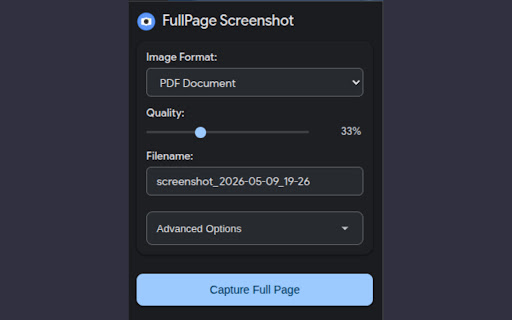
- Advanced Format Support: Now export your captures as next-gen WebP and AVIF images for incredibly small file sizes without quality loss, or export directly to a PDF Document!
- Smart UI Cleaner: Automatically hide annoying sticky headers, cookie banners, bottom navigation bars, and floating advertisements before the screenshot is taken for a perfectly clean capture.
- Interrupt & Save Partial: Scanning a massive page? Hit the new "Stop & Save Partial" button to immediately halt the capture and perfectly crop the image to what you've scanned so far.

Core Features:
- Capture full-length screenshots of any webpage.
- Save in PNG, JPEG, WebP, AVIF, or PDF formats.
- Adjustable image compression quality for smaller file sizes.
- Real-time progress indicator during long page captures.
- Custom timestamped filename generation.
- Beautiful, modern interface with native Dark Mode support.

Advanced UI Removal Tools:
Located under the "Advanced Options" menu, you can toggle the extension's smart-cleaner to automatically detect and hide:
- Fixed/Sticky Headers
- Bottom Bars & Footer Navigations
- Cookie Consent Banners
- Floating Advertisements

(Disclaimer: Because every website is built differently, the automatic UI-removal tool relies on dynamic detection algorithms and may not successfully hide elements on 100% of websites. Some highly custom or aggressively sticky layouts may still appear in captures).

Perfect For:
Archiving receipts, compiling research, saving long articles, creating design portfolios, or turning web documentation into readable PDFs. Ideal for designers, developers, students, and professionals.

No tracking, no bloat, and completely free. Just a fast, reliable screenshot tool that captures exactly what you need, without the clutter.
- May 22, 2026permissions
activeTab, scripting, downloads, storage
activeTab, scripting, downloads, storage, tabs
Permissions & access
- Permissions
- activeTabscriptingdownloadsstoragetabs
- Host access
- None declared
Screenshots



About
FullPage Screenshot & Document Exporter

Capture entire webpages with a single click, even when content extends beyond what's visible on your screen. This lightweight, powerful extension takes high-quality screenshots of complete webpages, saving all scrollable content seamlessly.

New in Recent Updates:
- Advanced Format Support: Now export your captures as next-gen WebP and AVIF images for incredibly small file sizes without quality loss, or export directly to a PDF Document!
- Smart UI Cleaner: Automatically hide annoying sticky headers, cookie banners, bottom navigation bars, and floating advertisements before the screenshot is taken for a perfectly clean capture.
- Interrupt & Save Partial: Scanning a massive page? Hit the new "Stop & Save Partial" button to immediately halt the capture and perfectly crop the image to what you've scanned so far.

Core Features:
- Capture full-length screenshots of any webpage.
- Save in PNG, JPEG, WebP, AVIF, or PDF formats.
- Adjustable image compression quality for smaller file sizes.
- Real-time progress indicator during long page captures.
- Custom timestamped filename generation.
- Beautiful, modern interface with native Dark Mode support.

Advanced UI Removal Tools:
Located under the "Advanced Options" menu, you can toggle the extension's smart-cleaner to automatically detect and hide:
- Fixed/Sticky Headers
- Bottom Bars & Footer Navigations
- Cookie Consent Banners
- Floating Advertisements

(Disclaimer: Because every website is built differently, the automatic UI-removal tool relies on dynamic detection algorithms and may not successfully hide elements on 100% of websites. Some highly custom or aggressively sticky layouts may still appear in captures).

Perfect For:
Archiving receipts, compiling research, saving long articles, creating design portfolios, or turning web documentation into readable PDFs. Ideal for designers, developers, students, and professionals.

No tracking, no bloat, and completely free. Just a fast, reliable screenshot tool that captures exactly what you need, without the clutter.
Technical
- Version
- 1.9.0
- Manifest
- V3
- Size
- 226KiB
- Min Chrome
- 88
- Languages
- 1
- Featured
- No
Metadata
- ID
- akhfpapnpgoindkahmdfkijillkohcjj
- Developer ID
- ud7d1a088e7f1190eacd69e4bde03b5ed
- Developer Email
- [email protected]
- Created
- Mar 18, 2025
- Last Updated (Store)
- May 10, 2026
- Last Scraped
- Jun 10, 2026
- Website
- https://techstoriesindia.in/
- Support URL
- —
- Privacy Policy
- https://sites.google.com/view/fullpagescreenshot/home
Similar extensions
Alternatives to FullPage Screenshot, ranked by description similarity.

Full Page Capture
Capture the entire scrollable page as a single PNG image.
7

Full Page Capture
Capture the entire page as an image or PDF, including scrolling content.
39
★ 5.0

Full Page Screenshot
Capture full page screenshots with one click. Smart fixed element handling for clean, seamless results.
80
★ 5.0

Full Page Screen Capture
Capture full webpage screenshots as JPG with preview, PDF export, clipboard copy, and smart handling of fixed/sticky elements
8
★ 5.0

Full Page Screenshot
A simple extension to capture a full-page screenshot of any website.
10

FullScreen Screenshot
Capture full-page screenshots with smooth scrolling and progress tracking. Press Alt+C for instant capture!
5

Screenshot Full Page - Professional
Capture and download full page screenshot in PNG, JPG, WebP and PDF file formats. Quick, private, reliable and works in offline too!
8
★ 5.0

Screen site Tool – Capture Full Page as PNG
Capture full-page website screenshots in one click. Save instantly as PNG. Clean and simple.
172
★ 5.0
Data sourced from the Chrome Web Store · last verified Jun 10, 2026.