
Chegg Notifier
Sends a notification on mobile whenever there is a new question on the Chegg Dashboard.
As of May 2026, Chegg Notifier has 88 users and a 5.00/5 rating from 1 reviews in the Productivity category.
Usersdown 2.2 percent−2.2%
88
88
Ratingno change0%
5.00
1 reviews
Reviewsno change0%
1
Version
2.0
Manifest V3
History
2 snapshotsTracking since Apr 25, 2026.
View as table
| Date | Users | Rating | Reviews | Version |
|---|---|---|---|---|
| Apr 25, 2026 | 90 | 5.00 | 1 | 2.0 |
| May 22, 2026 | 86 | 5.00 | 1 | 2.0 |
| Now | 88 | 5.00 | 1 | 2.0 |
Permissions & access
- Permissions
- notificationsstorage
- Host access
- None declared
Screenshots


About
This extension sends a notification to your Telegram app on your mobile phone whenever a new question appears on your Chegg dashboard. No more waiting in front of your laptop—get notified instantly wherever you are.

How to Use the Extension:

1. Add the extension to your Chrome browser.

2. Set up the Telegram bot:

Open your Telegram app and search for "CheggNotifierBot."
Click "Start" or type "/start" to begin. The bot will send you your chat ID(Refer screenshots above).

3. Link your chat ID:

In your Chrome browser, click the "Extensions" icon in the top-right corner. Click the Chegg Notifier icon to open a window where you can enter your chat ID(Refer screenshots above). Enter the chat ID provided by the bot. You're all set! Now, you’ll receive a Telegram notification whenever a new question appears on your Chegg dashboard. Just make sure the Chegg Expert Q&A page (https://expert.chegg.com/qna/authoring/answer) is open in Chrome.

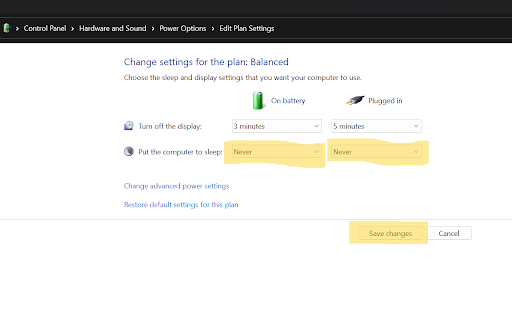
Important Note: The extension won’t work if your laptop goes to sleep due to inactivity. To prevent this, adjust your power settings:

1. Go to Control Panel → Hardware and Sound .

2. Click on "Change when the computer sleeps" under "Power Options"

3. Select "Never" from the dropdown for both "On battery" and "Plugged in" against "Put the computer to sleep" than click on "Save changes" (Refer screenshots above).

For quick query resolution, discussions, latest updates, and more, join our "Chegg Notifier GROUP" on Telegram.
Link: https://t.me/+tWV2fx5df9RjYTFl

Need Help or Have Suggestions? For feedback, suggestions, or support, email us at [email protected], and our team will be happy to assist you.
Technical
- Version
- 2.0
- Manifest
- V3
- Size
- 7.69KiB
- Min Chrome
- 88
- Languages
- 1
- Featured
- No
Metadata
- ID
- aifjebknfaloicblpopfllookgdniffg
- Developer ID
- u472bb7ed829a9cdc6767f1a8103cc711
- Developer Email
- [email protected]
- Created
- Aug 21, 2024
- Last Updated (Store)
- Oct 21, 2024
- Last Scraped
- May 22, 2026
- Website
- —
- Support URL
- —
Similar extensions
Alternatives to Chegg Notifier, ranked by description similarity.

Chegg Expert Question Alert
Get instant sound alerts for new Chegg questions! Auto-refresh and multitask without constantly monitoring the Q&A page.
27
★ 5.0

iClicker Poll Notifier
Never miss an iClicker poll! Get instant desktop and phone notifications when polls start.
327
★ 5.0

ChatGPT Popup Notifier
ChatGPT Popup Notifier is a chrome extension that creates a notification popup when ChatGPT finishes generating your response.
117
★ 1.0

ChimeIn Response Tool
Base Level Extension
10
★ 5.0

Smart Cookies Memorizer
A tool to help you memorize/manage what you read
12
★ 5.0

FivAlerts
Get instant Fiverr inbox alerts on Telegram & reply to clients without opening Fiverr. Auto-notifications for freelancers.
69

ChatGPT Question Sidebar
Display all your ChatGPT questions in a convenient sidebar. Click any question to smoothly scroll to it.
13
★ 5.0

ChatGPT Search: Instantly Search Your Chat Logs
A Chrome extension to search through ChatGPT chats
219
★ 4.5
Data sourced from the Chrome Web Store · last verified May 22, 2026.