
Case Counter Clicker
Track your daily case processing goals as a claim analyst
As of June 2026, Case Counter Clicker has 10 users in the Productivity category.
Usersno change0%
10
10
Ratingno change0%
—
— reviews
Reviewsno change0%
—
Version
1.9.4
Manifest V3
History
7 snapshotsTracking since Apr 6, 2026.
View as table
| Date | Users | Rating | Reviews | Version |
|---|---|---|---|---|
| Apr 6, 2026 | — | — | — | 1.9.4 |
| Apr 19, 2026 | 10 | — | — | 1.9.4 |
| Apr 29, 2026 | 10 | — | — | 1.9.4 |
| May 8, 2026 | 10 | — | — | 1.9.4 |
| May 16, 2026 | 11 | — | — | 1.9.4 |
| May 25, 2026 | 10 | — | — | 1.9.4 |
| Jun 4, 2026 | — | — | — | 1.9.4 |
| Now | 10 | — | — | 1.9.4 |
Permissions & access
- Permissions
- storageactiveTab
- Host access
- https://zenquotes.io/*, https://api.quotable.io/*, https://quotes.rest/*, https://quotegarden.io/*
Screenshots

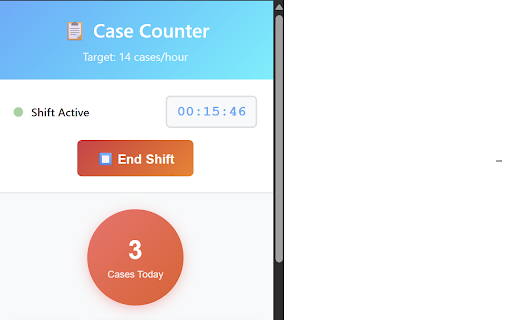
About
A Chrome extension designed specifically for claim analysts to track their daily case processing goals. Keep track of your cases per hour target and monitor your productivity throughout the day.

## ✨ Features

- **Simple Click Counter**: Click the big red button every time you complete a case
- **Real-time Tracking**: Monitor cases completed this hour and remaining until the goal
- **Hourly Breakdown**: Visual representation of your performance throughout the workday
- **Daily Progress**: Track progress toward your daily goal- **Badge Display**: Chrome icon shows current hour progress and remaining cases
- **Comprehensive Reporting**: View statistics for today, this week, this month, and custom date ranges
- **Local Data Storage**: All data is stored locally on your computer for privacy
- **Keyboard Shortcuts**: Use the spacebar to quickly add a case

## 🎯 Target Goals

- **Hourly Target**: Customizable (default: 14 cases per hour)
- **Daily Target**: Automatically calculated based on work hours
- **Work Hours**: Customizable (default: 8 AM to 4 PM)
- **Badge Display**: Multiple format options (hourly, daily, percentage)

## 📱 Usage

### Basic Operation:
1. **Click the extension icon** in your Chrome toolbar
2. **🚀 Start your shift** by clicking the Start Shift button
3. **Click the big red button** each time you complete a case
4. **Monitor your progress** in real-time with work timer
5. **⏹️ End your shift** when you're done for the day
6. **View detailed reports** by clicking "View Reports"

### Badge Information:
- **Badge Text**: Shows "CurrentHour/Remaining" (e.g., "8/6" means 8 cases this hour, 6 remaining)
- **Badge Colors**:
  - 🟢 Green: On track (7+ cases this hour)
  - 🟡 Yellow: Behind pace (1-6 cases this hour)
  - 🟠 Orange: Significantly behind (0 cases this hour)

### Keyboard Shortcuts:
- **Spacebar**: Add a case (when the pop-up is not focused on the input fields)

### Settings & Customization:
- **Cases per Hour**: Adjust your hourly target (1-50 cases)
- **Work Hours**: Set your start and end times (24-hour format)
- **Badge Format**: Choose how progress is displayed on the icon
- **Badge Visibility**: Toggle badge on/off

## 📊 Reporting Features

### Today's Summary:
- Total cases completed
- Daily goal progress
- Completion percentage

### Weekly View:
- Last 7 days' performance
- Daily case counts
- Visual weekly chart

### Monthly Statistics:
- Last 3 months overview
- Monthly totals
- Performance trends

### Custom Date Range:
- Select any start and end dates
- Generate custom reports
- Export data for external analysis

## 🔧 Configuration

### Default Settings:
- **14 cases per hour** target
- **8 AM to 4 PM** work hours
- **Daily goal** automatically calculated

### Customization Options:
- **Settings Panel**: Access via the ⚙️ Settings button
- **Real-time Updates**: Changes apply immediately
- **Local Storage**: All settings are saved on your computer
- **Validation**: Input validation prevents invalid settings

### Badge Format Options:
- **Hourly Progress**: Shows "8/6" (current/remaining this hour)
- **Daily Progress**: Shows "45/112" (current/daily goal)
- **Percentage**: Shows "40%" (daily completion)

### Shift Management:
- **Start/End Shift**: Track actual work time for accurate productivity
- **Work Timer**: Real-time clock showing current shift duration
- **Case Validation**: Only count cases during active shifts
- **Shift Summary**: End-of-shift report with performance metrics
- **Auto-start**: Optional automatic shift start prompts

## 💾 Data Storage

- **Local Storage**: All data is stored on your computer using Chrome's local storage
- **Privacy**: No data is sent to external servers
- **Persistence**: Data persists between browser sessions
- **Export**: Generate JSON reports for external analysis

## 🎨 UI Features

- **Modern Design**: Clean, professional interface
- **Responsive Layout**: Works on different screen sizes
- **Visual Feedback**: Button animations and progress indicators
- **Colour Coding**: Intuitive colour system for performance tracking


**Happy Case Counting! 🎉**

*Built with ❤️ for claim analysts everywhere*

Version 1.1.0 includes new average statistics in the view reports section
Version 1.2.0 updates the dynamic start time to reflect the current hour.
Version 1.3.0 resolved the issue with shifting shift times. Added undo case button.
Version 1.4.0 added styling
Version 1.5.0 added themes in settings
Version 1.6.0 added high score total
Version 1.7.0 added celebration animation and backlog tile
Version 1.8.0 fixed celebration misalignment, added the quotes panel and made other visual changes.
Version 1.9.0 added animation for the header with settings, and added the highest score panel
Version 1.9.2 - fixed the highest score bug and added a timer for animation
Versin 1.9.4 - layout changes to front front end.
Technical
- Version
- 1.9.4
- Manifest
- V3
- Size
- 56.53KiB
- Min Chrome
- 88
- Languages
- 1
- Featured
- No
Metadata
- ID
- ahndijcoocpdgoifdcbljakbkfkegclo
- Developer ID
- u4971a1a26151473689c3f9e87f3153a2
- Developer Email
- [email protected]
- Created
- Aug 21, 2025
- Last Updated (Store)
- Jan 13, 2026
- Last Scraped
- Jun 4, 2026
- Website
- —
- Support URL
- —
- Privacy Policy
- —
Similar extensions
Alternatives to Case Counter Clicker, ranked by description similarity.

Agent Timer Dashboard
Compact sidebar dashboard with timer, metrics, and alerts.
3
★ 5.0

ART_OTC
Boost your productivity on work platform with the Productivity Tracker Chrome extension. This powerful tool enhances your…
162

Work Hours Tracker
Use Work Hours Tracker app to increase your productivity and manage projects. Hour tracker for work can also track billable time!
163
★ 5.0

ZChrono Plugin
Seamlessly integrate ZChrono time tracking into your browser. Track time, manage tasks, and boost productivity with real-time sync.
3
Badge Clock: simple toolbar clock
Keep an eye on the time, even with taskbar hidden, with this animated digital clock in your browser toolbar.
1.0K
★ 4.6

tiktak
Track your tasks with worked hours stored locally.
4

Analytics Quick PageViews
Quickly view page views on your site using Adobe Analytics. Lightweight and secure tool for debugging tracking.
36
★ 5.0

Jira Status Time Tracker
Track time spent in different Jira status workflows. Get detailed insights into your team's workflow timing and project progress.
33
★ 4.0
Data sourced from the Chrome Web Store · last verified Jun 4, 2026.