Clap
Clap - smart compose anywhere
As of June 2026, Clap has 73 users and a 5.00/5 rating from 1 reviews in the Productivity category.
Usersdown 6.4 percent−6.4%
73
73
Ratingno change0%
5.00
1 reviews
Reviewsno change0%
1
Version
0.2.4
Manifest V3
History
2 snapshotsTracking since May 3, 2026.
View as table
| Date | Users | Rating | Reviews | Version |
|---|---|---|---|---|
| May 3, 2026 | 78 | 5.00 | 1 | 0.2.4 |
| Jun 2, 2026 | 77 | 5.00 | 1 | 0.2.4 |
| Now | 73 | 5.00 | 1 | 0.2.4 |
Permissions & access
- Permissions
- storageactiveTabtabs
- Host access
- None declared
Screenshots


About
Changelogs

v0.2.4
- Fix an error when text is too long.

v0.2.3
- Support customize prompt template for continue writing.

v0.2.2
- Fix the bug of empty content in the popup when adding a prompt.

v0.2.1
- Fix the error of not being able to edit the prompt.

v0.2.0
- Added replacement mode. Now you can freely edit prompts and shortcuts, and use clap to replace your selected text. For detailed usage, please visit https://chatlikea.pro

v0.1.9
- Fix the problem of continuation writing in temporary mode (such as using input method candidate words).

#AIWritingAssistant #SmartComposition #AutoComplete

Meet 'Clap', an innovative Chrome extension that takes your writing experience to the next level. Powered by cutting-edge GPT technology, Clap offers effortless smart composition, helping you craft engaging content on any website.

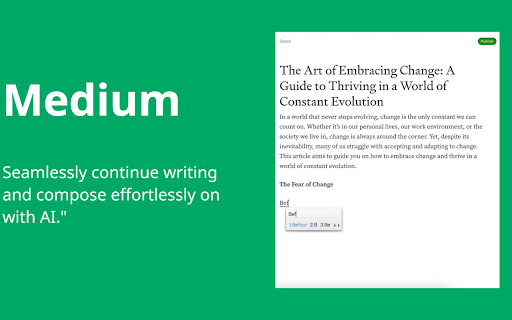
Unlike other extensions, Clap stands out with its non-intrusive, user-friendly interface. There are no pop-ups to distract you or break your flow. All interactions happen within the original text area you're working in. This unique feature allows you to focus solely on your writing, making the process more efficient and enjoyable.

Clap is compatible with a wide range of text editors, providing you with AI-powered suggestions as you type. These context-aware content continuations align with the website you're on, ensuring that your writing remains relevant and on-brand.

The extension also boasts multilingual support, making it an invaluable tool for global communication.

Using Clap is a breeze. Simply start typing in a text box, and AI suggestions will appear, marked by '...'. You can accept these suggestions by pressing 'Tab' or dismiss them with any other key. All of this can be achieved using just your keyboard, eliminating the need for any mouse clicks.

Upgrade your writing with Clap, the Chrome extension that combines simplicity, efficiency, and advanced AI technology to provide a superior writing experience.
Technical
- Version
- 0.2.4
- Manifest
- V3
- Size
- 431KiB
- Min Chrome
- 88
- Languages
- 1
- Featured
- No
Metadata
- ID
- aglgcefbnhfdangdiialldlapicnninn
- Developer ID
- u66edbe36de0a277510b3d41db3875f70
- Developer Email
- [email protected]
- Created
- Oct 19, 2023
- Last Updated (Store)
- Dec 4, 2024
- Last Scraped
- Jun 2, 2026
- Website
- chatlikea.pro
- Support URL
- https://chatlikea.pro
- Privacy Policy
- https://chatlikea.pro/privacy-policy
Similar extensions
Alternatives to Clap, ranked by description similarity.

ChatGPT Vision for ALL
This all-in-one tool captures webpage screenshots or selected text for AI-powered content analysis & text rewriting or optimization
67
★ 5.0

Quick Prompts: ChatGPT Text Rewriter & Summarizer
Instantly rewrite, correct grammar, or summarize any text with AI — right from your browser’s context menu.
63
★ 5.0

PromptClip AI
Instantly rephrase, refine, or rewrite any highlighted text on a webpage using advanced AI.
1

QuickAI
Access AI tools instantly without switching tabs. Polish text, chat, and summarize pages with one click, saving valuable time.
6

ChatGPT Writing Assistant
Right-click any text to instantly fix grammar, rewrite, change tone, shorten, expand, translate to English, or format as an email
37

Bring ChatGPT & Claude to Every Text Box | Clico
Clico brings AI directly into Google Docs, Gmail, and every text box, so you can work faster without switching tabs.
4.0K
★ 4.7

Prompter Pro ✨
Boost your prompt game with Prompter Pro 🧑💻✨
13

Prompt Pocket
A tool to save frequently used prompts and copy them with a single click. Speeds up interaction with AI.
26
★ 5.0
Data sourced from the Chrome Web Store · last verified Jun 2, 2026.