Lit Prism
Inspect Lit or Polymer webcomponents 'through a prism'. View and modify component properties on the fly through Chrome DevTools.
As of June 2026, Lit Prism has 729 users and a 5.00/5 rating from 7 reviews in the Developer Tools category.
Usersdown 4.6 percent−4.6%
729
729
Ratingno change0%
5.00
7 reviews
Reviewsno change0%
7
Version
1.2.0
Manifest V3
History
3 snapshotsTracking since Apr 1, 2026.
View as table
| Date | Users | Rating | Reviews | Version |
|---|---|---|---|---|
| Apr 1, 2026 | 764 | 5.00 | 7 | 1.2.0 |
| May 3, 2026 | 775 | 5.00 | 7 | 1.2.0 |
| Jun 2, 2026 | 760 | 5.00 | 7 | 1.2.0 |
| Now | 729 | 5.00 | 7 | 1.2.0 |
Permissions & access
- Permissions
- storage
- Host access
- None declared
Screenshots

About
Inspect LitElement or PolymerElement webcomponents 'through a prism'. View and modify component properties on the fly through Chrome Developer Tools.

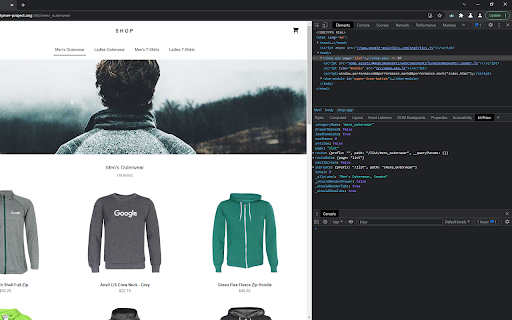
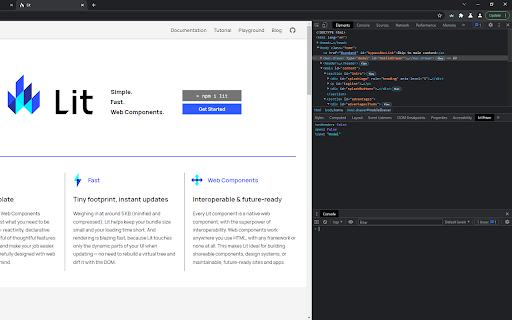
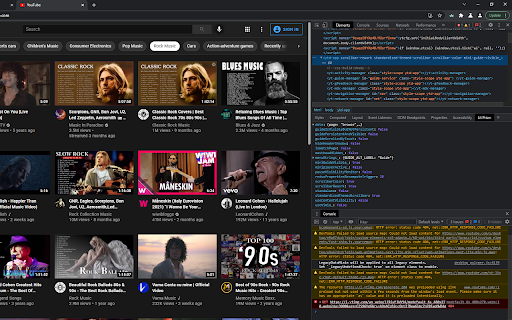
Open the developer tools (F12) and select the Lit Prism sidepane from within the Elements panel. Select an HTML element from the Elements panel in order to view its properties. Currently supported webcomponents are LitElement and PolymerElement components.

The list of properties will refresh automatically whenever a property or a subproperty value changes, and the sidepane will keep the current scroll position.

Due to a developer tools limitation the expanded values cannot be re-expanded after updating the property list. In such cases, it might be useful to toggle the "Automatically refresh property list' switch to 'disabled'.

No data is or will be collected.

Changelog:
v1.2.0 Added support for other types of webcomponents as well, especially for Lit V2 elements. Increased auto refresh interval to 1 second. Grouping webcomponent methods into _FUNCTIONS.

v1.1.1 Minor tweak, added the Lit Message also to arrays, as a first entry, in case it was an array, instead of an object, which contained a circular reference.

v1.1.0 Fixed issue regarding high resource consumption, due to the long process of depth-limited stringification process. Components whose integral list of properties can easily be stringified are returned instantly. For components which contain properties with circular references, the individual data props are analyzed, and only those are truncated, which have circular references. The rest of the props are returned as-is, irrelevant of the depth. An informative message is prepended as a sub-value to the truncated props. Props that are undefined are also listed now, with having the value "undefined" as a string.

v1.0.3 Fixed a bug because of which some Polymer properties which were specified in the component's static properties getter were not listed in the sidepane. Swapped the safeStringify method with an alternative one, which supports depth specification, thus, effectively limiting the JSON stringification process, avoiding endless circular references.

v1.0.2 Fixed a bug because of which array properties of Polymer components were not listed in the sidepane.

Marketplace searchable tags:
litelement, lit-element, lit element, polymerelement, polymer-element, polymer element
Technical
- Version
- 1.2.0
- Manifest
- V3
- Size
- 130KiB
- Min Chrome
- 88
- Languages
- 1
- Featured
- No
Metadata
- ID
- agkgbfkeimkbdljdljinnaomlcjboaie
- Developer ID
- udfbfd94aad11a23a3f24b35e6de8677b
- Developer Email
- [email protected]
- Created
- Aug 17, 2021
- Last Updated (Store)
- Aug 13, 2022
- Last Scraped
- Jun 2, 2026
- Website
- —
- Support URL
- https://groups.google.com/g/lit-prism
- Privacy Policy
- —
Similar extensions
Alternatives to Lit Prism, ranked by description similarity.

Web Component DevTools
Developer tooling for Web Components and Web Component Libraries
8.0K
★ 4.3

CSS Stacking Context inspector
Helps inspecting the css stacking contexts and solving the z-index war.
9.0K
★ 3.7

CSS Peek: Element Inspector
Instantly inspect elements and explore CSS properties, XPath, and more. Easily export assets, color palettes, and typography.
367
★ 5.0

Recoilize
A Chrome extension that helps debug Recoil applications by memorizing the state of components with every render.
1.0K
★ 3.7

Element Spy
Generate CSS selectors and XPath locators for web automation testing. Press Ctrl while hovering to inspect elements.
99
★ 5.0

LWC Lens
Inspect Lightning Web Components on Salesforce pages — hover to identify, view component trees, copy component paths.
23
★ 5.0

Element Inspect
Inspect padding, margin, tag, class, and size by hovering over elements.
156
★ 5.0

LocatorPro | Element Locators for Test Automation
Professional DOM element locator generator for Playwright, Cypress, and Selenium test automation
74
Data sourced from the Chrome Web Store · last verified Jun 2, 2026.